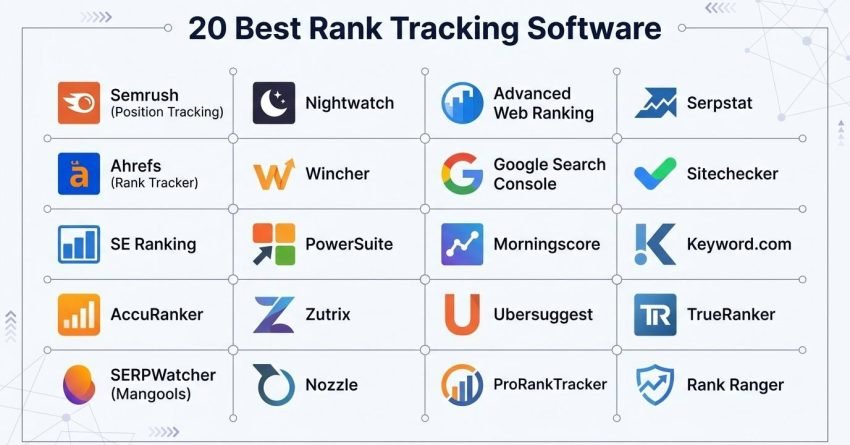
Rank tracking software tells you where your pages sit in search results and, increasingly, whether an AI answer took the click before anyone reached your page. I tested more than 30 trackers across live client work and kept the 20 that survived contact with real SERPs.
The gap that broke the old model is simple. Positions hold steady while sessions fall, and the tracker still shows green. That happens when an AI Overview, a chatbot response, or a SERP feature resolves the query first.
Below, I cover what a rank tracker actually measures, how I tested and what I looked for, the free-versus-paid trade-off and real cost per keyword, all 20 tools with pricing and ratings, the setup sequence and the mistakes that corrupt tracking data, and a matching guide plus FAQs that turn the list into a decision.
Summary Table: 15 Best Rank Tracker Tools (2026)
Here is the condensed view of everything that came out of testing. I kept the original 15 in place and added five more below them, so the table now runs to 20 rows.
| Tool Name | Best For | Free Access | Our Notes |
| Semrush (Position Tracking) | One platform covering search, AI answers, and reporting | Free Trial | Dense and expensive at scale, unbeatable when you want a single login |
| Ahrefs (Rank Tracker) | Data you can defend in a client meeting | Free Plan | The tracker I open first when a number looks wrong |
| SE Ranking | Agencies balancing depth against budget | Free Trial | Closest thing to enterprise coverage without enterprise invoices |
| AccuRanker | On-demand refreshes during volatility | Paid Only | Fastest updates on this list, priced for teams that need them |
| SERPWatcher (Mangools) | Solo SEOs and small sites | Paid Only | Strips tracking back to one score and clean charts |
| Nightwatch | Reporting that clients actually read | Free Trial | Strong visuals, ZIP-level local, multi-engine coverage |
| Wincher | Teams that want it running today | Free Trial | Setup measured in minutes, not afternoons |
| PowerSuite | Analysts with enormous keyword lists | Free Plan | Dated interface, unlimited keywords, one-time licence |
| Zutrix | Small agencies running local campaigns | Free Trial | Accurate for the price, strong alerting |
| Nozzle | Teams that build their own reports | Free Trial | Deepest SERP data here, needs configuration time |
| Advanced Web Ranking | Long-running agency reporting | Free Trial | Reliable trend data and polished deliverables |
| Google Search Console | Confirming what really happened | Free | The reference layer every other tool gets checked against |
| Morningscore | Teams learning SEO as they go | Free Trial | Turns tasks into missions and keeps momentum up |
| Ubersuggest | First tracker on a small budget | Free Trial | Enough for a young site, not enough for an agency |
| ProRankTracker | Multi-location and local specialists | Free Trial | Street-level accuracy with strong white-label reports |
| Serpstat | Growing agencies wanting a full suite | Free Plan | Tracking plus research and audit in one affordable subscription |
| Sitechecker | Linking rank movement to site health | Free Trial | Positions sit next to crawl issues on the same screen |
| Keyword.com | Clients who want to check anytime | Free Trial | Live shareable dashboards remove the reporting bottleneck |
| TrueRanker | Local SEO on a tight budget | Free Trial | Map-pack and city-level tracking at entry-level pricing |
| Rank Ranger | Custom reporting and API workflows | Free Trial | Built for teams piping ranking data into their own stack |
What is a Rank Tracker?
Rank tracking software is a monitoring tool that records the position of a website’s pages in search results for a defined keyword set, across chosen locations and devices, on a repeating schedule. It stores each check as a dated data point so position changes become a trend line rather than a snapshot.
Modern trackers extend past the ten blue links. They log which SERP features occupy the page, whether an AI Overview appeared, and how much vertical space sits above your listing.
Three questions only a tracker answers reliably. Where you appear once location and device are held constant. Whether a competitor moved or the result page itself changed shape. Whether a traffic drop lines up with a position drop at all.
Without that record, every performance conversation becomes an argument about memory.
How I Selected the Best Rank Trackers
I ran each tool inside active client work rather than on a demo domain. At White Label SEO Service, we manage local, national, ecommerce, and SaaS campaigns at the same time, so every tracker faced small city-level keyword sets and five-figure national sets in the same week.
Here is the process each tool went through.
- Live campaign deployment. Every tracker was pointed at real client domains across ecommerce, SaaS, and content-led sites, then left running through normal ranking movement.
- Manual SERP verification. When a tool reported a position, I opened the same query in an incognito session at the matching location and device and compared. Tools that drifted more than one position on stable terms lost points.
- AI and SERP feature capture. I checked whether the tracker recorded AI Overviews, featured snippets, local packs, video carousels, and shopping units, and whether it flagged the moment one appeared.
- Reporting turnaround. I timed how long a client-ready export took from login to finished file, including any manual cleanup.
- Integration behaviour. Connections to Looker Studio, Search Console, Sheets, and Slack were tested for stability, not just presence.
- Pricing per unit of work. I converted every plan into cost per tracked keyword per month so the comparison held across wildly different pricing models.
- Multi-client scaling. Tools were judged on whether adding a tenth client felt the same as adding a second.
- Data retention. I checked how far back historical SERP data goes, because a tracker that forgets last year cannot explain this year.
Every ranking claim in this article was checked against a live search result before it made the list.
Why Should Agencies Use Rank Trackers (Even When AI Thinks It Knows Better)
The uncomfortable client call is rarely about the drop. It is about not being able to explain the drop within the hour.
A tracker converts scattered activity into a record you can interrogate. Across our accounts, the tracker is the first artefact we open when performance shifts, because it separates three very different events that all look identical in an analytics dashboard.
Here is what it isolates for you.
- Whether a SERP feature expanded and pushed your listing below the fold
- Whether mobile moved while desktop stayed flat, which points to layout rather than content
- Whether a competitor published or rebuilt a page in the same window
- Whether an AI Overview started answering the query directly
- Whether your page fell or the result page reorganised around a stationary page
Agencies carry a second obligation on top of diagnosis. Clients need the story in language that survives a board meeting, and a dated position record with a matching SERP snapshot does that better than any narrative.
Once you manage more than one site, tracking stops being a reporting nicety. It becomes the difference between responding in a day and discovering the problem a month later in a billing conversation.
What to Look for in a Rank Tracker
After running these tools across hundreds of keyword sets, the separator is never the feature list. It is whether the tool makes a change obvious and tells you what to do about it.
These are the criteria I weight, with the question I use to test each one.
- Data consistency. Run the same keyword twice in a day. A stable term should not swing three positions between checks.
- Location and device granularity. Confirm the tool supports the smallest geography you sell into, whether that is a country, a city, or a postcode.
- Full-SERP visibility. Ask whether it records what sits above you, not only your number. A position three listing under an AI Overview and a shopping row performs like position eight.
- Competitor context. Check whether you can add rivals and see share of voice move against yours on the same chart.
- Reporting a client can read. Time one export end to end. If it needs manual cleanup, multiply that by your client count.
- Workflow integrations. Verify Looker Studio, Search Console, Sheets, and Slack connect without a middleware layer.
- Pricing that scales with keywords. Divide plan cost by keyword allowance before comparing headline prices.
- Historical retention. Ask how long SERP history is stored, because year-on-year analysis needs a year of data.
Rank trackers earn their place when volatility spikes. That is when weak data becomes obvious and strong data becomes valuable.
Free vs Paid Rank Trackers: What You Actually Give Up
The free tier question comes up on nearly every onboarding call, and the honest answer depends on how many keywords you need and how much precision the decision requires.
Free tools give you real data. They limit the dimensions you can slice it by.
| Capability | Free tools | Paid tools |
| Keyword volume | Roughly 5 to 25 tracked terms | Hundreds to unlimited |
| Update frequency | Weekly, or manual lookups | Daily, or on demand |
| Location targeting | Country level | City, postcode, and coordinate level |
| Device separation | Often merged | Mobile and desktop tracked separately |
| SERP feature logging | Minimal or absent | Full feature capture with history |
| AI visibility | Rare | Standard on mid-tier plans and above |
| Competitor tracking | One rival at best | Multiple rivals with share of voice |
| Historical data | Weeks | Months to permanent |
| Client reporting | Manual screenshots | Scheduled white-label delivery |
Search Console sits outside this table because it reports first-party data rather than scraped positions. It is free, it is accurate about impressions and clicks, and its average position figure aggregates across every location and device that produced an impression.
That aggregation is precisely why a paid tracker still earns its place. Search Console tells you an average position of 8.4 with no way to know whether that means position four in your target city and position twelve everywhere else.
My rule is straightforward. Under 25 keywords on one site, free tools plus Search Console will hold. Past that, or the moment a client is paying for the report, the paid tier pays for itself in time saved.
How Much Should You Pay Per Keyword Tracked?
Headline pricing hides the real comparison because plans bundle wildly different keyword allowances. Converting everything to cost per keyword per month makes the market legible.
Here is the calculation across the pricing tiers listed in this article.
| Tool | Entry plan | Keywords included | Cost per keyword |
| Ubersuggest | $12/mo | Small site allowance | Lowest entry cost on the list |
| Zutrix Starter | $19/mo | 250 | About $0.08 |
| SERPWatcher Basic | $18.85/mo | 200 | About $0.09 |
| Wincher Basic | $41/mo | Entry allowance | Mid-range per keyword |
| Nozzle Basic | $49/mo | Configurable | Varies with refresh frequency |
| SE Ranking Core | $103.20/mo | 500 | About $0.21 |
| AccuRanker Professional | $224/mo | 2,000 | About $0.11 |
| SEO PowerSuite Professional | $29.10/mo | Unlimited | Approaches zero at volume |
Three things fall out of that table.
Refresh frequency is the hidden multiplier. A tool at eleven cents per keyword updating daily costs the same per keyword as one updating weekly, but delivers seven times the data points.
Unlimited plans only win above a threshold. SEO PowerSuite beats everything on cost per keyword once you pass a few thousand terms, and loses on convenience below that.
Per-keyword pricing ignores reporting time. If a cheaper tool costs you two extra hours per client per month, price those hours into the comparison before you switch.
15 Best Rank Tracker Tools in 2026 (Free + Paid)
These are the fifteen that performed best across our client work. Each one owns a distinct role rather than competing for the same job.
- Semrush — Best all-in-one tracking for large teams
- Ahrefs — Best for accuracy and SEO visibility
- SE Ranking — Best balance of price and AI visibility
- AccuRanker — Best for real-time updates
- SERPWatcher (Mangools) — Best for clean, simple reporting
- Nightwatch — Best for multi-engine tracking
- Wincher — Best for small and mid-sized businesses
- SEO PowerSuite — Best for unlimited keyword tracking
- Zutrix — Best affordable AI-powered rank tracker
- Nozzle — Best for data-heavy, enterprise-level users
- Advanced Web Ranking — Best for white-label client reporting
- Google Search Console — Best free diagnostic tracker
- Morningscore — Best for beginners and small teams
- Ubersuggest — Best low-cost starter rank tracker
- ProRankTracker — Best for local SEO tracking
Five more tools follow after these, bringing the full list to twenty. Let me take each one in turn.
1. Semrush One – Best All-in-One Platform for Google and AI Search
Best For:
Teams that want search rankings, AI answer visibility, competitor movement, and client reporting behind a single login rather than four subscriptions.
How I Use It:
Semrush is my weekly visibility review and my first stop when traffic moves without a matching position change. I pull share of voice, check AI presence, and export the client update in one session.
Overview
Most people picture Semrush as a keyword research platform with tracking bolted on. That framing is a version or two out of date.
Semrush One packages the SEO toolkit alongside an AI Visibility Toolkit in one subscription. You are not buying position tracking, then buying a separate product to learn whether a chatbot recommends you.
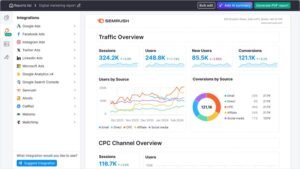
In daily use, it works like this. Position Tracking opens on your Google rankings segmented by device, location, and SERP feature. Scroll, and you reach an AI visibility score covering how often the brand surfaces in ChatGPT responses, Google AI Overviews, Gemini, and Perplexity. Click a keyword, and you see which prompt returned a rival instead.
That view previously required three tools and a spreadsheet to reconcile them.
The AI layer monitors a very large global prompt database, weighted heavily toward United States and ChatGPT coverage. On a client whose traffic slid while positions held, the AI score explained it immediately. They were sitting at position three organically while a competitor took the majority of relevant chatbot recommendations.
Position Tracking on its own remains among the most complete trackers available. Daily refreshes, segmentation by device, page, country, city, language, and SERP feature, share of voice rather than raw position, and alerts that fire on drops or competitor movement.
The costs are real. It is a heavy platform with a learning curve, and pricing climbs quickly once you add seats, AI visibility across several domains, and local tracking. A small agency can land several times the headline plan price before anyone notices.
For teams tired of reconciling four dashboards, nothing else here consolidates as much into one screen.
Why It’s Worth It
- Google positions and AI answer visibility reported in the same dashboard
- Prompt monitoring across ChatGPT, Gemini, Perplexity, and Google AI Overviews
- Daily Position Tracking segmented by device, location, language, and SERP feature
- Share of voice and visibility index instead of raw position averages
- Prompt data showing which topics drive AI-sourced demand in your category
- Competitive research covering both organic results and LLM responses
- Direct connections to Looker Studio, Search Console, and the wider Semrush suite
- Recommendations attached to findings rather than raw exports
Pricing
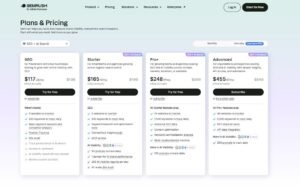
- 7-day free trial
- Starter: $165.17/month
- Pro+: $248.17/month
- Advanced: $455.67/month
Reviews & Ratings
- G2: 4.5 out of 5 stars (3,035+ reviews)
- Capterra: 4.6 out of 5 stars (2,299+ reviews)
Sentiment: Strong praise for dataset breadth, the AI visibility layer, and multi-location coverage. Recurring criticism of pricing complexity as seats and add-ons accumulate.
2. Ahrefs – Best for Accuracy and Deep SEO Visibility

Best For:
Agencies whose work leans on backlink analysis, competitor research, and ranking data that holds up when a client questions it.
How I Use It:
Ahrefs is open most working days for keyword research, SERP analysis, and link audits. When a position looks implausible, its Rank Tracker is the number I trust to settle it.
Overview
Some tools you keep because they are impressive. Ahrefs stays in the stack because it is boring in the best sense.
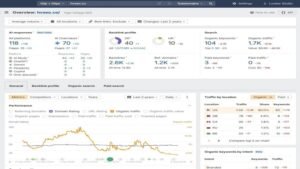
Retesting it this year confirmed why it never leaves our toolset. Numbers hold still. Two checks on the same keyword return the same answer, which sounds trivial until you have spent an afternoon reconciling three trackers that disagree.
The Rank Tracker draws on one of the largest keyword databases in the industry, spanning more than a hundred billion keywords across two hundred plus countries. That breadth matters most on long-tail sets where thinner databases return no data at all.
What changed this year is how naturally it absorbed AI search. Brand Radar reports visibility inside ChatGPT, Gemini, and Copilot alongside organic positions.
On a client losing traffic with flat rankings, Brand Radar located the cause in minutes. An AI Overview was resolving the query above every organic result. That single view replaced what would otherwise have been a full diagnostic audit.
The interface has stayed familiar through the expansion. SERP snapshots are more detailed than before, and the Looker Studio and Search Console connections make reporting close to automatic.
Ahrefs is not the flashiest tool here. When a client challenges a number, dependable beats flashy every time.
Why It’s Worth It
- Position tracking and brand mentions across both search engines and AI platforms.
- One of the largest keyword databases available, with strong long-tail coverage
- Brand Radar reporting visibility inside ChatGPT, Gemini, and Copilot
- AI-assisted localisation and technical SEO automation
- Native integrations with Search Console, Looker Studio, and a documented API
- Reporting and visualisation built for agency and enterprise delivery
Pricing
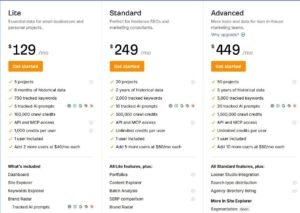
- Lite: $129/month
- Standard: $249/month
- Advanced: $449/month
- Enterprise: $1,499/month
Reviews & Ratings
- G2: 4.5 out of 5 stars (606+ reviews)
- Capterra: 4.7 out of 5 stars (577+ reviews)
Sentiment: Consistently rated for accuracy and reliability across large keyword sets.
3. SE Ranking – Best Balance of Price and AI Visibility

Best For:
Agencies that need daily accuracy, SERP feature depth, and AI visibility without moving to enterprise pricing.
How I Use It:
SE Ranking handles the accounts where I need SERP feature tracking, keyword grouping, and share of voice on one screen without paying for capabilities I will not use.
Overview
Nothing in testing shifted my expectations more than SE Ranking. It has quietly become a full platform rather than a tracker with extras attached.
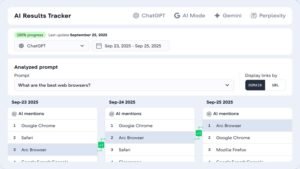
The AI treatment is what stands out. Rather than selling AI visibility as an upgrade, it lives inside the core tracking view. Google AI Overviews, ChatGPT, Gemini, and Perplexity presence appear beside Google and Bing positions in the same table.
At $103.20 per month for 500 keywords, the depth per dollar is difficult to match. It records more than 37 SERP features, supports keyword grouping and tagging, caches SERP snapshots for later review, and connects cleanly to Analytics, Search Console, and Looker Studio.
Cached SERPs deserve particular mention. When a client asks what the result page looked like six weeks ago, having the snapshot ends the conversation immediately.
The reason agencies gravitate to it became obvious quickly. It reports where a page genuinely stands in the context of the full result page, not just the number in a column.
[Image Source: SERanking]
Why It’s Worth It
- Visibility across Google AI Overviews, ChatGPT, Gemini, and Perplexity in the core view
- More than 37 SERP features monitored with daily refreshes
- Keyword grouping, tagging, and share of voice analysis built in
- Cached SERP snapshots for retrospective analysis
- Clean integrations with Analytics, Search Console, and Looker Studio
- Forecasting, reporting, and API access for scaling teams
Pricing
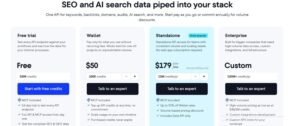
- Free trial available
- Core: $103.20/month
- Growth: $223.20/month
Reviews & Ratings
- G2: 4.7 out of 5 stars (2,330+ reviews)
- Capterra: 4.7 out of 5 stars (296+ reviews)
Sentiment: Among the highest-rated tools in the category for price-to-performance.
4. AccuRanker – Best for Real-Time Updates
Best For:

Agencies and consultants who need positions refreshed the moment something moves rather than on tomorrow’s schedule.
How I Use It:
During algorithm updates, AccuRanker becomes the primary screen. I refresh keyword sets on demand and watch the shift resolve in near real time.
Overview
Waiting for tomorrow’s crawl is the single most frustrating part of rank tracking, and AccuRanker exists to remove it.
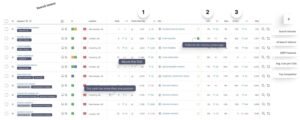
Its on-demand refresh returns updated positions within moments of the request. The first time you use it during a volatile week, going back to a daily schedule feels like working blind.
The AI layer runs through AccuLLM, and the filtering system is deeper than most teams will fully use. Fifty-plus filters, tagging, and custom dashboards mean you can isolate a segment down to a specific page group in one location.
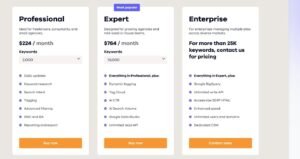
Pricing starts around $224 per month for 2,000 keywords, which places it squarely with agencies and in-house teams carrying serious keyword loads. It is not a starter tool and does not pretend otherwise.
Running it through an algorithm update made the value concrete. Instead of guessing which page groups were affected, I refreshed segments in sequence and had the pattern mapped before the update finished rolling out.
Speed converts directly into response time, and response time is what clients notice.
[Image source: AccuRanker]
Why It’s Worth It
- On-demand keyword refreshes returning results in moments
- AI visibility tracking through AccuLLM
- More than 50 filters, plus tagging and custom dashboards
- Integrations with Analytics, Search Console, and Looker Studio
- Forecasting for traffic, conversions, and commercial impact
Pricing
- Professional: $224/month
- Expert: $764/month
- Enterprise: Custom
Reviews & Ratings
- G2: 4.8 out of 5 stars (227+ reviews)
- Capterra: 4.9 out of 5 stars (330+ reviews)
Sentiment: Widely regarded as the fastest and most accurate tracker available, with standout real-time capability.
5. SERPWatcher (Mangools) – Best for Clean, Simple Reporting
Best For:
Freelancers and small businesses who want dependable daily tracking without a configuration project.
How I Use It:
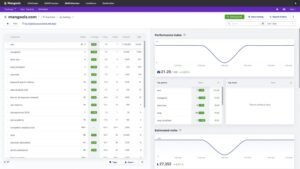
When a client wants one number that summarises progress, SERPWatcher gets the account. The Performance Index does the explaining for me.
Overview
There is a real cost to complexity, and SERPWatcher is built around removing it.
The whole tool orients around a single Performance Index that blends position with search volume into one movement figure. Clients understand it without a walkthrough, which saves a recurring conversation.
Plans start at $18.85 per month, scaling through keyword allowances into the low thousands, with coverage across tens of thousands of global locations. Daily updates, SERP snapshots, and shareable report links come standard.
Nothing here pretends to be enterprise software. Setup takes minutes, the dashboard fits on one screen, and there is no configuration layer between you and the data.
Because it sits inside the Mangools suite, it connects naturally to KWFinder and LinkMiner, which keeps research and tracking in one subscription.
For a solo operator or a small site, this is the tool that gets checked daily instead of ignored.
[Image source: SERPWatcher (Mangools)]
Why It’s Worth It
- Performance Index combining position and volume into one score
- Coverage across 65,000+ global locations on desktop and mobile
- Clean interface with daily refreshes and SERP snapshots
- Shareable report links and automated alerts
- Works alongside KWFinder and LinkMiner in the Mangools suite
Pricing
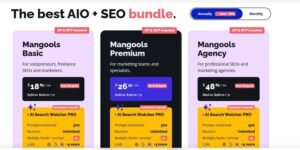
- Free Plan: Forever free account (limited: 5 lookups/24h, no credit card)
- Basic: $18.85/month
- Premium: $26.35/month
- Agency: $48.85/month
- 48-hour money-back guarantee
Reviews & Ratings
- G2: 4.7 out of 5 stars (95+ reviews)
- Capterra: 4.8 out of 5 stars (91+ reviews)
Sentiment: A straightforward, reliable tracker with a beginner-friendly design, well-suited to smaller businesses.
6. Nightwatch – Best for Multi-Engine Tracking
Best For:
Agencies that need presentation-quality reporting, granular filtering, and coverage beyond Google.
How I Use It:
Nightwatch handles accounts needing postcode-level local tracking and white-label reports that go to a client without editing.
Overview
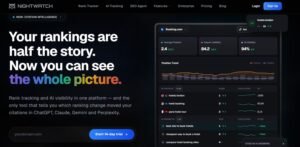
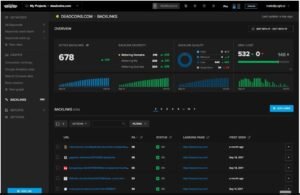
Reporting quality is an underrated selection criterion, and Nightwatch treats it as a first-class feature rather than an export option.
The dashboards are genuinely well designed, and the underlying data is more detailed than the visuals suggest. AI search visibility across ChatGPT, Gemini, and Claude now sits alongside conventional tracking.
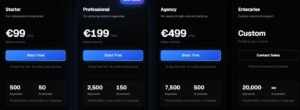
Pricing opens at €79 per month. Coverage spans Google, Bing, YouTube, Yahoo, and DuckDuckGo, with local tracking across 190,000 locations down to postcode precision.
That engine spread matters more than it used to. Clients with video libraries or marketplace listings need visibility outside Google, and few trackers handle both in one account.
On a reporting-heavy account, Nightwatch produced the cleanest white-label output I have generated from any tool in this list. The templates required no manual correction before sending.
The depth carries a cost in onboarding time. Expect a week before the filtering system feels natural rather than overwhelming.
[Image Source: G2]
Why It’s Worth It
- Conventional and AI search results displayed side by side
- Coverage across Google, YouTube, Bing, Yahoo, and DuckDuckGo
- Local tracking in 190,000+ locations down to postcode level
- Integrations with Analytics, Search Console, and Data Studio
- Customisable dashboards with automated white-label reporting
Pricing
- 14-day trial
- Starter: €79/month
- Professional: €159/month
- Agency: €399/month
- Custom Pricing
Reviews & Ratings
- G2: 4.9 out of 5 stars (43+ reviews)
- Capterra: 4.8 out of 5 stars (39+ reviews)
Sentiment: A visually polished tracker known for clean dashboards and deep local insight, well matched to agency reporting.
7. Wincher – Best for Small and Mid-Sized Businesses

Best For:
Small businesses and lean teams needing accurate daily tracking, multilingual coverage, and a setup that finishes in one sitting.
How I Use It:
Wincher covers accounts where I want ranking trends, competitor comparison, and landing page data without building anything first.
Overview
Time to first useful data is a metric nobody publishes, and Wincher would win it.
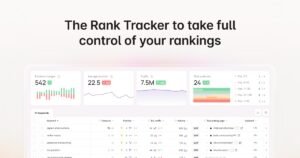
The tool is deliberately narrow. Daily positions, trend charts, landing page attribution, competitor comparison, and an on-page checker. No configuration layer, no unused modules.
Pricing opens at $41 per month, covering daily refreshes, multilingual tracking, local targeting, and landing page insight. It plugs directly into WordPress, Wix, and Looker Studio.
During testing, the account was returning useful data within minutes of the domain being added. Keyword trends, competitor positions, and page-level attribution were all populated before I had finished reading the settings.
Landing page attribution deserves a mention. Knowing which URL ranks for a term catches the cannibalisation problems that position-only tools hide completely.
For a small team, accuracy plus clarity plus speed of setup is a stronger combination than depth nobody uses.
[Image Source: Wincher]
Why It’s Worth It
- Daily position tracking across desktop and mobile
- Local and multilingual keyword coverage
- Historical charts with landing page attribution
- Competitor tracking and an on-page SEO checker included
- Direct integrations with WordPress, Wix, and Looker Studio

Pricing
- Basic: $41/month
- Standard: $74/month
- Professional: $266/month
Reviews & Ratings
- G2: 4.6 out of 5 stars (456+ reviews)
- Capterra: 4.8 out of 5 stars (107+ reviews)
Sentiment: A straightforward, dependable tracker offering strong value, well-suited to smaller businesses.
8. SEO PowerSuite – Best for Unlimited Keyword Tracking

Best For:
Teams carrying very large keyword lists who want to stop paying per term.
How I Use It:
Rank Tracker handles deep historical SERP analysis and multi-engine checks where a subscription model would make the same work uneconomic.
Overview
The interface looks like software from another decade because it partly is. That is also why it does things subscription tools cannot.
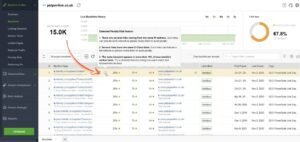
This is a desktop application rather than a hosted platform. It tracks unlimited keywords across more than 590 search engines, including Google, Bing, Yahoo, Baidu, and YouTube, on a one-time licence.
Running locally changes the economics completely. Check as often as you want, across as many locations as you want, without a usage meter running. On a client with tens of thousands of terms, that difference is measured in thousands of dollars annually.
You also get local, mobile, and global checks on demand, years of stored SERP history, and white-label reports that are presentable without editing.
The trade-offs are honest ones. It runs on your machine, so it needs your machine on. The interface takes patience. Large check runs take real time.
Nobody chooses this for elegance. You choose it because it removes the keyword ceiling entirely.
[Image Source: SEO PowerSuite]
Why It’s Worth It
- Unlimited keyword and website tracking with no per-term caps
- Coverage across Google, Bing, Yahoo, YouTube, Baidu, Yandex, and more
- Local tracking down to city and street level
- Keyword research, SERP feature tracking, and competitor analysis built in
- Integrations with Google Analytics and Search Console
- One-time licence rather than a recurring subscription
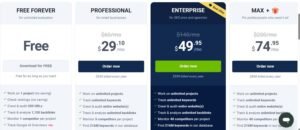
Pricing
- Free
- Professional: $29.10/month
- Enterprise: $49.95/month
- Max +: $74.95/month
Reviews & Ratings
- G2: 4.5 out of 5 stars (557+ reviews)
- Capterra: 4.5 out of 5 stars (380+ reviews)
Sentiment: A desktop-only tool valued for unlimited tracking and strong local performance despite its dated interface.
9. Zutrix – Best Affordable AI-Powered Rank Tracker

Best For:
Small teams needing accurate tracking and useful alerting at entry-level pricing.
How I Use It:
Zutrix runs the accounts with hyper-local requirements and Slack alerting, particularly for clients operating across several regions at once.
Overview
Plenty of tools describe themselves as AI-powered without much behind the label. Zutrix earned the description in testing.
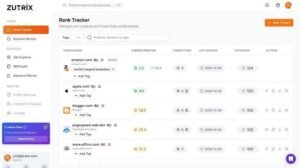
Its numbers lined up closely with Search Console across the accounts I compared, which is not something every budget tracker manages. Cheap trackers usually reveal themselves through drift on competitive terms, and this one held.
Pricing starts at $19 per month for 250 keywords and scales past 10,000 on the enterprise tier. It simulates human search behaviour to maintain accuracy and covers more than 200 countries and 2,000 cities.
The alerting is where it earns daily use. Slack and Zapier connections mean a significant movement reaches the team without anyone opening the dashboard.
Site audits, backlink tracking, and AI visibility insight are bundled rather than sold separately, which is unusual at this price.
For a small agency juggling local and international campaigns simultaneously, the accuracy-to-cost ratio is difficult to argue with.
[Image source : Zutrix]
Why It’s Worth It
- AI-driven alerts that flag position changes as they happen
- Automation through Slack and Zapier
- Entry pricing accessible to small marketing teams
- Site audits, backlink tracking, and AI visibility insight included
- Coverage across 200+ countries and 2,000+ cities
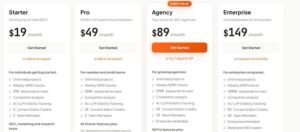
Pricing
- Starter: $19/month
- Pro: $49/month
- Agency: $89/month
- Enterprise: $149/month
Reviews & Ratings
- G2: 4.1 out of 5 stars (10+ reviews)
Sentiment: One of the more capable AI-driven trackers available to smaller agencies.
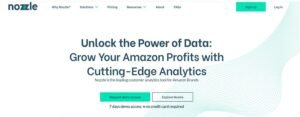
10. Nozzle – Best for Data-Heavy, Enterprise-Level Users
Best For:
Analysts and enterprise SEO teams who want to build their own view of the result page.
How I Use It:
Nozzle covers work needing granular competitor tracking or refresh intervals measured in minutes rather than days.
Overview
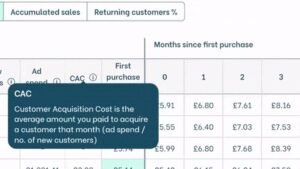
Most trackers decide which metrics matter and present those. Nozzle hands you the underlying data and lets you decide.
It measures the full result page rather than your listing alone. Pixel distance from the top, share of voice across domains and subdomains, and every feature occupying the page are all captured and queryable.
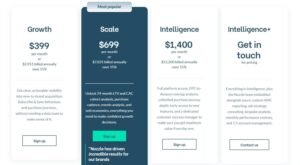
Pricing opens at $49 per month, with refresh intervals configurable from every few minutes through hourly, daily, or weekly. Historical data is retained indefinitely, which makes multi-year analysis genuinely possible.
Permanent retention is rarer than it should be. Most tools quietly discard older data on lower tiers, and you discover the gap when you need year-on-year comparison.
The honest caveat is that Nozzle rewards configuration effort. Straight out of the box, it presents a lot of data without opinion. Spend the setup time and the segmentation is unmatched here.
For teams with an analyst who enjoys building custom views, it is the most capable option on this list.
[Image Source: Nozzle]
Why It’s Worth It
- Highly customisable dashboards and segmentation
- On-demand refreshes as frequent as every few minutes
- Pixel-level measurement of position on the result page
- Strong competitor and brand monitoring across domains
- Scales cleanly across multi-domain portfolios
Pricing
- Basic: $49/month
- Advanced: $99/month
- Pro: $249/month
- Pro Plus: $499/month
Reviews & Ratings
- G2: 4.6 out of 5 stars (112+ reviews)
- Capterra: 4.8 out of 5 stars (82+ reviews)
Sentiment: A SERP intelligence platform favoured by data-heavy SEO teams.
11. Advanced Web Ranking – Best for White-Label Client Reporting
Best For:
Agencies needing polished white-label deliverables and reliable multi-location tracking over long periods.
How I Use It:
AWR handles accounts where pixel-level ranking data matters and where reports go out with minimal editing.
Overview
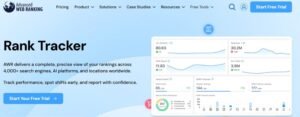
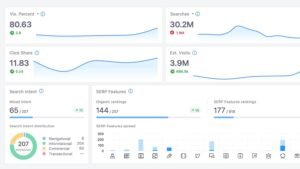
Longevity in this category tells you something. AWR has been running long enough to have solved the problems newer tools are still discovering.
Its appeal is unglamorous and specific. Ranking data arrives clean, on schedule, in a format clients accept without questions.
Coverage extends across more than 4,000 search engines, including Google, YouTube, Amazon, Yandex, Baidu, and DuckDuckGo, in over 190 countries. Desktop and mobile results are separated, and pixel position tracking shows whether you sit above the fold.
That last metric changes how you read a report. Position four above the fold and position four below three SERP features produce completely different click behaviour, and only pixel data distinguishes them.
Forecasting and click share estimates sit alongside the raw positions, turning a ranking report into a projection a client can plan against.
It was built by people who have lived agency reporting cycles, and that shows in every scheduled delivery.
[Image Source: Advanced Web Ranking]
Why It’s Worth It
- Client-ready reports with scheduled automatic delivery
- Forecasting and click share metrics alongside raw positions
- Multi-engine and multi-location coverage across 190+ countries
- Pixel position tracking for above-the-fold visibility
- Strong historical and trend visualisation
Pricing
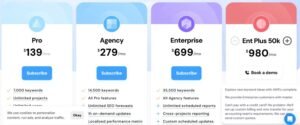
- Pro: $125/month
- Agency: $251/month
- Enterprise: $629/month
- Ent plus 50k: $882/month
Reviews & Ratings
- G2: 4.3 out of 5 stars (21+ reviews)
- Capterra: 4.8 out of 5 stars (35+ reviews)
Sentiment: An established tool trusted by agencies for reporting reliability.
12. Google Search Console – Best Free Diagnostic Tracker
Best for:
Anyone from beginner to advanced who needs first-party performance data straight from Google.
How I use it:
Search Console is the reference layer. Before accepting any third-party number, I check impressions, click-through rate, device split, and whether Google is rewriting the result page.
Overview
Google Search Console is a free performance reporting service that shows how a site appears in Google Search, using first-party data from Google’s own index rather than scraped results. Google documents the average position metric as an aggregate across every impression, which is exactly why it complements a tracker rather than replacing one.
Search Console is not a conventional tracker, and after testing more than thirty tools it remains the source I trust above all of them for diagnosis. It is the closest available view of how Google itself sees your site.
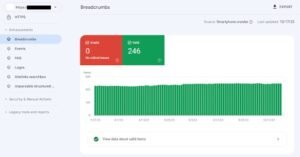
Its value shows up in the mismatches. On an AI-related visibility investigation, Search Console pinpointed the week impressions dropped while positions stayed flat. That combination points to the result page changing shape, not the content losing relevance. No paid tool made that as clear.
The strength is pattern recognition rather than precision. Device splits reveal mobile-specific problems. Country breakdowns show which markets actually pull the brand. Click-through rate collapse at stable positions signals a SERP feature took the click.
Every experienced SEO runs it alongside paid tools for the same reason. A tracker reports the position; Search Console explains what the position produced.
[Image Source: Moz]
Why It’s Worth It
- First-party position, impression, and click data direct from Google
- Device-level visibility separating mobile and desktop behaviour
- Country and page-level performance breakdowns
- Click-through rate diagnostics that expose result page changes
- Essential for isolating sudden drops from gradual decline
- Early signals on AI-driven result page impact
Pricing
- Free
Reviews & Ratings
- G2: 4.7 out of 5 stars (437+ reviews)
- Capterra: 4.8 out of 5 stars (211+ reviews)
Sentiment: Universally treated as the necessary companion to any paid tracker.
13. Morningscore – Best for Beginners and Small Teams

Best for:
Small businesses, early-stage marketers, and startup teams wanting a simple, task-driven tracker.
How I use it:
Morningscore goes to non-specialist teams. The mission structure gets tasks completed instead of postponed.
Overview
Most SEO tools assume you already know what to do with the data. Morningscore assumes you might not, and builds around that.
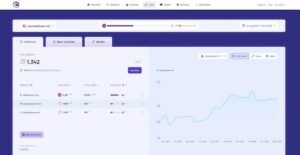
The tool converts optimisation work into a mission system with a running health score. It sounds gimmicky until you watch a non-technical team actually complete tasks because the interface tells them what to do next.
Underneath the presentation, the tracking is solid. Daily position updates, clear progress charts, keyword difficulty scoring, and content suggestions, all reported without jargon.
Pricing opens at $69 per month. Reporting is simple enough that a small team can send a client update without help.
For a marketing team new to SEO, this was the only tool that produced confidence rather than paralysis. That outcome is worth more than feature depth nobody uses.
Think of it as tracking with the barrier to entry removed rather than tracking with capability removed.
[Image Source: Morningscore]
Why It’s Worth It
- Mission structure that turns SEO tasks into completed work
- Daily position tracking with clear visual progress
- Keyword difficulty scoring and content suggestions
- Simple reporting suited to small teams
- Accessible to people with no prior SEO background
Pricing
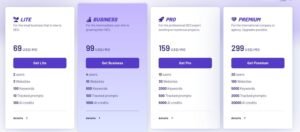
- Lite: $69/month
- Business: $99/month
- Pro: $159/month
- Premium: $299/month
Reviews & Ratings
- G2: 4.5 out of 5 stars (26+ reviews)
- Capterra: 4.8 out of 5 stars (43+ reviews)
Sentiment: Well regarded by teams wanting direction and momentum rather than dashboard depth.
14. Ubersuggest – Best Low-Cost Starter Rank Tracker

Best for:
Beginners, solo founders, and small business owners starting SEO on a limited budget.
How I use it:
Ubersuggest covers light audits and quick keyword checks before a project justifies moving to a heavier platform.
Overview
Every SEO stack starts somewhere, and for a large number of people it starts here.
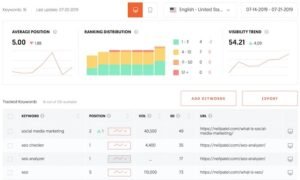
Retesting it for this article, the tracking component has improved noticeably against earlier versions. Mobile and desktop positions are separated, competitor comparison works, and SERP snapshots are included.
For a young site or an early-stage blog tracking a modest keyword set, that covers the requirement completely. The data is directionally reliable, which is what matters when you are establishing a baseline rather than defending a report.
Pricing starts at $12 per month, and the lifetime option is one of the better beginner offers available for teams avoiding recurring costs.
The limits appear at scale. Keyword allowances tighten, SERP feature detail thins out, and there is no meaningful AI visibility layer.
It is not competing with the platforms above it, and it does not need to. It occupies the space between free tools and full suites, and it fills it well.
[Image source: Neil Patel]
Why It’s Worth It
- Affordable position tracking for small keyword sets
- Competitor comparison included at entry pricing
- Keyword suggestions alongside SERP snapshots
- Mobile and desktop tracking separated
- Lifetime pricing option for teams avoiding subscriptions
Pricing
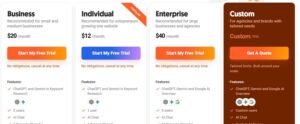
- Individual: $12/month
- Business: $20/month
- Enterprise: $40/month
Reviews & Ratings
- G2: 4.2 out of 5 stars (149+ reviews)
- Capterra: 4.4 out of 5 stars (93+ reviews)
Sentiment: A capable starting tool for newcomers and light workloads, with a simple interface.
15. ProRankTracker – Best for Local SEO Tracking
Best for:

Agencies, local SEO specialists, and teams running multiple client dashboards.
How I use it:
ProRankTracker handles projects needing street-level accuracy and highly detailed client reporting.
Overview
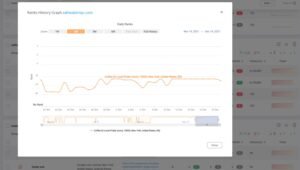
Local tracking exposes weak tools faster than anything else, because errors that hide at the national level become obvious at the postcode level.
Testing it again confirmed why local specialists keep it. Reported positions matched live results consistently, with almost no drift on the location-sensitive terms that usually cause disagreement.
Coverage spans Google, Bing, YouTube, Amazon, and Yahoo, but local is where it separates from the field. You can track to postcode, neighbourhood, and precise coordinate level.
For a multi-location client, that granularity changes the conversation entirely. Instead of one national average, you get a per-branch picture that shows which locations need work.
The reporting engine is among the strongest here. White-label ready, schedulable, and customisable enough that reports go out without manual editing.
It lacks the visual polish of Nightwatch. It compensates with accuracy where accuracy is hardest to achieve.
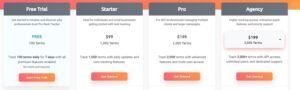
Prorank Tracker Pricing
Plans run from a Starter tier through Pro and Agency, with a free trial available before committing. Full figures are listed below.
[Image source: Capterra]
Why It’s Worth It
- Consistently accurate keyword tracking verified against live results
- Multi-engine support including YouTube and Amazon
- Local tracking with postcode and coordinate-level precision
- Customisable white-label reports with scheduled delivery
- Strong competitor tracking across multiple client dashboards
Pricing
- Free 7-Day Trial Available
- Starter: $89/month
- Pro: $134/month
- Agency: $179/month
Reviews & Ratings
- G2: 4.6 out of 5 stars (60+ reviews)
- Capterra: 4.6 out of 5 stars (122+ reviews)
Sentiment: Favoured by local SEO professionals for postcode-level accuracy.
5 More Rank Tracking Tools Worth Adding to Your Shortlist
The fifteen above cover the majority of use cases. Five more earned inclusion during testing because each solves a problem the others leave open.
- Serpstat — Best multi-tool suite for growing agencies
- Sitechecker — Best for combining rank tracking with site health
- Keyword.com — Best for live-shareable client dashboards
- TrueRanker — Best budget tracker for local and multi-location SEO
- Rank Ranger — Best for custom reporting and API-driven workflows
16. Serpstat – Best Multi-Tool Suite for Growing Agencies

Best For:
Agencies past the starter stage that need tracking, keyword research, competitor analysis, and site audit inside one affordable subscription.
How I Use It:
Serpstat covers accounts where I need research and tracking together, but the budget does not stretch to a premium suite.
Overview
There is an awkward middle stage in agency growth. Point tools stop scaling, and premium suites cost more than the client base supports.
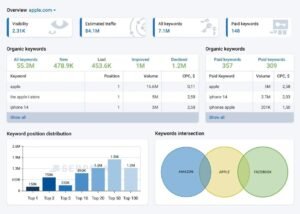
Serpstat sits in that gap deliberately. Position tracking, keyword research, competitor analysis, backlink data, and site audit arrive in one subscription priced well below the platforms above it.
The tracker itself handles daily updates across desktop and mobile, supports location targeting down to the city level, and records SERP features alongside positions. Competitor tracking runs in parallel, so you see relative movement rather than isolated numbers.
What makes it work for growing teams is the clustering. Keywords group automatically by result page similarity, which shows you which terms one page can realistically target together.
That clustering saves genuine planning time. On a content-heavy client, it collapsed several hundred keywords into a manageable set of page targets in one pass.
The interface carries the density you would expect from a tool doing this much. Budget an onboarding week before it feels comfortable.
[Image Source: Serpstat]
Why It’s Worth It
- Tracking, research, competitor analysis, and audit in one subscription
- Daily position updates across desktop and mobile with city-level targeting
- Automatic keyword clustering based on result page similarity
- Competitor tracking running alongside your own positions
- Priced well below comparable all-in-one platforms
- API access available for teams building custom reporting
Pricing
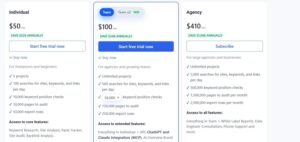
- Free plan with limited daily queries
- Individual: entry tier for solo operators
- Team: mid-tier for small agencies
- Agency: highest tier with expanded limits and user seats
Reviews & Ratings
- G2: 4.0 out of 5 stars (100+ reviews)
- Capterra: 4.6 out of 5 stars (200+ reviews)
Sentiment: Valued for suite breadth at accessible pricing, with the interface density noted as the main learning curve.
17. Sitechecker – Best for Combining Rank Tracking With Site Health

Best For:
Teams that want position movement and technical site issues visible in the same place rather than in two separate tools.
How I Use It:
Sitechecker goes on accounts where technical problems and ranking drops keep arriving together and I need the correlation visible immediately.
Overview
Ranking drops caused by technical faults are among the slowest to diagnose, because the tracker and the crawler live in different tools.
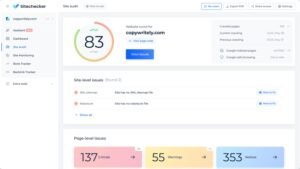
Sitechecker closes that gap. Position tracking and site auditing run against the same domain in one interface, so a drop and the crawl error that caused it appear on adjacent screens.
The tracker covers daily updates, desktop and mobile separation, and location targeting. The audit layer monitors indexation, page speed signals, broken links, redirect chains, and structural issues on a recurring crawl.
Change tracking is the feature that earns its place. It flags when a tracked page changes materially, which catches the deployment nobody told you about before rankings react.
On one client, a redirect introduced during a site update was surfaced by the change monitor two days before the position drop registered. That lead time is difficult to buy elsewhere.
It will not out-track AccuRanker or out-audit a dedicated crawler. Having both correlated in one view is worth more than marginal gains in either.
[Image Source: Sitechecker]
Why It’s Worth It
- Position tracking and site auditing correlated in one interface
- Daily updates with desktop, mobile, and location separation
- Recurring crawls covering indexation, speed signals, and redirect chains
- Page change monitoring that flags material edits to tracked URLs
- Faster diagnosis when technical faults cause ranking movement
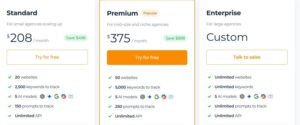
- Accessible pricing relative to running two separate tools
Pricing
- Free trial available
- Basic: entry tier for single sites
- Startup: mid tier with expanded crawl and keyword limits
- Growing: higher tier for agencies managing multiple domains
Reviews & Ratings
- G2: 4.6 out of 5 stars (60+ reviews)
- Capterra: 4.8 out of 5 stars (30+ reviews)
Sentiment: Appreciated for pairing technical monitoring with ranking data in a single workflow.
18. Keyword.com – Best for Live-Shareable Client Dashboards
Best For:
Agencies whose clients want to check performance whenever they like, without waiting for the monthly report.
How I Use It:
Keyword.com handles accounts where transparency is part of the relationship, and I want the client to check a live view instead of emailing for updates.
Overview
Reporting cycles create a strange dynamic. Clients wait a month for numbers, then question them, and you spend a call reconstructing what happened three weeks ago.
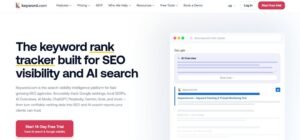
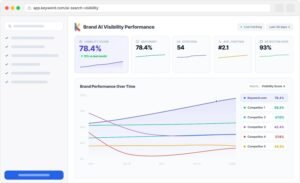
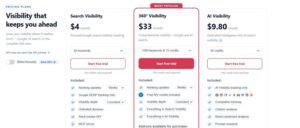
Keyword.com removes the waiting. Every client gets a live dashboard on a shareable link, updated daily, viewable without a login.
The tracker underneath is focused rather than sprawling. Daily positions, desktop and mobile separation, location targeting, competitor comparison, and SERP feature detection. No modules you did not ask for.
Share of voice is calculated across your tracked set so clients see aggregate movement rather than fixating on individual keywords. That framing prevents the conversation where one term dropping two places overshadows twenty terms improving.
White-label branding applies to the dashboard itself, not just the exported report, so the live view carries your identity.
The trade-off is scope. There is no keyword research, no audit, no backlink data. It tracks, and it reports, and it does both cleanly.
[Image Source: Keyword.com]
Why It’s Worth It
- Live shareable dashboards clients can check without logging in
- Daily updates with desktop, mobile, and location separation
- Share of voice calculated across the full tracked keyword set
- White-label branding applied to the live dashboard
- Competitor comparison and SERP feature detection included
- API access for teams pushing data into their own systems
Pricing
- Free trial available
- Starter: entry tier with a modest keyword allowance
- Professional: mid tier for growing agencies
- Agency: highest tier with expanded keywords and client seats
Reviews & Ratings
- G2: 4.5 out of 5 stars (40+ reviews)
- Capterra: 4.6 out of 5 stars (25+ reviews)
Sentiment: Praised for client transparency and reporting simplicity rather than feature breadth.
19. TrueRanker – Best Budget Tracker for Local and Multi-Location SEO
Best For:
Local SEO specialists and small agencies needing city-level and map-pack tracking without ProRankTracker pricing.
How I Use It:
TrueRanker covers multi-location clients where I need per-branch visibility, but the budget will not carry a premium local tool.
Overview
Local tracking usually forces an uncomfortable choice. Accurate tools cost real money, and cheap tools return national averages dressed up as local data.
TrueRanker sits between those positions. It delivers genuine city-level and map-pack tracking at pricing that works for smaller agencies.
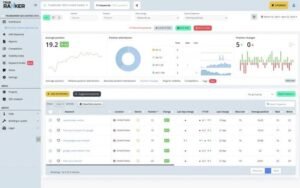
The tracker covers Google organic results and the local pack separately, which matters because a business can hold map-pack position two while sitting on page two organically. Treating those as one number hides half the picture.
Location targeting runs to city and postcode level, and each tracked location reports independently. On a client with several branches, that produced a per-location view that guided where the next citation work went.
Reporting is white-label capable with scheduled delivery, and the Search Console connection brings first-party data alongside tracked positions.
It is not as granular as street-level coordinate tracking. For most multi-location businesses, city and postcode resolution answers the question at a fraction of the cost.
[Image source: TrueRanker]
Why It’s Worth It
- Organic and local pack positions tracked as separate metrics
- City and postcode-level location targeting with independent reporting
- Per-branch visibility for multi-location businesses
- White-label reports with scheduled delivery
- Search Console integration bringing first-party data into the view
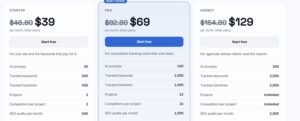
- Entry pricing well below premium local tracking tools
Pricing
- Free trial available
- Basic: entry tier for single-location businesses
- Pro: mid tier covering multiple locations
- Agency: highest tier with expanded client and keyword limits
Reviews & Ratings
- G2: 4.5 out of 5 stars (20+ reviews)
- Capterra: 4.7 out of 5 stars (15+ reviews)
Sentiment: Recognised for delivering credible local accuracy at accessible pricing.
20. Rank Ranger – Best for Custom Reporting and API-Driven Workflows

Best For:
Teams building ranking data into their own dashboards, warehouses, or client portals through an API.
How I Use It:
Rank Ranger handles accounts where ranking data has to feed an existing reporting system rather than live in a vendor dashboard.
Overview
At a certain scale, the tracker stops being the reporting destination. It becomes a data source feeding something you built.
Rank Ranger is designed around that reality. The API is treated as a primary interface rather than an afterthought, and the reporting builder assumes you want to construct views rather than accept defaults.
Tracking covers Google, Bing, Yahoo, and YouTube, with desktop and mobile separation, location targeting to the city level, and comprehensive SERP feature capture. Daily updates are standard.
The report builder is where it distinguishes itself. You assemble widgets, apply branding, set delivery schedules, and pull in Analytics and Search Console data so one report covers positions, traffic, and conversions together.
That consolidation matters more than it sounds. A client report showing positions next to sessions and conversions ends the debate about whether ranking work produced business results.
The cost is setup time. Out of the box, it presents capability rather than conclusions, and a first report takes real configuration effort.
Why It’s Worth It
- API-first design for feeding ranking data into custom systems
- Report builder with widget-level control and branding
- Coverage across Google, Bing, Yahoo, and YouTube with SERP features
- Analytics and Search Console data combined into unified reports
- Daily updates with desktop, mobile, and city-level separation
- Scheduled white-label delivery across multiple client accounts
Pricing
- Free trial available
- Essentials: entry tier for smaller keyword sets
- Advanced: mid-tier with expanded API access
- Enterprise: custom pricing for high-volume and integration-heavy use
Reviews & Ratings
- G2: 4.4 out of 5 stars (30+ reviews)
- Capterra: 4.5 out of 5 stars (20+ reviews)
Sentiment: Valued by technical teams for API depth and report customisation.
How to Set Up Rank Tracking Correctly on Day One
Most tracking data problems trace back to setup rather than the tool. Running tracking across local, national, ecommerce, and SaaS campaigns at White Label SEO Service taught us to follow the same sequence every time.
- Define the location before adding keywords. Set the country and, where the business is local, the city or postcode. A national setting on a local business returns numbers that look fine and mean nothing.
- Separate mobile and desktop from the start. Merging them averages away the device-specific problems you most need to see, and you cannot recover the split retrospectively.
- Add competitors during setup. Positions without competitive context tell you a number moved. Competitor data tells you whether you lost ground or the whole market shifted.
- Group keywords by page, not by theme. Assign every keyword to the URL it should rank with. This surfaces cannibalisation immediately and makes reporting map to actual pages.
- Tag by intent and priority. Separate commercial terms from informational ones. A drop on a money keyword needs a different response to a drop on a blog term.
- Connect Search Console before the first report. First-party impression and click data alongside tracked positions turn a ranking report into a performance report.
- Enable SERP feature tracking. Without it, you cannot tell whether a click loss came from a position change or a feature appearing above you.
- Verify against a live search. Open three tracked keywords in an incognito session at the target location and compare. If the tool disagrees by more than a position, the location setting is usually wrong.
Set alerting thresholds last, once you have a fortnight of baseline data. Setting them beforehand produces noise that trains everyone to ignore alerts.
The verification step in point eight is the one teams skip most often, and it is the one that catches configuration errors before they contaminate a quarter of reporting.
Rank Tracking Mistakes That Quietly Ruin Your Data
Bad tracking data is worse than no tracking data, because it produces confident decisions built on nothing. These are the failures that appear most often in accounts we take over.
Tracking the wrong location. A local business tracked at the national level shows positions that no actual customer experiences. This is the single most common error and the easiest to fix.
Averaging mobile and desktop. The two result pages differ in layout and feature density. A merged average hides a mobile-specific collapse until traffic reveals it.
Comparing across two tools. Different trackers use different data centres, refresh schedules, and personalisation controls. Two tools disagreeing by a position is normal and does not mean either is broken.
Watching positions without SERP context. Position three under an AI Overview, a video carousel, and a shopping row performs like position eight. Position alone stopped describing visibility some time ago.
Tracking vanity keywords. Terms with no commercial relevance produce charts that look excellent and revenue that does not move. Every tracked keyword should map to a page with a purpose.
Ignoring the URL that ranks. When two pages compete for one term, positions oscillate, and neither ranks well. Only landing page attribution exposes this.
Reacting to single-day movement. Daily fluctuation is normal. Treat a change as real once it holds for several consecutive checks, not on the first drop.
Each of these produces a report that reads correctly and misdirects the work behind it. Fixing the setup usually resolves more apparent ranking problems than the ranking work does.
Which Rank Tracker Fits Your Situation
The list gives you options. This table gives you a decision.
| Your situation | Recommended tool | Why it fits |
| Solo SEO or freelancer, under 200 keywords | SERPWatcher or Ubersuggest | Low cost, minimal setup, one clear progress metric |
| Small business tracking one site | Wincher or Morningscore | Fast setup, plain reporting, no configuration project |
| Local business, single location | TrueRanker or Zutrix | City-level accuracy at entry pricing |
| Multi-location or franchise business | ProRankTracker or Nightwatch | Postcode-level precision with per-branch reporting |
| Growing agency, 5 to 20 clients | SE Ranking or Serpstat | Suite breadth without enterprise cost |
| Agency where reporting is the bottleneck | Advanced Web Ranking or Keyword.com | Scheduled white-label delivery and live client dashboards |
| Team responding to volatility daily | AccuRanker or Nozzle | On-demand refreshes and deep segmentation |
| Very large keyword sets on a fixed budget | SEO PowerSuite | Unlimited tracking on a one-time licence |
| Enterprise team with an analyst | Nozzle or Rank Ranger | Full SERP data plus API-driven custom reporting |
| Technical faults and ranking drops arriving together | Sitechecker | Position and crawl data correlated in one view |
| One platform for everything | Semrush One or Ahrefs | Depth, AI visibility, and reliability in a single login |
| Any situation, alongside a paid tool | Google Search Console | Free first-party data that verifies everything else |
Two rules cut through the rest. Choose for the smallest geography you sell into, because a tool that cannot track your locations produces confident nonsense. Then choose for reporting time, because the hours you spend cleaning exports every month cost more than the subscription difference between almost any two tools here.
Key Takeaways: What We Learned After Testing 30+ Rank Trackers
Weeks of testing, demos, and side-by-side comparison produced five conclusions that held across every account.
1. AI visibility is no longer optional
Semrush, Ahrefs, SE Ranking, and AccuRanker now report brand presence inside AI Overviews, ChatGPT, and Gemini alongside conventional positions.
That layer explained traffic losses during testing that position data alone could not account for. The pattern was consistent enough to stop treating it as an emerging concern. Visibility increasingly resolves before anyone reaches a result page, and a tracker blind to that reports a reality your customers no longer occupy.
2. Speed actually matters
Diagnosing a drop with day-old data is guesswork with extra steps.
AccuRanker and Nozzle separated themselves through refresh speed. Watching positions resolve within minutes rather than waiting for tomorrow changes what you can do about a problem. During a volatile week, that difference decides whether you respond inside the window or explain afterwards.
3. Simple dashboards win
Switching between heavy platforms all week made one thing obvious.
Most solo marketers and small businesses do not need ten layers of segmentation. They need to know what changed and what to do. SERPWatcher and Wincher demonstrated how much a restrained interface delivers. Less to read, faster to act, and the tool actually gets opened daily rather than at report time.
4. Automation saves you hours
Integrations moved from convenience to requirement during this round of testing.
SE Ranking, Nightwatch, and Ahrefs all push data into Looker Studio, Slack, and Search Console without middleware. Once those connections are running, reports refresh themselves, and alerts arrive before anyone notices a problem manually. Across ten clients, that recovers most of a working day every month.
5. There’s no one-size-fits-all
This was the conclusion every other finding pointed toward.
The correct tracker depends entirely on your keyword volume, geography, client count, and reporting obligations. Enterprise teams need APIs, segmentation, and permanent history. Small businesses need clarity and a price that makes sense. Every tool here wins in a specific situation and loses badly outside it. Match the tool to your workflow rather than to someone else’s recommendation.
Final Verdict: The Rank Tracker Landscape in 2026
AI did not end SEO measurement. It expanded what has to be measured.
Tracking now covers organic positions, AI answer presence, SERP feature occupancy, and how much space sits above your listing. That wider frame explains movement that a position column cannot, and it is why the tools that adapted separated so clearly from the ones that did not.
For dependable data and deep context, Ahrefs and Semrush remain the reference standard.
For the strongest balance of price, usability, and AI readiness, SE Ranking is the pick.
For real-time control and granular segmentation, AccuRanker and Nozzle are purpose-built.
Among the five additions, Serpstat suits growing agencies wanting suite breadth, Sitechecker suits teams where technical faults drive ranking movement, Keyword.com suits client transparency, TrueRanker suits local work on a budget, and Rank Ranger suits teams feeding data into their own systems.
The pattern every experienced SEO eventually recognises still applies. The best tracker is the one you open every day, because consistent measurement is what moves the numbers.
Conclusion
Rank tracking earns its cost when it turns a traffic question into a specific, answerable diagnosis. The twenty tools here each solve a different version of that problem, and the right one depends on your keyword volume, geography, and reporting load.
Set it up correctly on day one, verify against live results, and track the terms that map to pages with a commercial purpose. Everything else is noise that looks like data.
We manage rank tracking across local, national, ecommerce, and SaaS campaigns at White Label SEO Service, and we build the reporting layer that turns those positions into decisions. Get in touch if you want that handled properly from the start.
Frequently Asked Questions
How accurate are rank tracking tools compared to real search results?
Good trackers land within one position of live results when location and device are configured correctly. Most reported inaccuracy comes from setup errors rather than the tool itself.
Why do two rank trackers show different positions for the same keyword?
Trackers use different data centres, refresh schedules, and personalisation controls. A one- ortwo-positionn difference between tools is normal and does not indicate either is faulty.
How often should I check my keyword rankings?
Daily tracking with weekly review works for most sites. React to changes that hold across several consecutive checks, not to single-day fluctuations.
Can I track AI Overview and ChatGPT visibility with a rank tracker?
Yes. Semrush, Ahrefs, SE Ranking, AccuRanker, and Nightwatch all report brand presence across AI Overviews and major chatbots alongside conventional positions.
Is Google Search Console enough on its own for rank tracking?
Search Console gives accurate first-party data but averages position across all locations and devices. Pair it with a tracker for location-specific and competitor visibility.