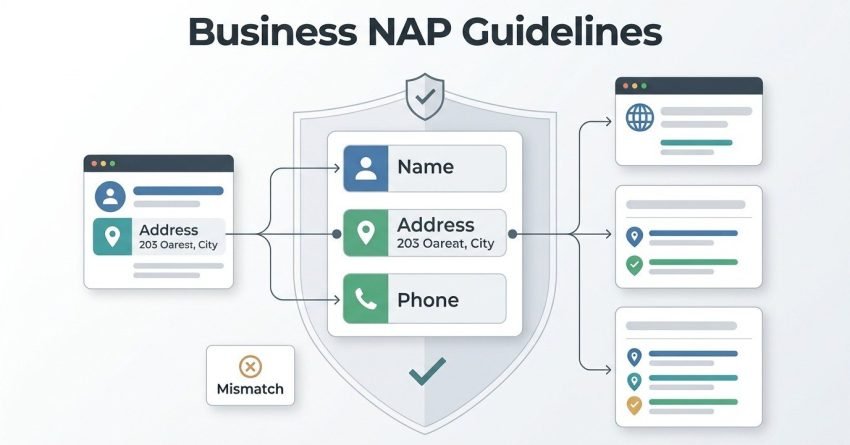
I’ve audited hundreds of Google Business Profiles that got suspended for reasons the owner never saw coming. Google Business Profile NAP guidelines are the rules governing how a business’s name, address, and phone number must appear to remain compliant and avoid suspension. Get any one of these three elements wrong, and Google can pull your listing with little warning.
Local visibility depends entirely on this data staying accurate. A single mismatch across platforms can trigger a review that ends in suspension.
This guide covers how Google evaluates your business name, the address rules that trip up service-area and multi-location businesses, phone number requirements including call-tracking pitfalls, and what to do if your profile gets suspended anyway. I’ll also cover how NAP consistency ties into your broader local SEO performance.
What Is NAP Consistency in Google Business Profile?
NAP consistency means your business Name, Address, and Phone number appear identically across your Google Business Profile, your website, and every directory that lists you. Google cross-references this data to confirm your business is real and located where you say it is.
I’ve seen listings flagged simply because a suite number was missing on one directory but present on another. Google’s matching systems don’t forgive small formatting differences the way a human reader would.
Why NAP Accuracy Matters for Local SEO
NAP accuracy matters because Google uses it as a trust signal when deciding which businesses to show in local search results and the Map Pack. Inconsistent NAP data creates doubt about whether a business is legitimate or still operating at that location.
I treat NAP audits as step one on every local SEO account I take on.
Why Google Suspends Business Profiles Over NAP Issues
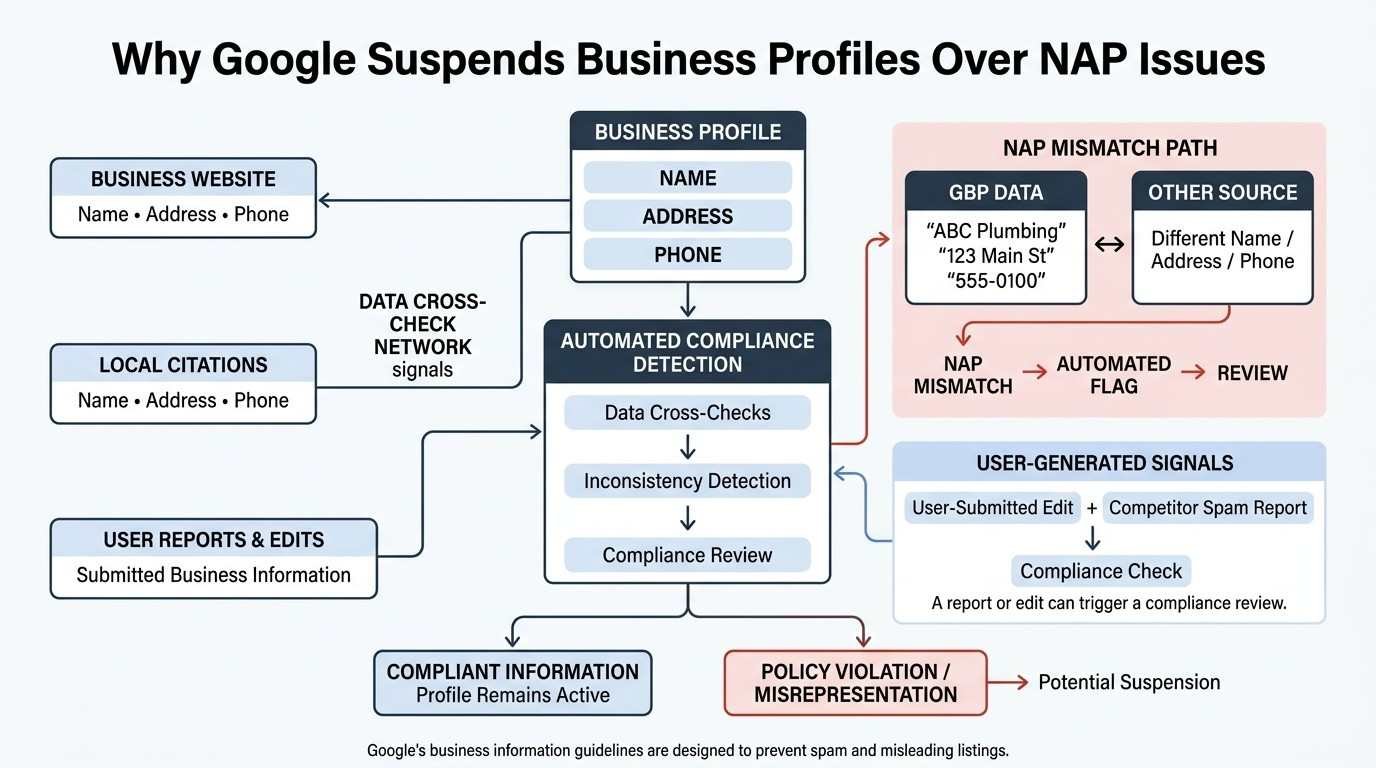
Google suspends profiles over NAP issues because inconsistent or non-compliant data violates its Guidelines for representing your business, which exist to prevent spam and misleading listings. The system is built to protect searchers from fake or duplicate businesses.
Suspensions aren’t always manual. Automated detection flags a huge share of violations before a human ever looks at the listing.
How Google’s Algorithm Detects NAP Violations
Google’s algorithm cross-references your listed name, address, and phone number against data scraped from your website, citations, and user reports. A mismatch across even two sources can trigger an automatic flag for manual review.
The system also weighs user-submitted edits and competitor spam reports, so a single complaint can start a compliance check even when your data is accurate.
Types of Google Business Profile Suspensions
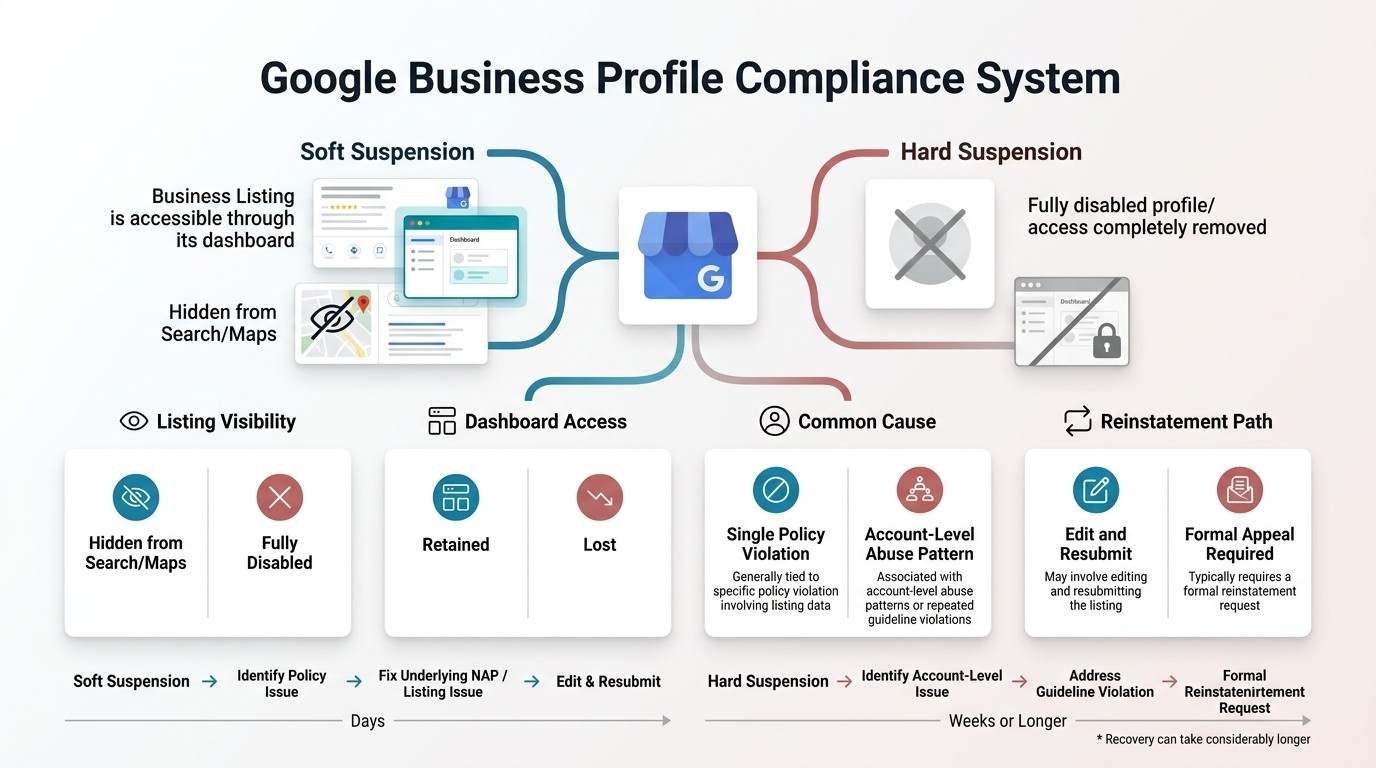
Google Business Profile suspensions fall into two categories: soft suspensions, where the listing is hidden from search but the dashboard remains accessible, and hard suspensions, where the entire account is disabled. Each type requires a different recovery path.
A soft suspension usually means Google flagged a specific policy violation tied to your listing data. I’ve recovered most soft suspensions within a few days once the underlying NAP issue was fixed.
A hard suspension is more severe and often ties to account-level abuse, like managing multiple listings for the same location or repeated guideline violations. Recovery from a hard suspension typically requires a formal reinstatement request and can take considerably longer.
Soft Suspension vs. Hard Suspension
| Factor | Soft Suspension | Hard Suspension |
| Listing visibility | Hidden from Search/Maps | Fully disabled |
| Dashboard access | Retained | Lost |
| Common cause | Single policy violation | Account-level abuse pattern |
| Typical recovery time | Days | Weeks or longer |
| Reinstatement path | Edit and resubmit | Formal appeal required |
Google Business Name Guidelines Explained
A compliant Google Business name is your business’s real-world name exactly as it appears on your storefront, signage, and legal documentation. Google prohibits adding keywords, locations, or descriptors that aren’t part of your actual brand name.
I still see businesses adding phrases like “best plumber in [city]” to their listing name, and it’s one of the fastest ways to trigger a name-related suspension.
What Counts as a Compliant Business Name
A compliant business name matches your legal or DBA name without added marketing language, keywords, or unnecessary punctuation. Google checks this name against your website’s title tag, invoices, and physical signage during verification reviews.
Franchise and multi-location businesses face an added wrinkle here, since Google expects consistent branding across every location without location-specific keyword variations.
Common Business Name Violations That Trigger Suspension
Common business name violations include adding city names, service keywords, taglines, or accreditation claims to the official name field. Google’s system treats these additions as an attempt to manipulate local search rankings.
I’ve watched keyword-stuffed names climb rankings for a few weeks before getting flagged, so any short-term gain rarely survives long enough to matter.
Keyword Stuffing in Business Names
Keyword stuffing in a business name means inserting search terms, like a service type or city name, that aren’t part of your official registered name. Google’s guidelines explicitly prohibit this practice regardless of how common it appears among competitors.
How to Choose a Compliant Business Name
Choosing a compliant business name starts with pulling your name exactly as it appears on your business license, tax documents, or storefront signage. Matching official documentation is the safest way to survive a Google verification review.
I always cross-check the proposed listing name against the footer of the business website before submitting anything, since mismatches here are an easy flag for Google’s automated systems.
Google Business Address Guidelines Explained
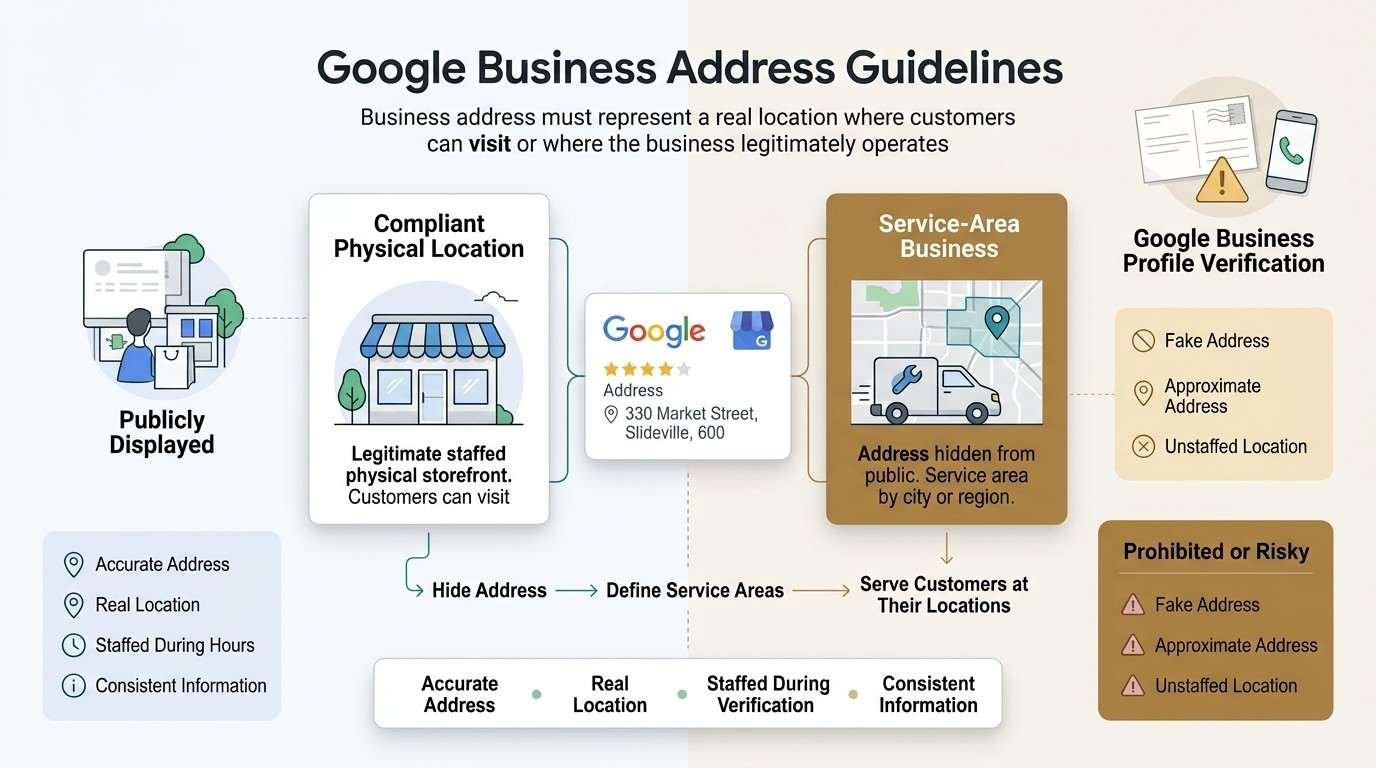
A compliant Google Business address is the actual physical location where customers can visit or where the business legitimately operates from, formatted consistently across every online listing. Google verifies this through postcards, phone calls, or automated checks tied to public records.
Address violations are the single most common reason I see profiles flagged during onboarding audits.
Physical Location Requirements
Physical location requirements mean the address on your profile must correspond to a real, staffed location during posted business hours. Google has increasingly cracked down on residential addresses used to game location-based rankings for businesses that don’t actually serve customers there.
Service-Area Business Address Rules
Service-area businesses that don’t serve customers at their own location must hide their address entirely rather than listing an approximate one. Plumbers, cleaners, and mobile service providers typically fall into this category.
Listing a fake or approximate address instead of properly hiding it is one of the fastest paths to suspension I’ve seen among trades businesses.
Hiding Your Address for Service-Area Businesses
Hiding your address for a service-area business involves selecting the “I deliver goods and services to my customers” option in the Google Business Profile dashboard and defining your service areas by city or region instead. This setting tells Google not to display a physical storefront location publicly.
Virtual Offices, PO Boxes & Shared Addresses
Virtual offices, PO boxes, and shared coworking addresses generally violate Google’s location guidelines unless the business genuinely staffs that location during business hours. Google’s verification process increasingly cross-references these addresses against known virtual office providers.
I’ve seen entire batches of listings suspended at once when Google identified a shared coworking address hosting dozens of unrelated businesses.
Multiple Locations & Duplicate Listing Risks
Multiple locations create duplicate listing risk when a business creates separate profiles for the same address or fails to properly differentiate branches with unique suite numbers or addresses. Google’s system automatically flags what it interprets as duplicate entries for the same physical location.
Franchise owners face this risk constantly, especially when a previous owner’s listing wasn’t properly transferred or closed before a new one was created.
Google Business Phone Number Guidelines Explained
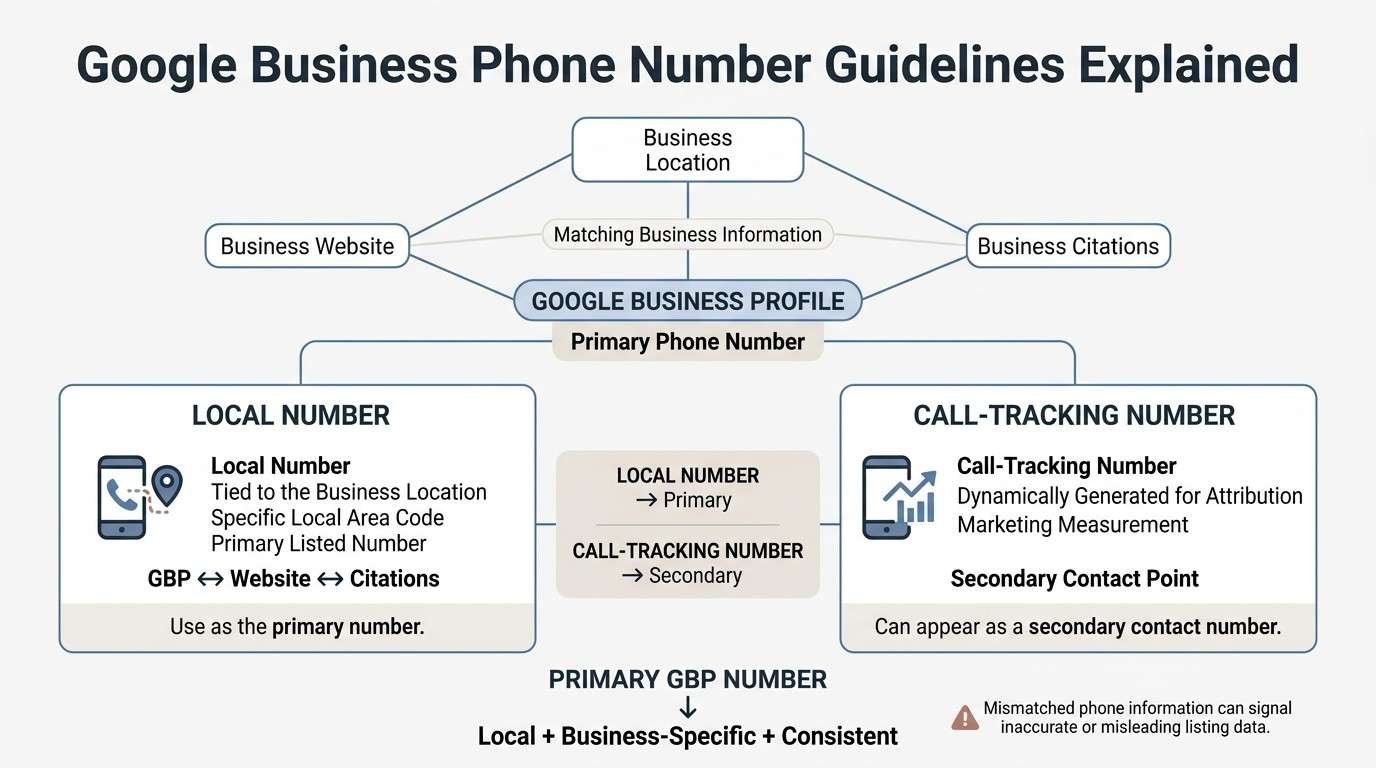
A compliant Google Business phone number is a local number tied directly to the specific business location, matching the number listed on the business website and citations. Google treats mismatched phone numbers as a signal that a listing might be inaccurate or fraudulent.
Local vs. Call-Tracking Numbers
Local numbers are tied to the specific area code of the business location, while call-tracking numbers are dynamically generated for marketing attribution purposes. Google’s guidelines require the primary listed number to be a local number, not a tracking number, even though tracking numbers can appear as secondary contact points.
Phone Number Mismatches That Cause Suspension
Phone number mismatches occur when the number on your Google Business Profile differs from the number on your website, citations, or directory listings. Even a single-digit discrepancy across platforms can trigger a manual review of the entire listing.
I run a phone number match across every major directory before touching any other part of a client’s SEO strategy, since this single fix often resolves ranking suppression I initially assumed was content-related.
How to Audit Your Google Business Profile for NAP Errors
Auditing your Google Business Profile for NAP errors means systematically comparing your listed name, address, and phone number against your website and every citation source where your business appears. A thorough audit typically takes a few hours for a single-location business.
Tools for Checking NAP Consistency
Tools for checking NAP consistency include citation audit platforms, manual directory searches, and Google’s own search results, which reveal how your business appears across indexed pages. Running a branded search of your business name often surfaces outdated addresses or phone numbers still live on old directories.
What to Do If Your Google Business Profile Gets Suspended
If your Google Business Profile gets suspended, the first step is identifying the specific violation through Google’s provided reason, then correcting the underlying NAP or policy issue before requesting reinstatement. Acting quickly matters, since prolonged suspension erases accumulated reviews and ranking history in some cases.
The Google Business Profile Reinstatement Process
The reinstatement process involves submitting an appeal through the Google Business Profile support dashboard, explaining the correction made and providing supporting documentation like a business license or utility bill. Google typically reviews appeals in the order received, without an expedited option for most businesses.
How Long Does Google Business Profile Reinstatement Take?
Google Business Profile reinstatement typically takes anywhere from a few days to several weeks, depending on suspension severity and appeal volume. Soft suspensions tied to a single clear fix tend to resolve faster than hard suspensions requiring documentation review.
I tell clients to expect a minimum of one to two weeks for any appeal involving address verification, since Google’s review team handles these manually.
How NAP Consistency Impacts Local SEO Rankings
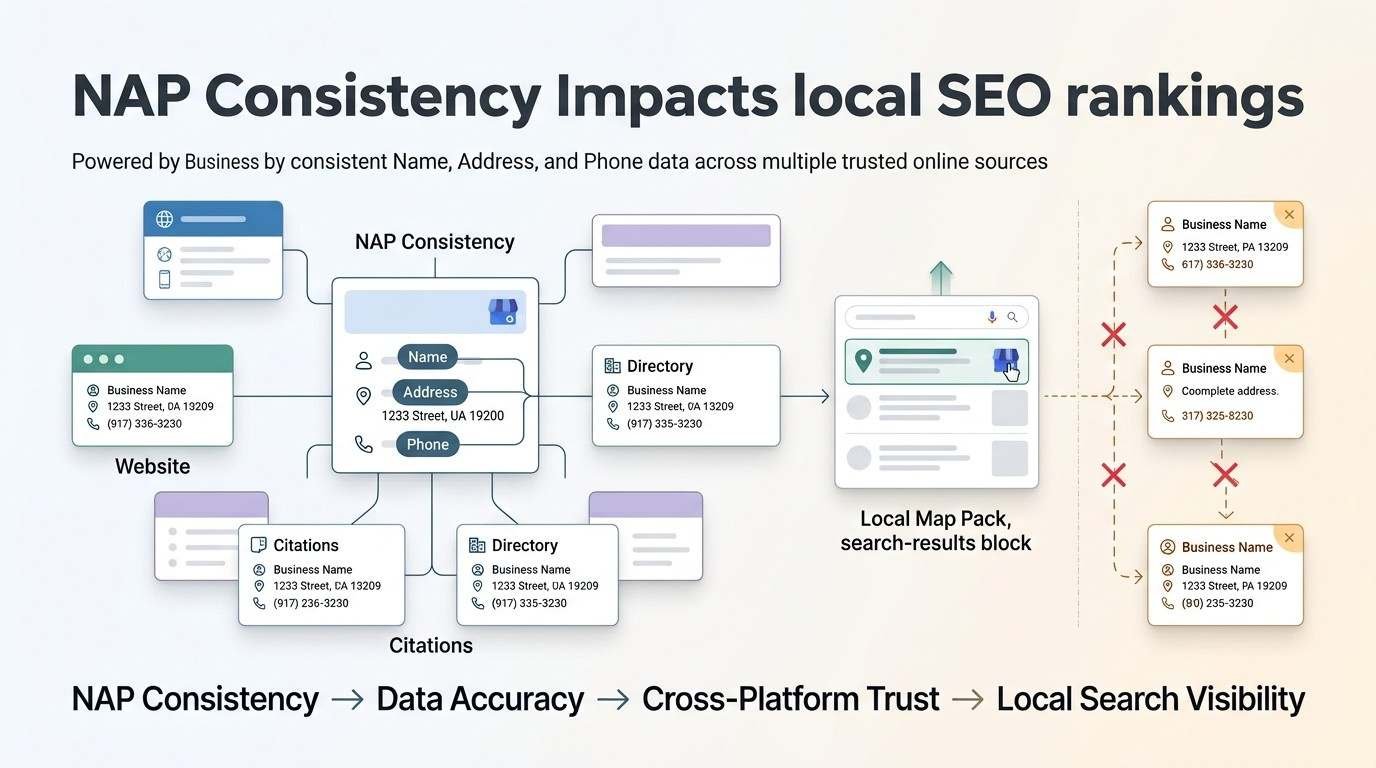
NAP consistency impacts local SEO rankings because Google’s local algorithm factors in data accuracy and cross-platform trust signals when ranking businesses in the Map Pack. A BrightLocal survey found NAP inconsistency remains one of the top reasons local businesses fail to rank despite otherwise solid on-page optimization.
Fixing NAP issues often produces ranking improvements faster than any other single local SEO change I make on an account.
NAP Consistency Across Citations & Directories
NAP consistency across citations and directories means your business information matches exactly on sites like Yelp, Bing Places, Apple Maps, and industry-specific directories. Search engines treat these external mentions as votes of confirmation for the data on your primary listing.
I prioritize the top twenty citation sources for any industry before worrying about smaller, less-trafficked directories.
Best Practices for Long-Term Google Business Profile Compliance
Long-term compliance comes from auditing your NAP data quarterly, updating every citation whenever your business moves or changes numbers, and avoiding any temptation to add keywords to your business name field. Businesses that treat this as an ongoing task rather than a one-time setup rarely face suspension.
I schedule NAP audits on a recurring calendar for every client account specifically because data drifts naturally as directories update independently over time.
Conclusion
Google Business Profile suspensions almost always trace back to name, address, or phone data that doesn’t match across platforms. Understanding these guidelines protects the visibility you’ve built.
Local SEO success depends on this foundation staying solid before layering on reviews, posts, and citations. Consistent NAP data is non-negotiable groundwork.
We help businesses build compliant, sustainable local visibility that lasts. Partner with White Label SEO Service to protect your rankings and grow with confidence.
Frequently Asked Questions
Can Google suspend my business profile without warning?
Yes, Google can suspend a profile without direct warning when automated systems detect a policy violation. Most business owners discover the suspension only after noticing their listing disappeared from search results.
How long does a Google Business Profile suspension last?
Suspension length varies from a few days for minor soft suspensions to several weeks for hard suspensions requiring appeal review. The timeline depends on violation severity and how quickly documentation is submitted.
Can I use a virtual address for my Google Business Profile?
Generally, no, unless the business is genuinely staffed at that location during posted hours. Google’s guidelines specifically target virtual offices and shared addresses used only for listing purposes.
What is considered a keyword-stuffed business name?
A keyword-stuffed name includes added service terms, city names, or taglines beyond your official registered business name. Examples include appending “best” or a service category to an otherwise legitimate name.
How do I check if my NAP information is consistent online?
Search your business name across Google, major directories, and your website to compare listed details side by side. Citation audit tools can also automate this comparison across dozens of sources simultaneously.
Will a suspended profile lose my reviews and rankings?
A suspended profile can lose accumulated rankings during the suspension period, though reviews are typically restored once reinstatement is granted. Extended suspensions carry a higher risk of permanent data loss in rare cases.
How often should I audit my Google Business Profile listing?
Quarterly audits catch most NAP drift before it becomes a suspension risk. Businesses that recently moved, rebranded, or changed phone providers should audit immediately rather than waiting for the next scheduled check.