Google Posts are short, timely updates that businesses publish directly to their Google Business Profile to share news, offers, events, and products with searchers. I’ve watched local businesses treat this feature as an afterthought, and it shows in their search visibility. We built this guide because a well-run Posts strategy is one of the few free levers left in local SEO.
Ignoring Posts means losing free visibility in the local pack right when a searcher is deciding. Businesses that post consistently show up more active, more current, and more trustworthy to browsers.
This guide covers what Google Posts are and how they function inside your profile, the different post types and when to use each, how to write and design posts that convert, and how to build a repeatable posting cadence. I’ll also walk through measuring performance and avoiding the mistakes that quietly tank visibility.
What Are Google Posts and How Do They Work on GBP?
Google Posts are short-form updates that appear directly inside a business’s Google Business Profile, visible in both Google Search and Google Maps. They function like a mini social feed attached to your listing. I think of them as free ad space that Google hands you, provided you use it correctly.
Posts show up below your business information panel and inside the Maps app when someone taps your listing. A searcher comparing three plumbers in the local pack sees whichever one has fresh, active posts and reads that as a signal of a business that’s actually open and engaged.
Where Posts Appear in Search and Maps
Posts render in the knowledge panel on desktop search, in the mobile local pack, and inside the Maps app under your profile’s update section. Placement depends on device and whether the searcher tapped into your full profile or is just scanning results.
I’ve noticed mobile users interact with Posts far more than desktop users, since the Maps app surfaces them more prominently. This matters when deciding how visual and CTA-heavy to make your post design.
How Posts Differ from Regular GBP Listing Content
Your core listing information hours, address, category, attributes is static and rarely changes. Posts are dynamic content meant to be refreshed regularly, similar to a lightweight content marketing channel bolted directly onto your search presence.
We treat listing fields as the foundation and posts as the ongoing conversation layer. A profile with accurate NAP data and inconsistent product page linking still underperforms if the posting layer sits empty.
The Different Types of Google Posts You Can Create
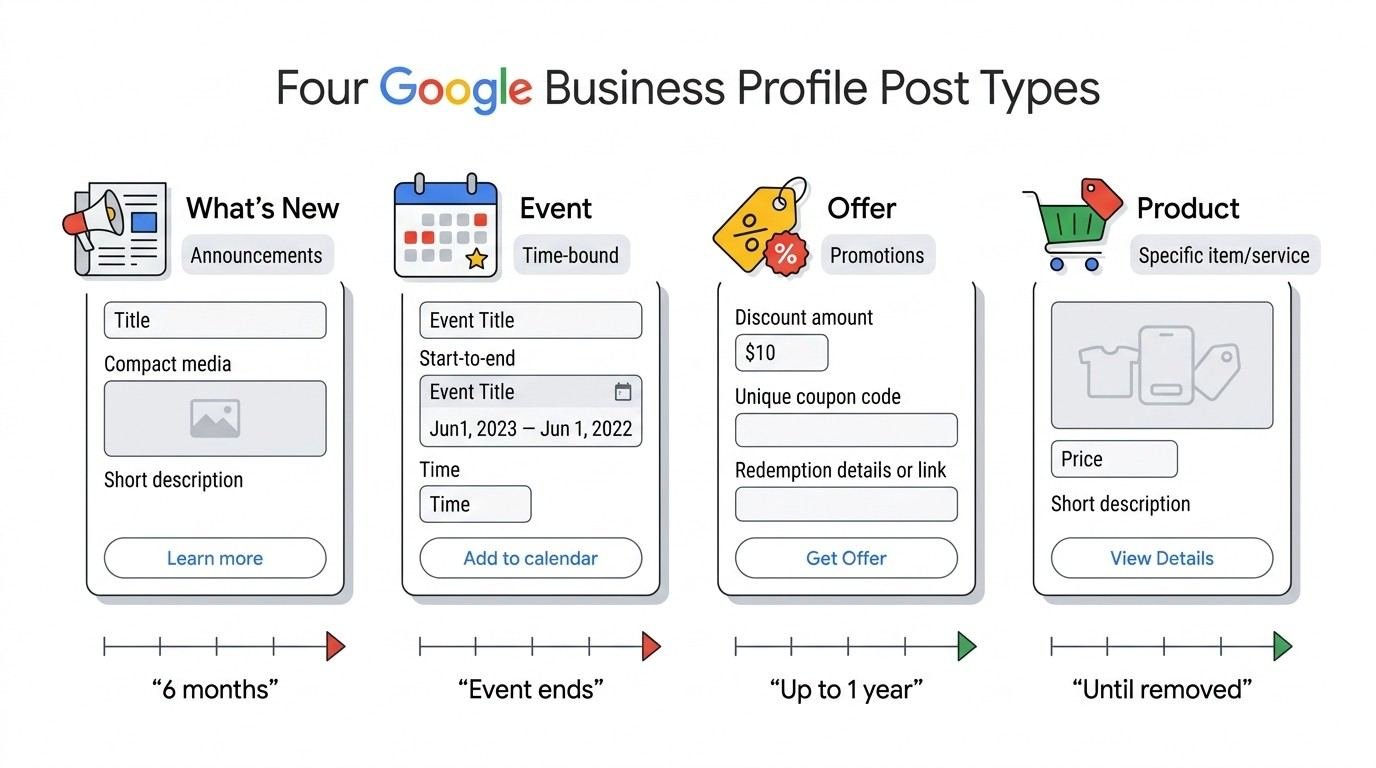
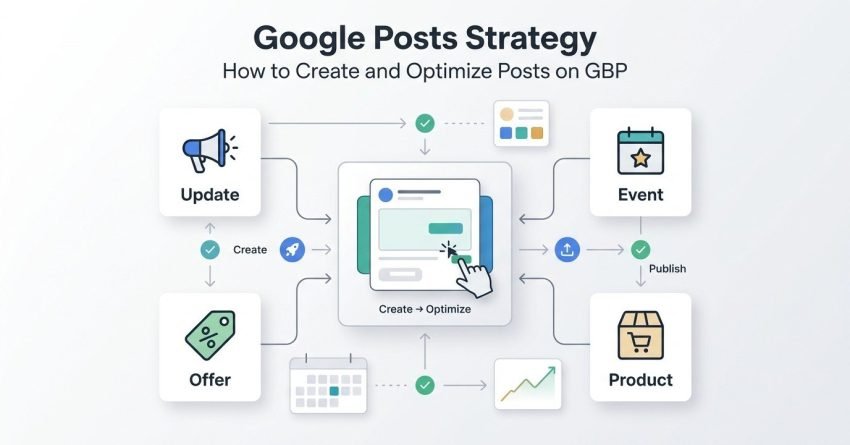
Google Business Profile currently supports four main post types, each suited to a different business goal.
| Post Type | Best Use Case | Expiration |
| What’s New / Update | General announcements, news | 6 months |
| Event | Time-bound happenings with a date range | Ends after event date |
| Offer | Discounts, promotions, coupons | Set by business, max 1 year |
| Product | Highlighting specific inventory or services | Until removed |
What’s New / Update Posts
Update posts function as your general-purpose announcement type. I use these for anything that doesn’t fit neatly into an event, offer, or product category: a staff hire, a new certification, a seasonal note.
These posts stay live for six months unless replaced, which makes them the most forgiving type if your posting cadence occasionally slips.
Event Posts
Event posts require a start and end date, and they’re built for anything time-bound: a sale weekend, a workshop, a grand reopening. Google automatically pulls the event off your profile once the end date passes.
I always recommend event posts over update posts whenever a hard date exists, since the automatic expiration keeps your profile from showing stale information.
Offer Posts
Offer posts include dedicated fields for coupon codes, terms, and redemption links, which makes them the strongest converting post type for retail and service businesses running promotions.
We’ve found offer posts get noticeably higher tap-through than update posts, largely because the “Offer” label itself signals a deal before the searcher even reads the copy.
Product Posts
Product posts let a business highlight a specific item or service with its own price field and description. They function almost like a mini product page inside your listing.
A GBP product catalog and product posts work together well, since a product post can spotlight one hero item while the fuller catalog stays parked for browsing.
Why Google Posts Matter for Local SEO and Visibility
Google Posts contribute to local SEO by signaling profile activity and giving Google fresh, structured content to associate with your business entity. An active posting history is one of the engagement signals search algorithms weigh in local ranking.
A study on local pack ranking factors from Whitespark found that Google Business Profile signals, including engagement activity, remain among the top-weighted local ranking inputs year over year. I don’t treat Posts as a magic ranking lever, but as one input among many that compounds with reviews and citations.
How Posts Influence Local Pack Engagement
Posts appearing in the local pack give searchers an extra reason to click into your profile instead of a competitor’s. A visible, recent post next to your listing reads as proof of an actively managed business.
I watch click-through data shift on client profiles the moment consistent posting starts, even before any ranking movement shows up.
How to Create a Google Post Step by Step
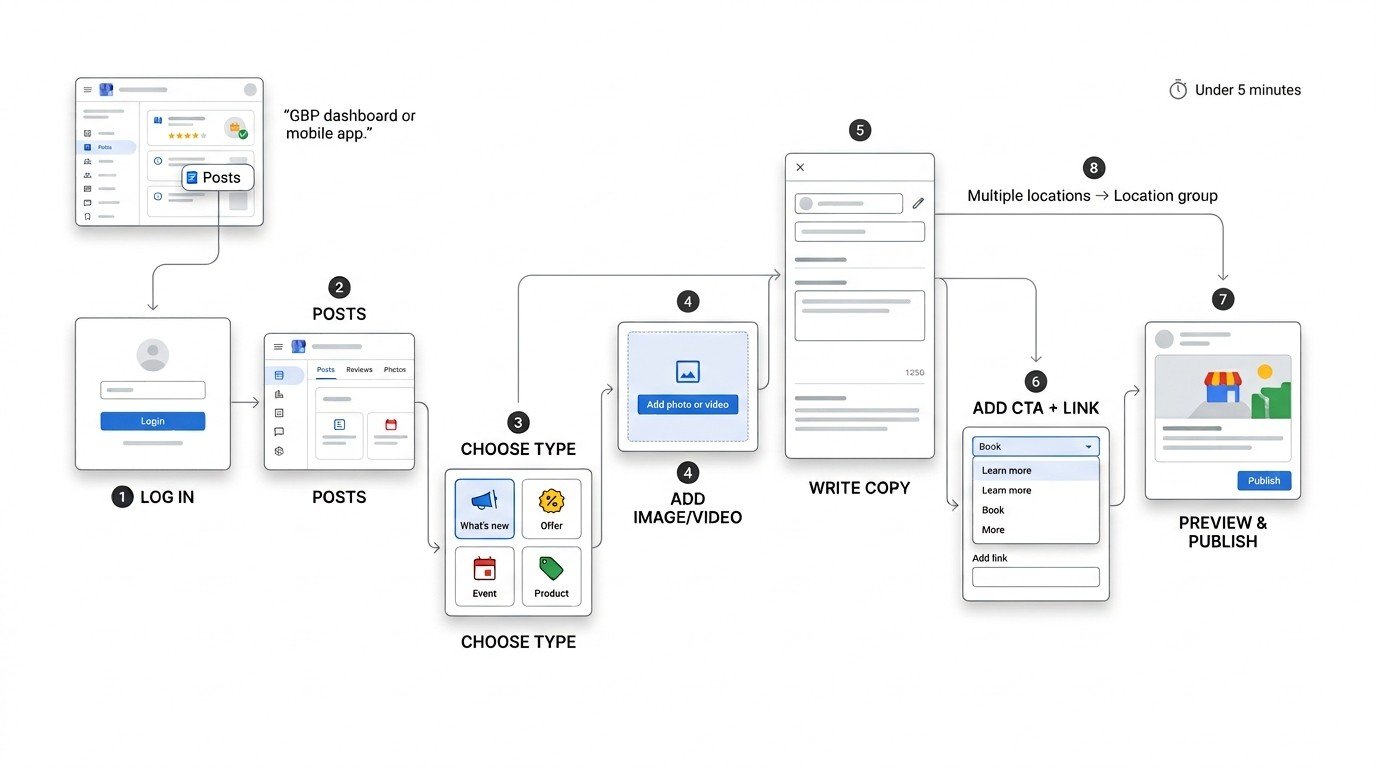
Creating a Google Post takes place directly inside your Google Business Profile dashboard or the GBP mobile app, under the “Add update” or “Posts” tab. The process takes under five minutes once you know the fields.
- Log into your Google Business Profile manager
- Select the “Posts” tab from the left navigation
- Choose your post type (Update, Event, Offer, or Product)
- Upload an image or video meeting the size requirements
- Write your headline and body copy within the character limits
- Add a call-to-action button and destination link
- Preview the post and click publish
Accessing the Posts Feature in GBP
The Posts tab sits in the same dashboard as your business info, reviews, and insights. Multi-location businesses manage posts through the bulk location group view rather than one profile at a time.
I recommend bookmarking the direct posts URL for any client posting weekly, since navigating through the full dashboard each time adds friction that kills consistency.
Required Fields and Character Limits
Google Posts allow up to 1,500 characters in the body, though only the first 100 characters show before a “read more” truncation in search results. The headline field, when used, caps at 58 characters.
We write the first sentence to work as a standalone hook, since most searchers never tap “read more.”
Writing Effective Post Copy That Drives Action
Effective Google Posts copy leads with the single most compelling detail a discount amount, a date, or a specific benefit within the first sentence, before any context or setup. The truncation limit punishes copy that buries the lead.
I write posts the same way I’d write a snippet-targeted meta description: front-loaded, specific, and free of filler words that don’t earn their place.
CTA Button Options and When to Use Each
GBP posts support several CTA button types: Book, Order Online, Buy, Learn More, Sign Up, Get Offer, and Call Now. Matching the button to the actual next step reduces friction and mismatched expectations.
A “Call Now” button on a post promoting an online-only sale creates a disconnect that costs conversions, so button choice deserves the same attention as the copy itself.
Image and Visual Requirements for Google Posts
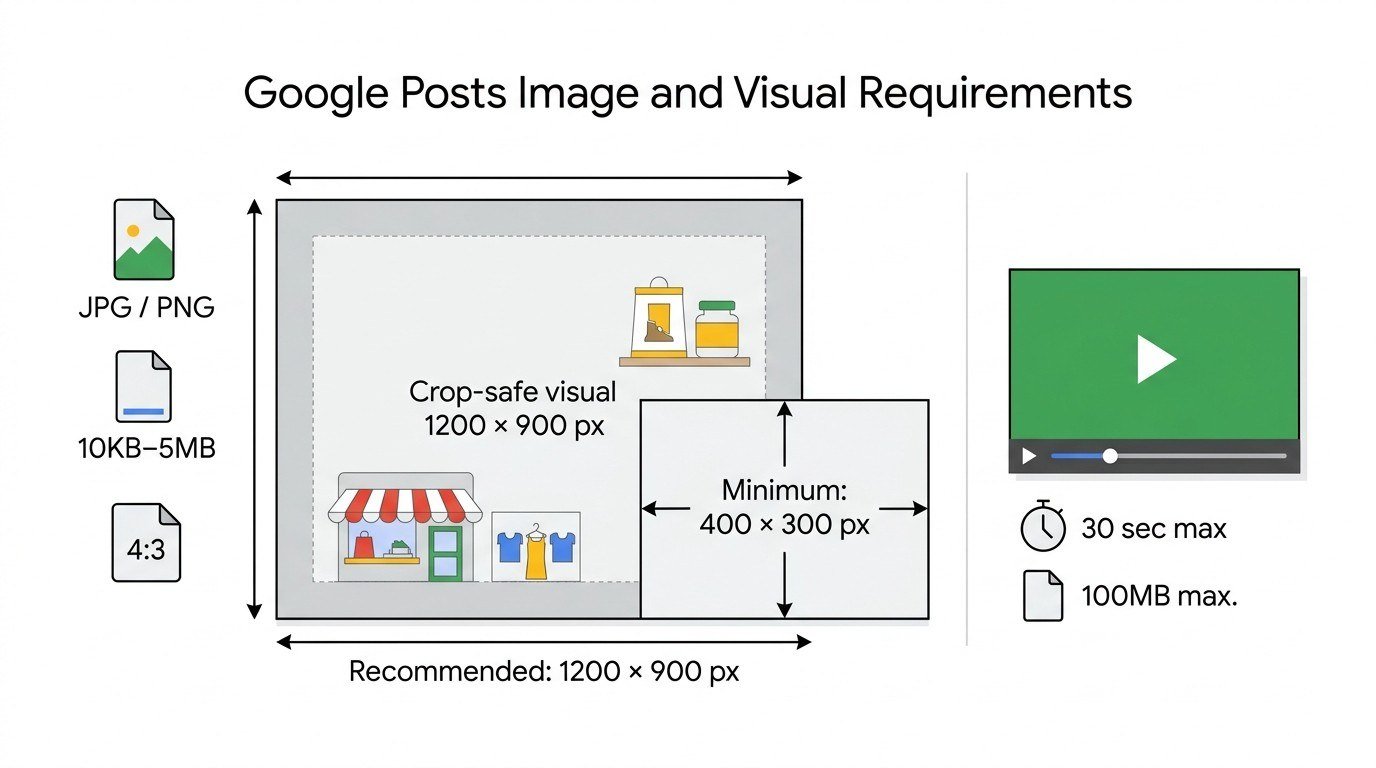
Google Posts require images at a minimum of 400 x 300 pixels, with Google recommending 1200 x 900 pixels for optimal display quality across devices. Photos under 10KB or over 5MB get rejected at upload.
I default to a 4:3 aspect ratio for consistency across post types, since GBP crops inconsistently sized images in ways that sometimes cut off important visual elements.
Recommended Dimensions and File Specs
| Requirement | Specification |
| Minimum resolution | 400 x 300 px |
| Recommended resolution | 1200 x 900 px |
| File formats | JPG, PNG |
| File size range | 10KB – 5MB |
Video posts, where supported, cap at 30 seconds and 100MB, and I’ve found short vertical clips underperform compared to landscape format on desktop search views.
How Often You Should Post to GBP
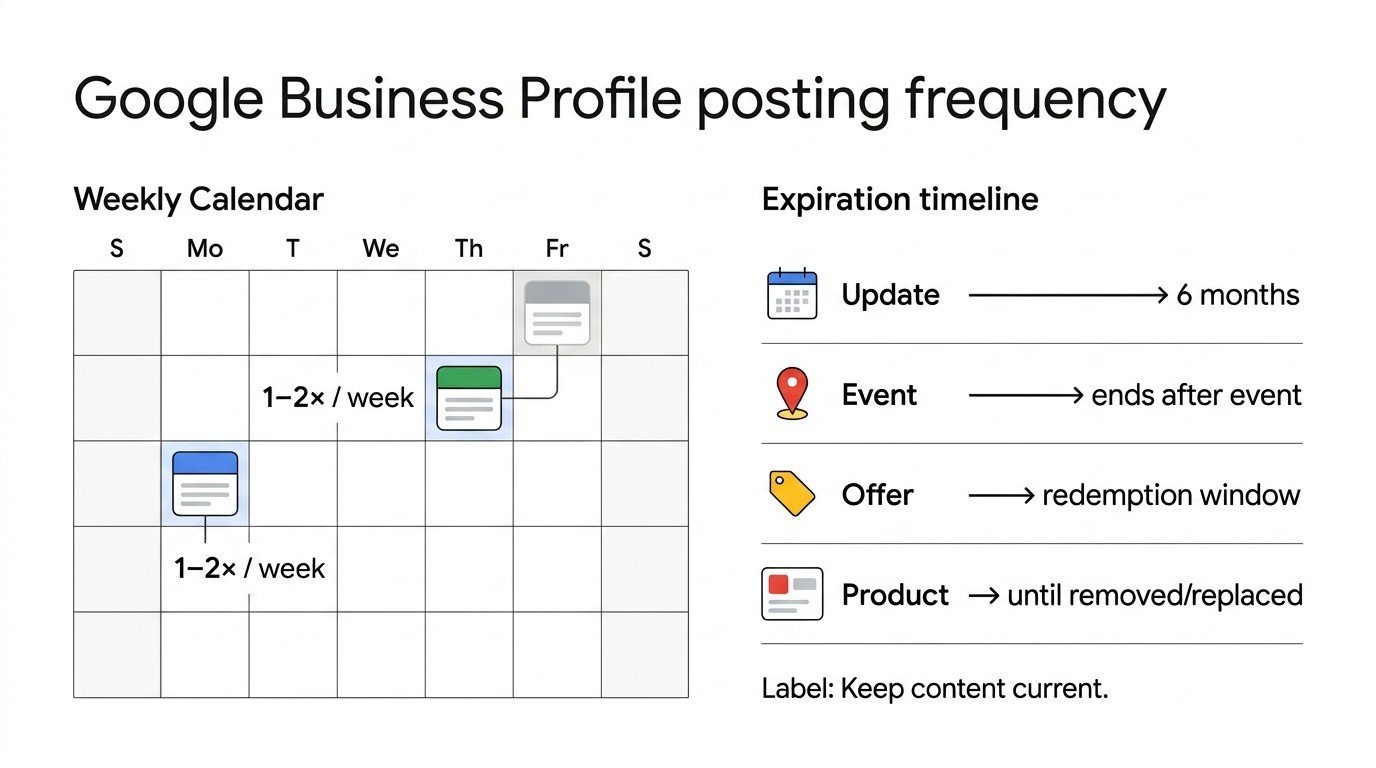
Businesses see the strongest engagement results posting to Google Business Profile one to two times per week, based on patterns I’ve tracked across dozens of local client profiles. Less frequent posting causes the feed to look abandoned; more frequent posting rarely adds proportional benefit.
Update posts expire after six months, which technically allows for infrequent posting, but a profile with month-old content sitting as the “latest” post signals inactivity to anyone scanning the local pack.
Post Expiration Rules by Post Type
Offer posts expire based on the redemption window you set, event posts expire the day after the event ends, and product posts remain live until manually removed or replaced. Update posts are the only type running on a fixed six-month clock.
I map expiration dates against my client calendars so nothing goes stale unnoticed, particularly for offer posts tied to a specific promotional window.
Building a Google Posts Content Calendar and Cadence Strategy
A Google Posts content calendar maps upcoming announcements, offers, and events against a fixed weekly or biweekly publishing schedule, so posting never depends on someone remembering to do it. I build these the same way I’d build a lightweight social content calendar, just scaled down to GBP’s simpler format.
Seasonal businesses front-load their calendar around known peak windows holidays, local events, weather-driven demand spikes and fill quieter stretches with general update posts.
Aligning Posts with Business Events and Promotions
I sync the posting calendar to whatever marketing already exists elsewhere: email campaigns, social pushes, in-store promotions. A post announcing the same sale as an email blast reinforces the message across every channel a customer might see it.
This alignment also prevents the awkward gap where a promotion runs everywhere except the Google profile it should logically appear on first.
Optimizing Google Posts for Keywords and Local Relevance
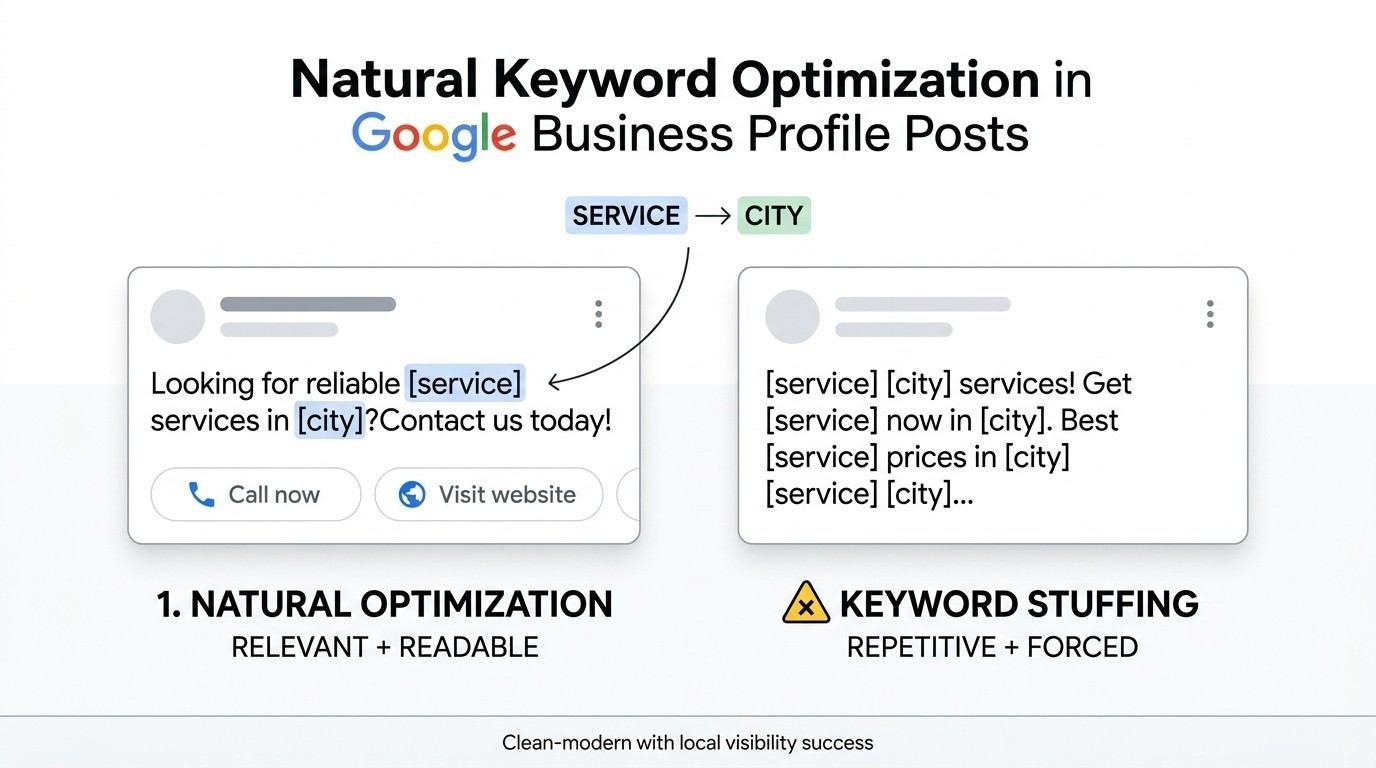
Google Posts should include natural mentions of your core service and location terms within the body copy, written the way a person would actually describe the business rather than stuffed for search engines. Keyword stuffing in post copy reads as spam to both users and to Google’s content evaluation systems.
I write posts assuming a human reads every word, then check afterward whether the primary service and city name appear at least once naturally.
Natural Keyword Placement Without Over-Optimization
The service name and city typically fit naturally into the first sentence of a post, since most business announcements reference what the business does and where it operates anyway. Forcing in a neighborhood name or secondary service that doesn’t fit the update looks exactly like what it is.
I’ve seen posts rejected or flagged under review for keyword stuffing that violates Google’s content policies, so restraint here protects the whole profile, not just that one post.
Measuring Google Posts Performance and Insights
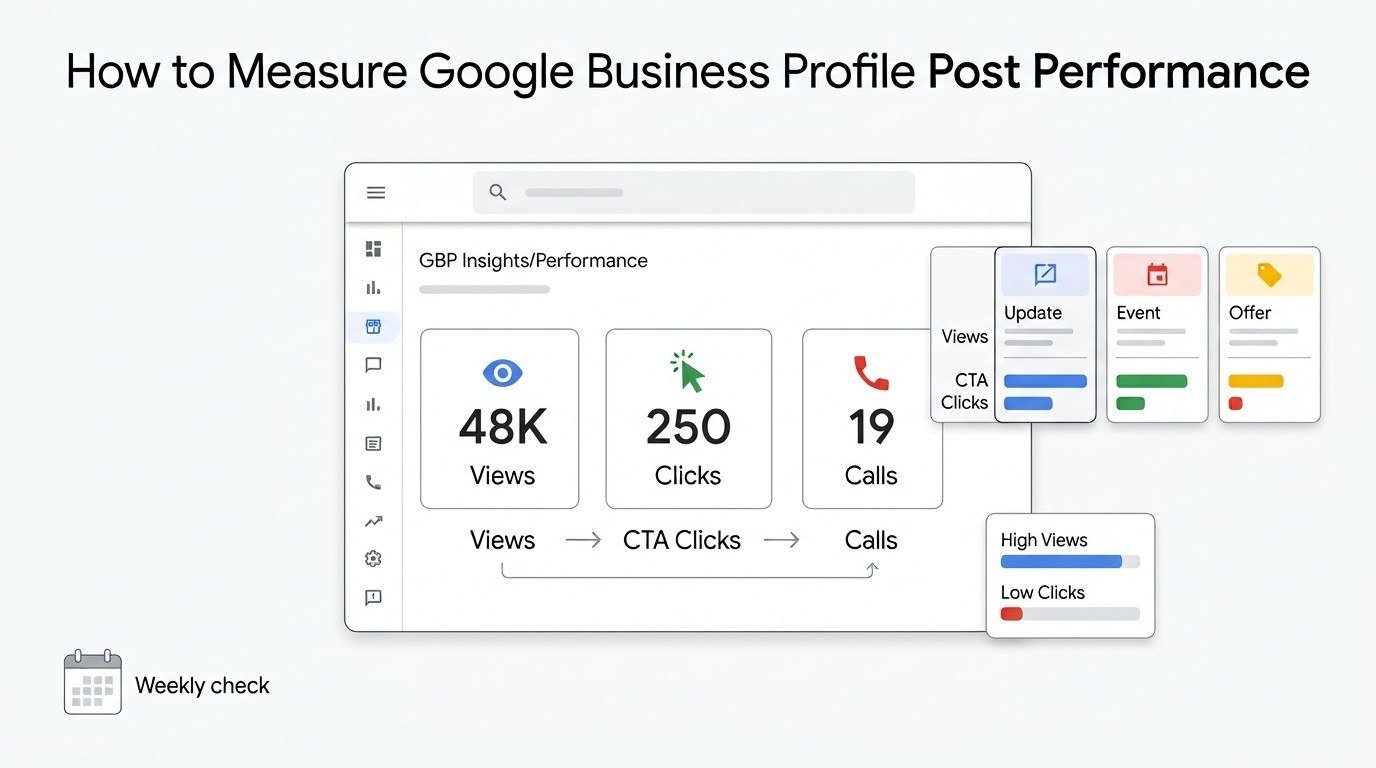
Google Business Profile Insights is the built-in analytics dashboard that reports how many people viewed, clicked, and called from each post published to the profile. These metrics live under the Insights or Performance tab depending on your dashboard version.
I check post performance weekly for active clients, mainly comparing views and CTA clicks across post types to see which format the local audience responds to.
Reading GBP Insights Metrics for Posts
The Insights dashboard breaks down post performance into views, clicks, and calls generated directly from that post’s CTA button. Offer and event posts typically outperform update posts on click-through rate, based on the client data I’ve reviewed.
A post with high views but low clicks usually means the image or headline earned attention, but the copy or CTA failed to convert that attention into action.
Common Google Posts Mistakes That Hurt Visibility
The most damaging Google Posts mistake is letting the feed go stale, since an inactive posting history signals a neglected or possibly closed business to anyone scanning the local pack. I see this constantly on profiles that posted enthusiastically for a month and then stopped entirely.
Other frequent mistakes include low-resolution images, CTA buttons that don’t match the post’s actual offer, and copy that buries the key detail past the truncation point.
Compliance and Content Policy Pitfalls
Google’s content policies prohibit misleading claims, prohibited content categories, and excessive promotional language stacked across every single post. A profile that violates these repeatedly risks post removal or, in serious cases, a full profile suspension.
I keep a mental checklist against Google’s stated guidelines before publishing anything client-facing, since a suspended profile costs far more than one skipped post ever would.
Google Posts vs. Other GBP Features (Q&A, Reviews, Updates)
Google Posts differ from the Q&A and Reviews sections in that Posts are entirely business-controlled, while Q&A and Reviews depend on customer or public input that the business can only respond to, not originate. This makes Posts the one feature where a business fully owns the messaging.
| Feature | Who Controls Content | Update Frequency |
| Posts | Business | As often as published |
| Reviews | Customers | Ongoing, unpredictable |
| Q&A | Public/Customers | Ongoing, unpredictable |
I treat Posts as the proactive channel and Reviews/Q&A as the reactive channels, both needing attention but requiring very different response strategies.
How Google Posts Fit Into a Complete Local SEO Strategy
Google Posts function as one component within a broader local SEO strategy that also includes citation consistency, review management, and on-site local landing pages. Posts alone rarely move rankings without the supporting fundamentals already in place.
I position Posts as the maintenance layer sitting on top of a properly optimized profile, not a replacement for the technical and content work underneath it.
Conclusion
Google Posts connect directly to your profile’s visibility, engagement, and local ranking signals. Mastering post types, cadence, and copy turns a static listing into an active search asset.
Posts work best alongside citations, reviews, and a complete local SEO foundation across your broader online presence. Consistent execution compounds over time into measurable visibility gains.
We help businesses build and maintain this strategy end to end. Reach out to White Label SEO Service to start optimizing your Google Business Profile today.
Frequently Asked Questions
Do Google Posts directly affect search rankings?
Google Posts are not a confirmed direct ranking factor, but the engagement and activity they generate contribute to broader profile signals Google considers in local search.
How long do Google Posts stay visible?
Update posts stay visible for six months, event posts expire after their end date, and product posts remain until manually removed or replaced.
Are Google Posts free to use?
Yes, Google Posts are a completely free feature included with every Google Business Profile, requiring no ad spend or subscription.
Can I schedule Google Posts in advance?
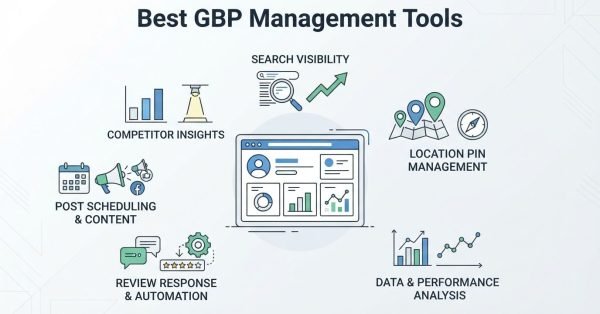
Google Business Profile does not offer native scheduling, though several third-party GBP management tools support scheduled publishing.
What is the ideal length for a Google Post?
The ideal length keeps the first 100 characters compelling since that’s what displays before truncation, with the full post staying under 300 words for readability.
Do Google Posts work for multi-location businesses?
Yes, multi-location businesses can publish posts individually per location or in bulk through the location group management dashboard.
Can I repost the same content on GBP?
Reposting identical content repeatedly is discouraged since it reduces the appearance of fresh activity and can look like spam to both users and Google’s systems.