Google Business Profile spam is any listing, review, or piece of content on Google Maps or Search that violates Google’s guidelines to manipulate rankings or mislead customers. It shows up as fake addresses, keyword-stuffed names, bogus reviews, and duplicate listings competing unfairly for local visibility. I see it constantly across client accounts, and it distorts local search results for everyone nearby.
Local pack rankings shift when spam listings outrank legitimate businesses using fake signals. Ignoring it costs you visibility, leads, and trust in your own market.
This guide covers the main categories of Google Business Profile spam, from fake listings and review manipulation to verification hijacking and service-area abuse. I’ll walk through real examples, how Google detects and penalizes violations, and the exact steps to report bad listings and protect your own.
What Counts as Google Business Profile Spam?
Google Business Profile spam is any attempt to manipulate a listing’s visibility, ranking, or reviews in ways that violate Google’s guidelines for representing businesses on Google. This includes fake locations, misleading business information, and manipulated review activity.
I define abuse a bit more broadly than spam. Spam usually means gaming the ranking algorithm, while abuse includes harassment, hijacking, or malicious reporting aimed at a competitor’s legitimate listing.
Google’s guidelines exist because local search results directly influence which businesses get calls, visits, and revenue. A single fake listing in a competitive category can divert hundreds of monthly leads away from real businesses.
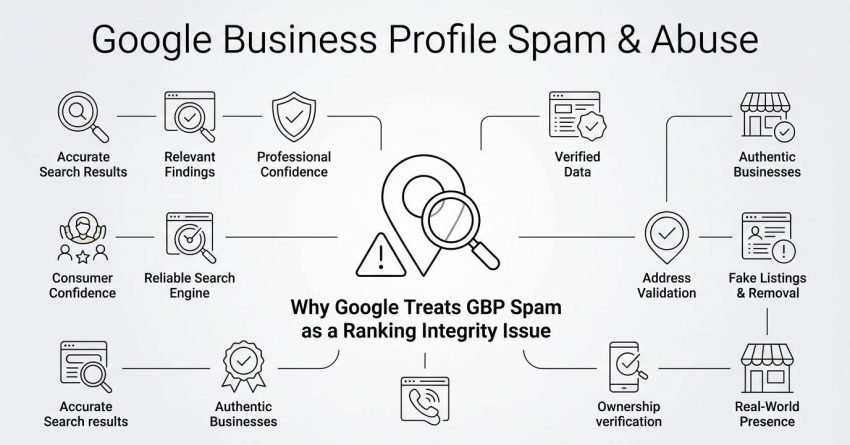
Why Google Treats GBP Spam as a Ranking Integrity Issue
Google treats spam as a direct threat to search quality because local results are trust-based by nature. Users call, visit, and pay based on what they see in the map pack, and manipulated listings break that trust immediately.
I’ve watched entire local categories, especially locksmiths, movers, and contractors, become dominated by spam networks. Google’s local search team actively targets these patterns because the categories generate outsized complaint volume.
The Main Types of Google Business Profile Spam
The main types of Google Business Profile spam include keyword-stuffed business names, fake or virtual addresses, ineligible duplicate listings, and misleading category selection. Each manipulates a different ranking signal Google uses to sort local results.
I break these into four buckets because each requires a different detection approach and a different reporting method. Understanding which type you’re dealing with speeds up the reporting process considerably.
| Spam Type | Manipulated Signal | Common Industries |
| Keyword stuffing | Relevance/name matching | Locksmiths, plumbers, movers |
| Fake addresses | Proximity/distance | Home services, legal |
| Duplicate listings | Prominence/review count | Multi-location franchises |
| Miscategorization | Relevance | Medical spas, contractors |
Keyword Stuffing in Business Names
Keyword stuffing happens when a business adds service or location terms directly into its Google Business Profile name field, such as “Joe’s Plumbing – Emergency 24/7 Water Heater Repair Denver.” Google’s name guidelines only permit the actual registered or DBA business name.
I flag this constantly in competitive metro markets. A stuffed name can boost relevance scoring for dozens of extra keyword variations without any legitimate ranking work behind it.
Fake or Virtual Business Addresses
A fake or virtual address listing uses a mailbox, vacant property, or an address with no genuine staffed presence to appear closer to searchers in a target area. This directly manipulates the proximity signal Google uses to rank the local map pack.
Service-area businesses without a public-facing office are the most common source of this violation. I’ve traced spam networks running 40+ fake addresses across a single metro area for one contractor.
Ineligible or Duplicate Listings
Duplicate listings occur when the same business, or a business with no legitimate separate location, creates multiple Google Business Profiles to occupy more map pack real estate. Google’s guidelines only allow one listing per legitimate location.
A BrightLocal study of 500 local business categories found that duplicate and fake listings appeared in over 25% of results for the most spam-prone industries, including locksmiths and moving companies.
Misleading Categories and Services
Misleading categorization happens when a business selects a primary category unrelated to its actual services to gain relevance for high-volume search terms. A carpet cleaner listing itself under “Water Damage Restoration Service” to capture emergency-intent searches is a typical example.
I see this most in emergency and medical-adjacent categories where search intent and average job value run higher.
Fake Reviews and Review Manipulation
Fake reviews are ratings or written feedback submitted by non-customers, paid reviewers, or bot accounts to inflate or deliberately damage a business’s star rating. Google’s review policies explicitly prohibit incentivized, fake, and duplicate review activity.
Review manipulation cuts both ways. Some businesses buy positive reviews to inflate trust signals, while others coordinate negative review attacks against competitors.
An FTC ruling in 2024 banned the sale and purchase of fake reviews outright, with penalties reaching $50,000 per violation for companies caught facilitating them.

Paid or Incentivized Reviews
Paid reviews involve compensating customers, employees, or third-party services with money, discounts, or products in exchange for a five-star review. Google’s guidelines classify any compensated review, positive or negative, as a policy violation regardless of disclosure.
I flag suspicious review patterns using a simple heuristic. Ten five-star reviews posted within 48 hours, from accounts with no other review history, almost always indicate a purchased batch.
Competitor Review Bombing
Review bombing is a coordinated attack where multiple accounts post fake negative reviews against a competitor’s listing to damage its rating and suppress its ranking. This form of abuse targets legitimate businesses rather than manipulating one’s own visibility.
Recognizing bombing patterns matters because Google’s removal process differs from standard fake review reporting, and timing evidence collection correctly affects the outcome.
Fake or Deceptive Business Photos and Media
Fake or deceptive photos are images uploaded to a Google Business Profile that misrepresent the actual location, staff, or work quality, including stock photos, stolen competitor images, or unrelated storefronts. This violates Google’s photo content guidelines directly.
I regularly find contractors using stock construction photos or, worse, screenshots of a competitor’s completed project uploaded as their own portfolio work. Deceptive photo abuse is harder to detect algorithmically than text-based spam, which is part of why manual reporting matters here.
Owner-Verification and Listing Hijacking Abuse

Listing hijacking occurs when an unauthorized party gains ownership access to an existing Google Business Profile, then alters the business name, address, phone number, or website to redirect calls and traffic. This is one of the more damaging forms of GBP abuse because the victim often loses complete control of their own listing.
Hijacking typically happens through Google’s ownership transfer request feature, where a malicious actor requests access, and Google’s automated system approves it without adequate verification.
A Search Engine Land investigation documented hijacking rings that redirected phone numbers on hundreds of dental and legal listings simultaneously, rerouting calls to call centers that resold the leads.
Lead Generation and Service-Area Business (SAB) Abuse
Service-area business abuse happens when companies operating without a public storefront create multiple fake location listings to rank in cities outside their actual service radius. Google’s SAB guidelines require hiding the exact address, but they don’t prevent businesses from fabricating dozens of city-specific profiles instead.
Lead generation companies drive much of this pattern because a single fake listing per target city can generate call volume that gets resold to local businesses at a markup. I’ve seen national HVAC lead-gen operations running 200+ listings across states where they have zero physical presence.
Duplicate Listings and Listing Manipulation Networks
Listing manipulation networks involve coordinated groups of fake or duplicate profiles, often controlled by a single agency or lead-gen operator, designed to dominate an entire local map pack for a high-value keyword. These networks combine several spam types at once: fake addresses, stuffed names, and purchased reviews working together.
Multi-listing networks are harder to report individually because removing one duplicate often leaves the rest of the network intact. Tracking the pattern across an entire category produces stronger evidence than reporting a single listing in isolation.
Real-World Examples of Google Business Profile Spam
Real examples of Google Business Profile spam include locksmith “lead gen mills” running hundreds of fake city listings, addiction treatment centers using deceptive names to appear as unaffiliated helplines, and moving companies rebranding under new fake names after Google suspends the original listing.
The addiction treatment industry became infamous enough that Google implemented a dedicated verification program in 2021 requiring LegitScript certification before any rehab or treatment center could even create a listing.
Locksmith spam remains one of the most persistent categories. A widely cited investigation found over 800 fake locksmith listings clustered around a single mid-sized US city, most using virtual addresses and near-identical stock photography.
How Google Detects and Penalizes GBP Spam
Google detects GBP spam through a combination of automated machine learning models that flag anomalous listing patterns and manual review triggered by user reports. Penalties range from listing suspension to permanent account bans for repeat offenders.
Automated detection catches obvious patterns like duplicate phone numbers across listings or address clustering in a small radius. Manual review handles nuanced cases like miscategorization or deceptive photos, which is why user reporting still matters even with sophisticated algorithms running in the background.

Google’s Automated and Manual Review Systems
Google’s automated systems scan for structural spam patterns, matching addresses, phone number reuse, and suspicious review timing across millions of listings simultaneously. Manual review teams then investigate flagged listings and user-submitted reports that don’t fit clean algorithmic patterns.
Suspension timelines vary widely. Some obvious violations get flagged within days, while nuanced cases involving miscategorization or subtle photo deception can take weeks to resolve.
How to Report Google Business Profile Spam
Reporting Google Business Profile spam involves flagging the listing directly through Google Maps or Search, then following up with Google’s Business Redressal Complaint Form if the standard report doesn’t resolve the issue. Both paths feed into Google’s review queue, but the redressal form carries more weight for persistent or high-impact spam.
Most single-listing spam gets resolved through the basic in-app reporting flow. Network-level spam or hijacking cases almost always require the formal complaint form with supporting evidence attached.
Reporting Through Google Maps or Search
Reporting through Google Maps requires searching for the business, opening its profile, selecting “Suggest an edit,” and choosing “Report profile” to flag the specific violation type. This process takes under two minutes and works for most single-listing violations.
I recommend reporting from a signed-in Google account with genuine local search history, since Google weighs reports from established accounts more heavily than anonymous flags.
Using the Business Redressal Complaint Form
The Business Redressal Complaint Form is Google’s formal escalation path for spam that persists after standard reporting, requiring the business name, address, a description of the violation, and supporting screenshots. This route typically produces faster action on network-level spam and hijacking cases.
Google’s own support documentation states that redressal complaints receive review within a target window, though actual resolution time varies by case complexity and current report volume.
How to Protect Your Own Listing From Spam and Abuse

Protecting your Google Business Profile starts with enabling two-factor authentication on the Google account tied to the listing, since most hijacking attempts exploit weak account security rather than gaps in Google’s verification system. Regular monitoring of your listing’s edit history catches unauthorized changes early.
Setting up Google’s ownership verification alerts means you get notified immediately if someone requests access to your profile. I check every client’s edit history monthly, because small unauthorized changes, like a swapped phone number, often go unnoticed for weeks otherwise.
Claiming and verifying every legitimate location personally, rather than through a third-party agency without documented access controls, reduces exposure to internal mishandling. A written access log showing exactly who has admin rights on the account prevents disputes later if something goes wrong.
What Happens After You Report a Listing
After you report a listing, Google places it into a review queue where automated systems perform an initial pattern check before routing complex cases to human reviewers. Most straightforward violations get resolved within days, while contested or ambiguous cases can take considerably longer.
Google doesn’t typically notify the reporter of the outcome or timeline directly. Checking back on the flagged listing periodically is the most reliable way to confirm whether action was taken.
When to Escalate or Seek Professional Help
Escalation becomes necessary when a spam listing has already caused measurable revenue loss, when a hijacking attempt has locked you out of your own profile, or when standard reporting produces no action after several weeks. At that point, involving an agency experienced in Google’s dispute processes often moves things faster than repeated individual reports.
Professional intervention matters most for hijacking cases and multi-listing networks, where evidence collection and pattern documentation genuinely change how quickly Google’s review team acts.
Conclusion
Google Business Profile spam spans fake listings, manipulated reviews, hijacked accounts, and deceptive photos, each distorting local search results. Reporting and monitoring protect visibility and trust in your market.
Staying ahead of these tactics protects revenue and reputation as local search competition intensifies. Sustainable visibility comes from clean, verified listings, not manipulation.
We help businesses monitor, protect, and strengthen their local presence against exactly this kind of abuse. Reach out to White Label SEO Service to safeguard your listing today.
Frequently Asked Questions
Is it illegal to post fake reviews on Google Business Profile?
Fake reviews violate Google’s policies and can violate FTC regulations in the US. Businesses caught buying or posting fake reviews risk listing suspension and regulatory fines.
How long does Google take to remove a spam listing?
Simple violations often resolve within days of reporting. Complex cases involving hijacking or duplicate networks can take several weeks to fully resolve.
Can a competitor get my Google Business Profile suspended?
Yes, coordinated false reporting by competitors can trigger a suspension. Google’s redressal form allows you to dispute wrongful suspensions with supporting documentation.
What is the difference between GBP spam and abuse?
Spam refers to manipulating rankings through fake listings, names, or reviews. Abuse includes hijacking, harassment, and malicious reporting against legitimate businesses.
How do I know if a competitor’s listing is fake?
Check for a residential or mailbox address, a keyword-stuffed business name, or reviews posted in suspicious clusters. Reverse image searching photos often reveals stolen content too.
Does Google penalize the whole account for one spam listing?
Repeated violations across multiple listings can lead to full account suspension. A single first-time violation typically results in listing-level action only.
Can I get my hijacked Google Business Profile back?
Yes, through Google’s ownership request process or the Business Redressal Complaint Form. Providing proof of legitimate business ownership speeds up recovery significantly.