I’ve tested a lot of local SEO software over the years, and Google Business Profile (GBP) management tools are platforms that let businesses and agencies edit, monitor, and optimize one or more Google Business Profiles from a single dashboard instead of Google’s native interface. They matter because a profile that isn’t actively managed slips in local rankings fast, and the businesses that show up in the map pack are almost always the ones updating their listings consistently.
Local search moved past “set it and forget it” years ago. I see this daily: the businesses I audit that ignore their profile lose visibility to competitors who post, respond, and track weekly.
This guide covers what GBP management software actually does, the features worth paying for, how review management and rank tracking fit into the picture, what the top tools look like across business sizes, and how pricing and integrations factor into your decision.
What Is Google Business Profile Management Software?
Google Business Profile management software is a category of platforms that centralize the editing, monitoring, and optimization of one or more Google Business Profiles outside Google’s own interface. I think of it as a control panel that sits on top of Google’s native tools and adds automation, reporting, and multi-listing capability that Google itself doesn’t provide well.
Google built its native GBP dashboard for single-location businesses managing their own listing casually. It breaks down fast once you’re handling five, fifty, or five hundred locations, which is exactly the gap this software category fills.
What Core Functions Does GBP Management Software Perform?
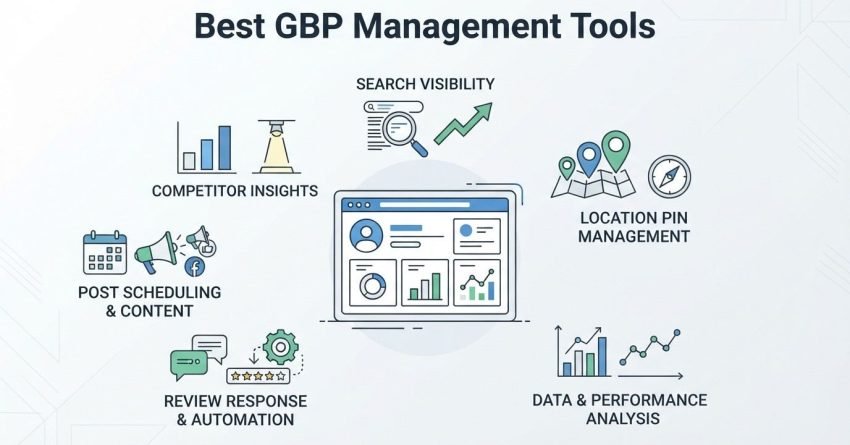
GBP management software performs four core functions: listing edits, review handling, performance tracking, and content publishing, all from one dashboard. I rely on these four functions to judge whether a tool is worth using at all.
Listing edits cover hours, categories, services, and photos. Review handling covers monitoring and responding at scale. Performance tracking covers rankings and visibility. Content publishing covers Google Posts and updates on a schedule.
Who Actually Needs Dedicated GBP Management Tools?
Multi-location businesses, agencies managing client listings, and any business competing in a crowded local map pack need dedicated GBP management tools. A single-location business with light competition can often manage things natively.
I’ve seen single-location owners in low-competition niches do fine without extra software. The moment a second location or a real competitor enters the picture, native tools stop being enough.
Why Does GBP Management Matter for Local SEO?
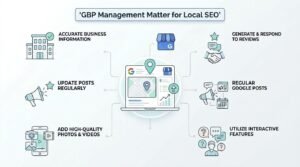
GBP management matters for local SEO because Google’s local algorithm weighs profile completeness, review signals, and activity frequency directly into map pack rankings. I’ve watched profiles jump multiple positions after a few weeks of consistent posting and review responses, with nothing else changing.
An unmanaged profile signals inactivity, and Google treats inactivity as a weak trust signal for a local business result.
How Does an Optimized Profile Influence Local Rankings?
An optimized Google Business Profile influences local rankings by strengthening the three core local ranking factors: relevance, distance, and prominence. Relevance improves when categories and services match what people search for, and prominence builds through reviews, citations, and engagement.
Distance is fixed by the searcher’s location, so relevance and prominence are the two levers a well-run profile actually controls. Consistent activity feeds both.
What Key Features Should You Look for in a GBP Tool?
The key features to look for in a GBP management tool are multi-location control, review automation, rank tracking, post scheduling, and Q&A monitoring. I treat this as the baseline checklist before evaluating any specific platform.
Tools that only offer one or two of these five tend to require stacking additional software, which erodes the “single dashboard” benefit that makes this category worth paying for in the first place.
Multi-Location and Bulk Listing Management
Multi-location and bulk listing management lets a single user push updates, hours changes, or holiday notices across dozens or hundreds of locations simultaneously instead of editing each listing one at a time. This feature alone justifies the cost for any franchise or multi-location brand.
Bulk editing becomes critical during holiday hour changes, when a single missed update across fifty locations creates fifty separate customer complaints.
Review Monitoring and Response Automation
Review monitoring and response automation aggregates reviews from Google (and often other platforms) into one feed and allows templated or AI-assisted responses. A BrightLocal study found that 98% of consumers read online reviews for local businesses, which makes fast, consistent responses a direct trust signal.
I never recommend a tool without response automation. Manually tracking reviews across ten or more locations is where most in-house teams give up entirely.
Local Rank Tracking and Visibility Reporting
Local rank tracking and visibility reporting shows where a profile ranks in the map pack for specific keywords across different physical grid points around a location. This matters because local rankings shift by searcher location in a way that standard organic rank tracking never has to account for.
Grid-based tracking reveals blind spots: a business might rank first downtown and invisible three miles out, and a tool without this granularity hides that entirely.
Post Scheduling and Content Automation
Post scheduling and content automation lets a business queue Google Posts, offers, and updates in advance rather than logging in manually every week. Consistent posting correlates with the activity signals Google’s local algorithm rewards.
I schedule posts a month out for most clients. It removes the excuse of “we forgot” that kills so many otherwise well-optimized profiles.
Q&A and Insights Monitoring
Q&A and insights monitoring surfaces the questions searchers post directly on a listing along with performance data like calls, direction requests, and website clicks. Unanswered questions sitting publicly on a profile look bad to anyone browsing before they visit.
Insights data also tells me which listings are actually driving calls versus which are just sitting there, which shapes where I focus optimization effort next.
How Does Review Management Software Improve GBP Performance?
Review management software improves GBP performance by increasing response speed, review volume, and review recency, three signals Google’s local algorithm actively weighs in prominence scoring. I’ve seen response time alone move a listing’s visibility within a single reporting cycle.
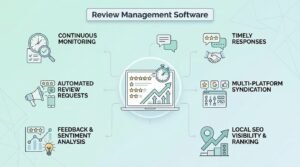
Speed matters because Google’s own guidance confirms that responding to reviews demonstrates that a business values its customers, which factors into how favorably a profile is perceived.
What Role Does Review Velocity Play in Local Rankings?
Review velocity, meaning the pace at which new reviews accumulate, plays a role in local rankings because a steady stream of recent reviews signals an active, trustworthy business. A business with 200 reviews from three years ago ranks weaker than one with 40 reviews from the past two months.
I watch velocity more closely than total count now. Total review count matters less than most business owners assume.
How Does Local Rank Tracking Work in GBP Tools?
Local rank tracking in GBP tools works by simulating searches from multiple geographic points around a business location and recording map pack position for each target keyword at each point. This produces a visual grid, often called a geo-grid or heat map, showing exactly where visibility is strong or weak.
I use geo-grid data to prioritize which service areas need more citation building or content support, rather than treating a single average rank as the whole picture.
What Are the Top GBP Management Tools Available Today?
The top GBP management tools available today span three categories: enterprise multi-location platforms, agency-focused white-label tools, and budget-friendly options built for single or small multi-location businesses. I group them this way because the right tool depends heavily on how many listings you’re managing and who’s managing them.
No single platform wins across all three categories, which is why matching the tool to the use case matters more than chasing whichever tool has the most features listed on its homepage.
Best Tools for Multi-Location Businesses
Tools built for multi-location businesses prioritize bulk editing, centralized reporting, and role-based access so regional managers can update their own listings without touching others. Franchise brands with inconsistent listing data across locations lose local visibility disproportionately compared to well-maintained competitors.
I look for audit logs in this category specifically. Multi-location brands need to know who changed what, and when, across a large team.
Best Tools for Agencies Managing Multiple Clients
Tools built for agencies managing multiple clients prioritize white-labeling, client-level reporting, and the ability to manage dozens of unrelated business profiles under one login. Agencies need reporting that can be exported or rebranded for client delivery without extra manual work.
Client churn drops noticeably when reporting is automated and delivered consistently, since clients see tangible proof of ongoing work rather than a black box.
Best Budget-Friendly Options for Small Businesses
Budget-friendly GBP tools for small businesses focus on the essentials: review alerts, basic rank tracking, and simple post scheduling, without the multi-location or white-label overhead. A single-location coffee shop doesn’t need enterprise bulk-editing features it will never use.
I steer smaller clients toward these lighter tools first. Paying for enterprise features you don’t need is one of the more common wastes I see in local SEO budgets.
How Do Free GBP Tools Compare to Paid Platforms?
Free GBP tools typically cover basic listing edits and manual review checks, while paid platforms add automation, multi-location control, and rank tracking that free tools don’t offer. Google’s own native dashboard is technically free and covers a single listing reasonably well.
The gap shows up at scale. Free tools rarely offer geo-grid rank tracking or bulk editing, which becomes the bottleneck the moment a business manages more than one or two locations.
How Does GBP Management Software Integrate with Other Marketing Tools?
GBP management software integrates with other marketing tools primarily through connections to Google Analytics, Google Search Console, and CRM platforms, allowing local visibility data to sit alongside broader traffic and lead data. This integration matters because local rankings alone don’t tell the full revenue story.
I pull GBP insights alongside Search Console data monthly for most clients. Seeing calls and direction requests next to organic traffic paints a much clearer picture of what’s actually working.
How Does GBP Data Connect to Analytics and SEO Platforms?
GBP data connects to analytics and SEO platforms through UTM-tagged links, API integrations, and shared reporting dashboards that pull local visibility metrics into a broader performance view. This lets a business trace a phone call or a direction request back to a specific campaign or keyword.
Without this connection, local performance sits in a silo, disconnected from the rest of a business’s marketing measurement.
What Should Agencies Look for in a White-Label GBP Tool?
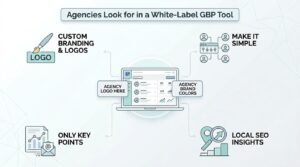
Agencies should look for white-label GBP tools that offer custom branding, client-level dashboards, and automated reporting that removes manual work from client delivery. A tool that can’t be rebranded forces an agency to explain a third-party logo to every client on every report.
I’ve switched platforms specifically over branding limitations before. Client trust builds faster when the reporting looks like it came directly from the agency, not a vendor.
How Much Do GBP Management Tools Typically Cost?
GBP management tools typically cost between $30 and $300 per location per month, depending on feature depth, with enterprise and agency platforms often priced on custom quotes based on listing volume. Entry-level single-location tools sit at the lower end of that range.
Pricing scales heavily with rank tracking granularity. A tool checking rankings at 10 grid points costs meaningfully less than one checking 100 points across a wide service area.
What Common Mistakes Reduce GBP Tool Effectiveness?
Common mistakes that reduce GBP tool effectiveness include ignoring the reporting dashboard after setup, leaving review responses on full automation without review, and never auditing category and service accuracy. I see the “set and forget” mistake constantly, even with businesses paying for premium software.
A tool is only as effective as the attention behind it. Software surfaces the data; someone still has to act on it.
How Does GBP Management Fit into a Broader Local SEO Strategy?
GBP management fits into a broader local SEO strategy as one of three core pillars, alongside on-page local optimization and citation consistency across directories. A perfectly managed profile with inconsistent business information across the web still underperforms.
I never treat GBP management as a standalone strategy with clients. It’s a critical piece that needs matching citation and on-site work to fully pay off.
How Do You Choose the Right GBP Management Tool for Your Business?
Choosing the right GBP management tool comes down to matching listing volume, team structure, and reporting needs to a platform’s core strength rather than picking based on feature count alone. A single-location retailer and a 200-location franchise have almost nothing in common in terms of software needs.
I always start with listing count and team size before looking at a single feature list. That one filter eliminates most mismatched options immediately.
Conclusion
Google Business Profile management brings listing control, review response, rank tracking, and scheduled posting into one workflow. The right tool depends on location count, team structure, and how deeply it should connect to your broader local SEO strategy.
We help businesses match the right GBP approach to their local SEO goals. Talk to White Label SEO Service about building a management system that fits your scale.
Frequently Asked Questions
What is the best free tool for managing a Google Business Profile?
Google’s native Business Profile Manager is the best free option for single-location businesses. It handles basic edits, posts, and review replies without added cost.
Can GBP management software prevent listing suspensions?
No software fully prevents suspensions, since Google’s own policies determine them. Tools that flag risky edits or duplicate listings reduce suspension risk significantly.
How often should a Google Business Profile be updated?
A profile should be updated at least weekly with a post, photo, or review response. Consistent activity supports the engagement signals local rankings depend on.
Do GBP tools work for multi-location franchises?
Yes, most enterprise-tier GBP tools are built specifically for multi-location franchises. They offer bulk editing and role-based access across dozens or hundreds of locations.
Is review management software worth it for small businesses?
It’s worth it once manual review tracking starts consuming significant time weekly. Businesses with under 10 reviews a month can often manage responses manually.
How do GBP tools help with local pack rankings?
GBP tools help local pack rankings by improving relevance and prominence signals through consistent updates, reviews, and accurate categories. Geo-grid tracking also reveals exactly where visibility needs improvement.
What’s the difference between GBP management software and a full local SEO service?
GBP management software handles the profile itself, while a full local SEO service covers citations, on-page optimization, and broader strategy. Many businesses use both together for complete local coverage.