The moment you try to do it at scale, you’re juggling prospect research, contact verification, outreach sequencing, and link monitoring, often across three or four disconnected tools at once. Picking the wrong stack early costs you weeks of wasted campaign time.
At White Label SEO Service, we run link acquisition as one piece of a broader organic growth strategy that also covers technical SEO, content, and long-term performance tracking. That vantage point means we’ve tested nearly every tool in this space to see what actually earns placements versus what just looks good on a features page.
This guide walks through backlink research platforms, outreach automation tools, contact-finding utilities, monitoring dashboards, and two newer additions built for content-led link attraction and digital PR. I’ll cover what each tool does well, where it falls short, what it costs, and who it’s actually built for, so you can build a stack that fits your team size and campaign volume instead of paying for features you’ll never touch.
Here’s what shaped every recommendation in this list:
Whether the tool surfaces genuinely relevant prospects instead of generic domain dumps; how quickly you can move from finding a prospect to sending a personalized pitch; whether the contact data is accurate enough to protect your sender reputation; how deep and how fresh the backlink data actually is; whether the pricing scales sensibly as your campaign volume grows; whether a team can pick it up without a week of onboarding
Let’s get into it.
What is a Link Building Tool?
A link building tool is software built to help you find websites worth getting backlinks from, manage the outreach required to earn those links, and track whether the links you’ve already earned are still live.
These platforms take over work that would otherwise eat entire workdays: surfacing relevant prospects, locating and verifying contact details, sending and following up on personalized emails, running competitor backlink comparisons, and flagging when a placement disappears or gets switched to nofollow.
They’re built for SEO teams, agencies, in-house marketers, and founders who need backlinks to support their organic growth without burning every available hour on manual prospecting. Whether you’re running one campaign or coordinating link building across a dozen client accounts, the right tool keeps prospects, contacts, and follow-ups from slipping through the cracks.
Backlinks remain one of the strongest ranking signals search engines use, and the gap between a team earning 10 links a month and one earning 100 usually comes down to whether they have the right tools supporting the workflow.
What to Look for in a Link Building Tool?
Not every tool in this category does the same job. Some are built purely for backlink research, others focus entirely on outreach, and a handful try to cover both without doing either particularly well.
Here’s what actually matters when evaluating one for a real campaign.
Backlink Database Size and Freshness
A tool is only as useful as the index behind it. You want a platform that crawls billions of pages regularly and refreshes that data often, because a stale index means you’re chasing dead prospects and missing new opportunities competitors already grabbed.
Platforms that update daily or near-daily matter most when you’re trying to catch a competitor’s new backlink before every other outreach team in the niche spots it too.
Prospect Discovery and Filtering
A useful tool surfaces prospects worth pursuing, not a spreadsheet of a thousand random domains you still have to vet by hand. Filtering by authority score, estimated traffic, topical relevance, and spam signals cuts that manual vetting time dramatically.
The more precise the filters, the less time your team spends opening tabs just to rule sites out.
Outreach Automation and Personalization
Sending pitches one at a time doesn’t hold up once you’re running more than a handful of prospects a week. Look for tools that support sequenced follow-ups, merge fields for personalization, and visibility into open and reply rates.
The tools worth using prioritize genuine personalization over raw send volume. Anything that reads as a template gets ignored, and ignored pitches waste both your time and the prospect’s trust in future outreach from your domain.
Contact Data Accuracy
None of this matters if the email you send lands in a bounce. Tools with built-in finding and verification save you from sending to addresses that no longer exist. A bounce rate creeping above 10% starts hurting your domain’s sender reputation, and once that happens, even good pitches land in spam.
Competitor Backlink Analysis
Looking at where your competitors already earn links is one of the fastest ways to build a prospect list that’s already proven to convert into placements. A solid tool shows exactly which domains link to competitors but not to you, filterable by link type and authority.
Integrations and Workflow Compatibility
Link building rarely happens inside a single piece of software. Check whether a platform connects to your CRM, your email provider, spreadsheet tools, or project management software your team already relies on.
Native integrations save your team from manually exporting and re-importing data between five different tabs every single day.
Pricing and Scalability
Pricing models vary wildly across this category: per user, per campaign, per email sent, or per placement. Understand exactly what you’re paying for before committing, because a plan built for a solo operator running one campaign rarely scales cleanly to an agency managing twenty accounts.
How I Selected the Best Link Building Tools
This list isn’t the product of a weekend of Googling “best link building tools” and skimming feature pages. It comes from testing more than 30 platforms across real outreach campaigns run through White Label SEO Service’s client work, spanning backlink prospecting, competitor gap research, outreach sequencing, monitoring, and authority vetting.
Here’s exactly what I measured while testing each one.
Prospecting Accuracy
I evaluated how consistently each tool returned relevant, high-authority domains instead of junk. A platform handing you 500 low-quality prospects is worse than one that returns 50 tightly targeted ones with genuine topical overlap and clean spam scores.
Outreach Deliverability
I tracked bounce rates, open rates, and reply rates for each platform’s outreach features. A tool whose built-in email finder keeps returning outdated contacts damages your sender reputation before the campaign even gets off the ground.
Data Reliability
I checked backlink metrics like domain authority, referring domains, anchor distribution, and link velocity against Google Search Console data directly. Some platforms inflate traffic numbers or miss toxic backlinks entirely, which becomes a real problem the moment you’re making strategic calls based on that data.
Workflow Speed
I timed how long it took to go from a seed keyword or competitor domain to a fully built, ready-to-send outreach list. In agency environments, every saved hour compounds across dozens of active accounts.
Real-World ROI
Ultimately, the tools that made this list are the ones that consistently helped earn quality backlinks at a reasonable cost per placement. A platform can look impressive in a demo and still fail to translate into actual links landed, and that gap is what separates the tools worth paying for from the ones that aren’t.
Summary Table: Best Link Building Tools
A quick side-by-side before the full breakdowns:
| Tool Name | Best For | Key Features | Starting Price | Our Notes |
| Ahrefs | Backlink analysis and competitor research | Massive backlink index, content explorer, backlink gap tool | $129/month | Strongest raw backlink dataset in this list |
| Semrush | All-in-one link building workflow | Backlink gap, outreach module, link monitoring | $165.17/month | Full research-to-outreach pipeline in one login |
| Skrapp.io | Bulk contact finding for outreach | Email finder, LinkedIn lookup extension, built-in verification | $29/month | Best bulk finder for domain-list campaigns |
| Majestic | Deep backlink index and trust analysis | Trust Flow, Citation Flow, historic index back to 2006 | $49.99/month | Unmatched historical link depth |
| BuzzSumo | Content-driven prospecting | Content analyzer, journalist database, backlink alerts | $199/month | Best for research before building linkable assets |
| SE Ranking | Multi-client backlink tracking | Backlink gaps, toxicity score, new/lost alerts | $129/month | Solid tracking inside a full SEO/GEO suite |
| WhitePress | Buying vetted guest post placements | 40-parameter publisher search, 36-month link guarantee | Pay per placement | Best marketplace for multilingual link buying |
| Mangools (LinkMiner) | Budget-friendly backlink analysis | Majestic-powered index, link strength score, inline preview | $30.50/month | Best value five-tool suite for beginners |
| Screaming Frog | Technical link audits | Site crawling, redirect chains, internal link mapping | $279/year | We run this before every campaign starts |
| Linkody | Backlink monitoring on a budget | 24/7 tracking, disavow tool, competitor monitoring | $11.20/month | Best dedicated watchdog for small teams |
| Pitchbox | Enterprise outreach automation | AI templates, campaign workflows, SEO integrations | $165/month | Best for agencies running 100+ links/month |
| Respona | Personalized content outreach | AI personalization, pre-built campaigns, prospecting | $100/placement | Strong balance of automation and personalization |
| BuzzStream | Outreach CRM for teams | Email sequences, contact discovery, team collaboration | $24/month | Our go-to CRM for managing outreach |
| Surfer SEO | Content-led link attraction planning | Content editor, SERP analyzer, topical brief generator | $99/month | Best for earning links through better content, not just outreach |
| Qwoted | Digital PR and journalist-sourced backlinks | Live journalist requests, source matching, pitch tracking | Free tier + $250/month Pro | Best HARO-style alternative for editorial links |
| Hunter.io | Finding and verifying email contacts | Email finder, domain search, verification | $49/month | Essential for keeping bounce rates low |
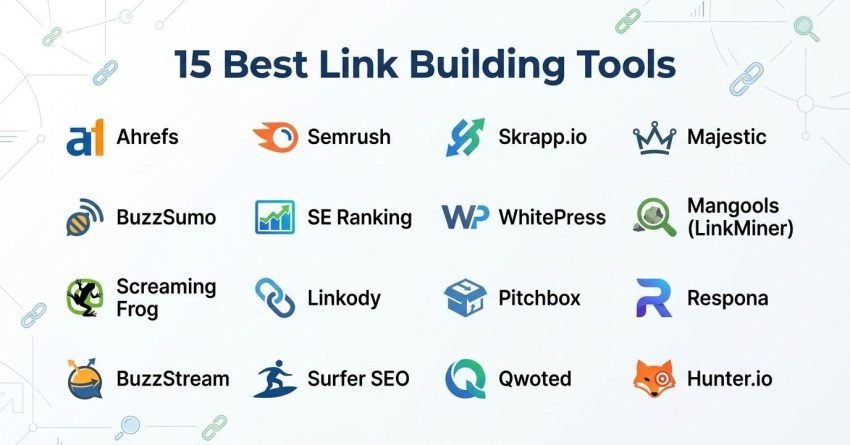
15 Best Link Building Tools in 2026 (Free + Paid)
- Ahrefs – best for backlink analysis and research
- Semrush – best for all-in-one link building
- Skrapp.io – best for bulk finding contacts
- SEO outreach Majestic – best for deep backlink index data
- BuzzSumo – best for content-driven link prospecting
- SE Ranking – best for agencies tracking backlinks across multiple client accounts
- WhitePress – best for buying vetted guest post placements across global markets
- Mangools (LinkMiner) – best for budget-friendly backlink analysis
- Screaming Frog – best for technical link audits
- Linkody – best for backlink monitoring on a budget
- Pitchbox – best for enterprise outreach automation
- Respona – best for personalized content outreach
- BuzzStream – best for outreach team collaboration
- Surfer SEO – best for content-led link attraction planning
- Qwoted – best for digital PR and journalist-sourced backlinks
I’ve tested each of these across real campaigns. Here’s what actually works, what doesn’t hold up, and exactly who each tool fits.
1. Ahrefs – Best for Backlink Analysis and Research

Best For: SEO teams and agencies who need the deepest, most current backlink data available to reverse engineer competitor link profiles and identify strong outreach targets.
How I Use It: I use Ahrefs to audit client backlink profiles, run gap comparisons against competitors, and find broken link opportunities before any outreach campaign starts.
Quick Overview
Ahrefs launched in 2010 out of Singapore and has become one of the most relied-upon SEO platforms in the industry. It runs one of the most active web crawlers outside of Google itself, powering what’s widely regarded as the largest live backlink index anywhere, well past 30 trillion known links.
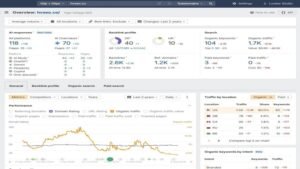
For link building, this is where nearly every campaign starts. Site Explorer lets you drop in a domain and immediately see its full backlink history, referring domains, anchor patterns, and growth trend over time. The Backlink Gap tool compares up to five domains at once and surfaces every site linking to competitors but not to you, which alone can generate more usable prospects in ten minutes than a full afternoon of manual digging.
Content Explorer rounds out the research side. It searches billions of indexed pages by topic and shows the most linked and shared content in any niche, which is genuinely useful for spotting linkable asset ideas and finding who already links to similar material.
The tradeoff is that Ahrefs stops at research. There’s no outreach sequencing, no CRM, and no email automation built in.
Ahrefs Key Features
- Site Explorer Backlink Analysis: Full backlink, referring domain, and anchor text history for any URL, giving a complete map of a competitor’s link strategy.
- Backlink Gap Comparison: Compares up to five domains side by side to surface prospects already linking to competitors but not you.
- Content Explorer: Searches billions of pages by topic to find high-authority, heavily linked content worth targeting for outreach.
- New and Lost Backlink Monitoring: Tracks link changes on a near-real-time refresh cycle, flagging appearances, disappearances, and breaks.
- Broken Backlink Finder: Surfaces dead pages on competitor sites still pulling live backlinks, an easy replacement-link opportunity.
Ahrefs Pros
- Deepest live backlink index available: The scale and refresh speed of the index outpaces most alternatives, giving genuinely fresher prospect data.
- Competitor research is genuinely unmatched: Site Explorer surfaces complete link strategies, growth trends, and top-linked pages in a single view.
- Backlink Gap builds prospect lists fast: Comparing a handful of domains at once turns manual research into a ten-minute task.
- Content Explorer saves real research time: Finding linkable ideas and existing link-worthy content replaces hours of manual tab-hopping.
- Data accuracy holds up under scrutiny: Cross-checking against Search Console consistently shows tighter alignment than most third-party tools.
Ahrefs Cons
- No built-in outreach features: You’ll need a separate platform for email sequencing, CRM, or campaign management.
- Credit system limits heavy usage: Daily report caps can feel restrictive when juggling several client accounts at once.
- Steep learning curve early on: The volume of available data and metrics can overwhelm anyone new to the platform.
Ahrefs Pricing
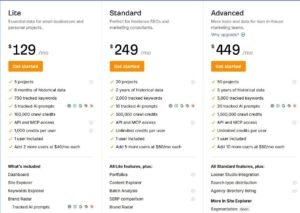
- Lite: $129/month
- Standard: $249/month
- Advanced: $449/month
- Enterprise: $1,499/month
Ahrefs Reviews
- G2: 4.5 out of 5 stars (669+ reviews)
- Capterra: 4.7 out of 5 stars (579+ reviews)
User sentiment consistently praises the depth and accuracy of the backlink database. Recurring complaints center on pricing and the credit-based usage model, along with the absence of any outreach functionality.
2. Semrush – Best for All-in-One Link Building
Best For: Marketing teams and agencies that want backlink research, prospect discovery, outreach, and monitoring inside one platform rather than stitching together separate subscriptions.
How I Use It: I run full campaigns through Semrush’s Backlink Gap and Link Building Tool, moving from competitor research through outreach and tracking without leaving the platform.
Quick Overview
Semrush launched in 2008 and has grown into one of the broadest digital marketing platforms available, spanning more than 55 tools across SEO, PPC, content, and social. For link building specifically, it’s the rare major platform that connects research directly to outreach in a single workflow.
The Backlink Gap tool is typically the starting point. Enter your domain alongside up to four competitors, and it immediately shows referring domains linking to them but missing from your own profile. Those prospects can flow straight into the Link Building Tool, which connects to Gmail, handles personalized sends, and tracks responses without needing a separate CRM.
The backlink database itself is large, with tens of trillions of tracked links, though the refresh cycle runs slightly behind Ahrefs. Traffic estimates tend to align closely with Search Console data when cross-checked.
Semrush suits agencies managing several clients and in-house teams that want research and outreach under one login rather than several.
Semrush Key Features
- Backlink Gap Analysis: Compares your domain against up to four competitors to surface referring domains missing from your profile.
- Built-In Link Building Tool: Manages the full pipeline from prospect discovery through outreach sends and link status tracking.
- Backlink Audit with Toxicity Scoring: Scans your profile for harmful links and generates disavow files automatically.
- Prospect Email Outreach Integration: Connects directly to Gmail for template customization, scheduled sends, and open/reply tracking.
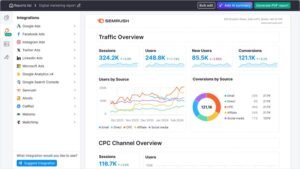
- Link Monitoring Dashboard: Tracks active, broken, lost, and rejected links over time with alerts when placements disappear.
- Authority Score Metric: A proprietary quality score blending backlink data, traffic, and spam signals for quick prospect vetting.
[Image Source: Semrush]
Semrush Pros
- Full campaign workflow in one tool: Research, prospecting, outreach, and monitoring all live under one dashboard.
- Backlink Gap shortcuts prospecting: Comparing domains surfaces hundreds of missed opportunities in minutes.
- Traffic estimates hold up well: Cross-referencing against Analytics and Search Console shows close alignment.
- Backlink Audit flags toxic links reliably: The toxicity scoring has caught harmful links other tools missed entirely.
- 55+ tools beyond link building: Keyword research, audits, and rank tracking are genuinely useful across the broader SEO workflow.
Semrush Cons
- Outreach tool feels basic next to dedicated CRMs: It lacks the sequencing depth of BuzzStream or Pitchbox.
- Interface can overwhelm new users: With 55+ tools packed in, finding the right feature takes time.
- Backlink refresh trails Ahrefs: Updates don’t happen as frequently, which matters for real-time tracking.
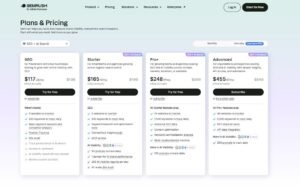
Semrush Pricing
- 7-day free trial
- Starter: $165.17/month
- Pro+: $248.17/month
- Advanced: $455.67/month
Semrush Reviews
- G2: 4.5 out of 5 stars (3,414+ reviews)
- Capterra: 4.6 out of 5 stars (2,314+ reviews)
Users consistently praise the breadth of features and the ability to run SEO, content, and link building from one platform. Common complaints mention steep pricing and an occasionally frustrating cancellation process.
3. Skrapp.io – Best for Bulk Finding Contacts for SEO Outreach
Best For: Finding verified email addresses for SEO managers, link-building specialists, or editorial contacts when launching outreach campaigns.
How I Use It: I use the bulk domain finder on lists exported from Ahrefs and Semrush, and the Chrome extension for individual lookups when I already know exactly who I need to reach.
Quick Overview
Skrapp is an email finding and verification platform built specifically around outreach prospecting. It combines a bulk finder, a verifier, and a LinkedIn Chrome extension into one workflow.
The bulk Email Finder takes lists exported from backlink tools and searches for contacts matching job titles you specify, like SEO manager or content lead, returning verified addresses up to your credit limit. The LinkedIn extension works the opposite direction: visit a profile, click the extension, and get a verified email for that specific person. The bulk LinkedIn finder scrapes contacts from search results pages using role and location filters, useful when you’re building a targeted list rather than working from a domain list.
Skrapp Key Features
- Bulk Email Finder: Finds and verifies multiple addresses by name and company at once.
- Individual Email Finder: Single lookups by name plus company or domain.
- LinkedIn Extension: Finds verified emails from LinkedIn profiles and search results.
- Email Verifier: Cleans existing contact lists to maintain database quality.
- CRM Integration: Connects to Salesforce, HubSpot, and offers a REST API plus CSV export.
Skrapp Pros
- Contact finding from multiple sources: Domain lists, LinkedIn profiles, and direct name lookups all in one platform.
- Verification built into the search: Results come back already checked, so you know what’s safe to send to.
- Precise individual lookups: Useful when you already know exactly who you’re pitching.
- Pairs cleanly with backlink tools: Bulk search works well alongside exported lists from Ahrefs or Semrush.
- Pay for verified contacts only: You’re not charged for invalid or nonexistent addresses.
Skrapp Cons
- No outreach sending built in: You’ll need a separate tool to actually launch campaigns.
- Paid plan required for scale: The free tier is limited to testing.
- Works best with pre-filtered lists: Credits burn fast without upstream filtering from a backlink tool.
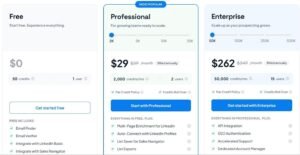
Skrapp Pricing
- Free: 50 credits to test
- Professional: $39/month for 2,000 credits
- Enterprise: $349/month for 50,000 credits
- 25% discount available on annual billing
Skrapp Reviews
- G2: 4.5 out of 5 stars (354+ reviews)
- Capterra: 4.5 out of 5 stars (57+ reviews)
Reviewers consistently praise the ease of use and accuracy of the LinkedIn extension. Complaints mention occasional verification inaccuracies and slower support during busy periods.
4. Majestic – Best for Deep Backlink Index Data

Best For: Link builders and SEO consultants who need the deepest historical backlink data available, paired with trust metrics no other platform replicates.
How I Use It: I turn to Majestic for full link history on legacy audits, expired domain research, and checking Trust Flow before committing to an outreach target.
Quick Overview
Majestic has focused on one thing since launching in 2004: mapping the link graph of the internet. While competitors expanded into keyword research and content tools, Majestic stayed narrowly focused on backlinks, and that specialization still shows in the depth of its data.
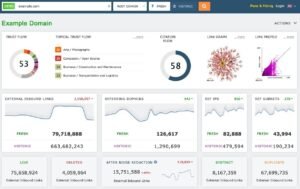
The platform runs two indexes. The Fresh Index updates daily. The Historic Index reaches back to 2006 and holds well over 20 trillion discovered URLs. Its proprietary Trust Flow metric measures link quality based on proximity to trusted seed sites, while Citation Flow measures raw link volume. The ratio between the two flags whether a domain’s profile looks clean or spammy.
Topical Trust Flow breaks that authority down by category, showing whether a site’s trust comes from relevant niches or unrelated ones, something neither Ahrefs nor Semrush offers in the same way.
Majestic Key Features
- Dual Index System: A daily Fresh Index plus a Historic Index dating to 2006.
- Trust Flow and Citation Flow: Separate metrics for link quality and link quantity.
- Topical Trust Flow: Breaks authority down by category to check niche relevance.
- Link Context Analysis: Shows surrounding text and placement of each backlink.
- Bulk Backlink Checker: Analyzes up to one million URLs in a single batch.
[Image Source: Majestic ]
Majestic Pros
- Deepest historical data available: The Historic Index going back to 2006 is unmatched for legacy research.
- Trust Flow offers a genuine quality signal: No comparable trust-based metric exists elsewhere.
- Topical relevance scoring prevents wasted outreach: Knowing whether authority is niche-relevant avoids irrelevant prospecting.
- Link Context shows real placement quality: Seeing whether a link is editorial or buried in a footer matters for judgment calls.
- Bulk analysis scales for agency work: Processing large URL batches keeps large-scale vetting practical.
Majestic Cons
- No keyword research or rank tracking: It’s backlinks only, so you’ll need a separate platform for everything else.
- No outreach features at all: There’s no CRM or campaign management built in.
- No organic traffic estimates: Unlike Ahrefs or Semrush, Majestic doesn’t estimate traffic for prospect evaluation.
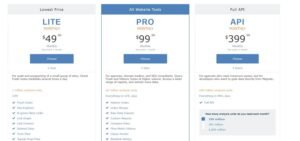
Majestic Pricing
- Lite: $49.99/month
- Pro: $99.99/month
- API: from $399.99/month
Majestic Reviews
- G2: 4.3 out of 5 stars (73+ reviews)
- Capterra: 4.4 out of 5 stars (30+ reviews)
Long-time users praise the reliability of the link index, with several noting over a decade of continuous use. Criticisms focus on the dated interface and the narrow, links-only feature set.
5. BuzzSumo – Best for Content-Driven Link Prospecting

Best For: Content marketers and PR teams who want to find top-performing content, trace its backlinks, and plan outreach around what already earns links.
How I Use It: I use BuzzSumo to research linkable content before starting a campaign, since it shows which formats already earn the most links in a given niche.
Quick Overview
BuzzSumo launched in 2013 and became a go-to content intelligence platform for marketers who want data behind their content decisions. It indexes billions of articles and tracks social engagement, backlinks, and performance across major platforms.
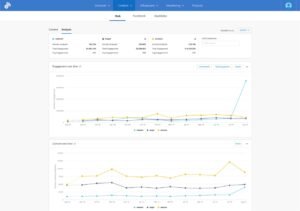
For link building, its value sits squarely in the research phase. Enter a topic or competitor domain, and it surfaces the most shared and most linked content in that space, along with the sites that linked to it and the people who shared it. That combination builds outreach lists from people who’ve already shown interest in similar material.
The Backlink Analyzer tracks which domains link to any URL over time. The Content Analyzer breaks down which formats and lengths earn the most engagement in a niche. Combined with a journalist database numbering in the hundreds of thousands, BuzzSumo bridges research and outreach planning, though it stops short of actually sending anything.
BuzzSumo Key Features
- Content Analyzer with Backlink Data: Finds the most shared and linked content by topic or domain, with full backlink and engagement breakdowns.
- Journalist and Influencer Database: Hundreds of thousands of profiles with recent coverage and contact details for digital PR lists.
- Competitor Content Intelligence: Shows a competitor’s top-performing content by engagement, backlinks, and shares.
- Backlink Alerts: Notifies you when new backlinks appear on tracked domains or URLs.
- Trending Content Discovery: Real-time feeds surface rising topics for timely content and pitch opportunities.
- Question Analyzer: Searches forum posts across major Q&A platforms to surface link-attracting content ideas.
[Image Source: BuzzSumo]
BuzzSumo Pros
- Content and link performance shown together: Seeing shares and backlinks in one view shapes smarter content-led strategy.
- Journalist database connects research to outreach: Finding reporters already covering your topic sharpens pitch targeting.
- Reveals link-earning formats from competitors: Replicating proven formats beats guessing at content ideas blindly.
- Real-time alerts keep campaigns current: Daily monitoring of new links removes manual tracking work.
- Trending feeds create timely opportunities: Catching rising topics early supports reactive pitching while stories are fresh.
BuzzSumo Cons
- No outreach or campaign features: You’ll need BuzzStream, Pitchbox, or similar to execute anything found here.
- Social virality doesn’t always predict link value: High shares don’t reliably correlate with backlink potential.
- B2B niches return thinner results: Specialized industries generate less social engagement, limiting usefulness there.
BuzzSumo Pricing
- Trial available
- Content Creation: $199/month
- PR & Comms: $299/month
- Suite: $499/month
- Enterprise: $999/month
BuzzSumo Reviews
- G2: 4.5 out of 5 stars (106+ reviews)
- Capterra: 4.5 out of 5 stars (146+ reviews)
Marketers consistently praise content discovery accuracy and trend-spotting speed. Common criticisms include pricing for smaller teams and limited value for B2B-heavy niches.
6. SE Ranking – Best for Agencies Tracking Backlinks Across Multiple Client Accounts

Best For: Agencies running link campaigns across several clients who need backlink monitoring, gap analysis, and rank tracking consolidated in one platform.
How I Use It: I use SE Ranking on accounts running continuous link building where I need to watch each new placement against ranking movement without switching between separate tools.
Quick Overview
SE Ranking launched in 2013 and built its backlink toolset directly around agency workflows: monitor acquired links, catch new and lost referring domains, and compare backlink growth against ranking changes in the same dashboard.
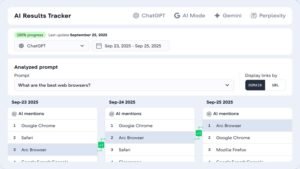
The database draws from trillions of tracked links across hundreds of millions of domains, refreshed on a monthly cycle rather than continuously. What separates it is the surrounding context. Gap analysis, rank tracking, technical audits, and AI search visibility all live in the same platform, so watching a new placement’s ranking impact doesn’t require exporting anything.
SE Ranking Key Features
- Backlink Checker with Domain and Page Trust: Judges prospect quality using proprietary trust scores before outreach.
- Competitor Backlink Gap Analysis: Surfaces referring domains linking to competitors but not you.
- Backlink Monitoring with Alerts: Tracks new and lost referring domains and indexing status.
- Broken Link Checker: Finds broken backlinks to fix lost equity or repurpose as replacement opportunities.
- API and Data Studio Access: Pulls backlink data programmatically into dashboards or client reports.
- Multi-Project Tracking: Manages backlink profiles across separate client projects with individual reporting.
[Image Source: SERanking]
SE Ranking Pros
- Full SEO and GEO platform included: Traditional and AI search optimization tools sit alongside link building features.
- Monitoring catches dropped placements quickly: New and lost alerts beat discovering losses at a monthly audit.
- Gap analysis builds prospect lists fast: Referring domain gaps surface outreach targets directly from competitor data.
- Multi-client management built in: Separate projects with white-label reporting suit agency structures well.
- API included from the entry plan: No additional purchase needed for programmatic backlink data access.
SE Ranking Cons
- Smaller index than Ahrefs or Majestic: Deep research on high-authority domains favors larger databases.
- Monthly refresh, not continuous: Real-time link tracking needs faster-updating tools.
- No built-in outreach tooling: Contact discovery and email sequencing require a separate platform.
SE Ranking Pricing
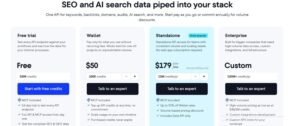
- Free trial available
- Core: $129/month
- Growth: $279/month
- Enterprise: custom pricing
SE Ranking Reviews
- G2: 4.7 out of 5 stars (2,330+ reviews)
- Capterra: 4.7 out of 5 stars (296+ reviews)
Reviewers praise rank-tracking accuracy and white-label reporting. For link building specifically, the recurring note is that it suits monitoring and gap analysis well but isn’t a full replacement for a primary research index.
7. WhitePress – Best for Buying Vetted Guest Post Placements Across Global Markets
Best For: Teams that want to buy link placements directly from a vetted publisher network instead of running outreach themselves, especially across international or multilingual markets.
How I Use It: I turn to WhitePress when a client needs placements in a market we don’t have existing outreach relationships in, filtering the marketplace by country and language rather than cold-emailing publishers from scratch.
Quick Overview
WhitePress launched in 2013 out of Poland and has grown into one of the largest link building marketplaces globally. It works differently from research or outreach tools: instead of finding prospects yourself, it connects you to a network of well over 100,000 publisher sites across 30-plus languages.
You filter the marketplace using dozens of parameters, including traffic, topic, language, and third-party domain metrics. Once you find a fit, you order the placement, submit content, and the platform manages quality checks and delivery.
One feature worth highlighting is the option to exclude domains that already link to your site, keeping every purchase focused on genuinely new referring domains. Every placement also comes with a multi-year visibility guarantee backed by ongoing monitoring, a level of accountability rare in the guest post marketplace space.
WhitePress Key Features
- Global Publisher Marketplace: Over 100,000 vetted sites across 30-plus languages and international markets.
- Multi-Parameter Publisher Search: Filters by traffic, topic, language, price, and third-party domain metrics.
- Existing-Link Exclusion Filter: Hides publishers already linking to your domain to protect budget.
- Long-Term Link Visibility Guarantee: Daily monitoring backs every purchased placement for years after publication.
- Content and Copywriting Marketplace: Order articles directly or submit your own for publisher approval.
- Digital PR and Distribution Tools: Run sponsored content campaigns from the same dashboard.
WhitePress Pros
- Skips manual outreach entirely: Buying directly from a vetted list removes the cold-email grind in unfamiliar markets.
- Genuinely strong international coverage: Dozens of languages and markets suit multilingual campaigns few other tools handle.
- Transparent pricing upfront: Every publisher lists cost and metrics before you commit to an order.
- Guarantee adds real accountability: Multi-year monitoring protects the investment in a way most marketplaces skip.
- Duplicate filter protects budget: Excluding existing linkers keeps spend focused on new referring domains.
WhitePress Cons
- Publisher quality varies by tier: The lower end includes thinner sites, so outcomes depend on careful selection.
- No outreach automation or CRM: It’s a marketplace, not a platform for running your own campaigns.
WhitePress Pricing
- Free to create an account and browse
- Per-placement pricing set by each publisher, ranging roughly from $100 for smaller sites to $20,000-plus for major outlets
- No flat subscription; you pay only for placements ordered
WhitePress Reviews
- Capterra: 4.1 out of 5 stars (7+ reviews)
- Trustpilot: 4.5 out of 5 stars (89+ reviews)
Reviewers consistently praise the depth of publisher filtering and pricing transparency. Common criticisms mention inconsistent support responsiveness and variable publisher quality at the lower tiers.
8. Mangools (LinkMiner) – Best for Budget-Friendly Backlink Analysis
Best For: Freelancers, bloggers, small businesses, and beginner SEOs who need affordable backlink analysis alongside keyword research and rank tracking.
How I Use It: I recommend Mangools to smaller teams just starting link building who need enough backlink data to prioritize prospects without an enterprise-level budget.
Quick Overview
Mangools launched in 2014 out of Bratislava, Slovakia, and now serves well over a million users worldwide, largely on the strength of its simple, approachable tools. The platform bundles five tools into one subscription: keyword research, SERP analysis, rank tracking, domain metrics, and LinkMiner for backlinks.
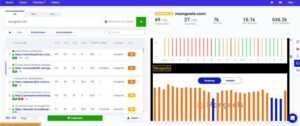
LinkMiner pulls its data from a major third-party backlink index, giving access to a large dataset through a cleaner, more beginner-friendly interface. Enter a domain, and it shows every backlink pointing to it, along with quality scores and anchor text data.
The inline site preview is a standout feature, showing exactly where a backlink sits on the source page without opening a new tab, which saves real time during manual evaluation.
Mangools (LinkMiner) Key Features
- Backlink Analysis via Major Index: Access to a large third-party dataset with quality and strength scores per backlink.
- Inline Source Page Preview: Shows backlink placement on the linking page without leaving the tool.
- New and Lost Backlink Tracking: Filters by acquisition date to monitor link velocity.
- Full Five-Tool SEO Suite: Keyword research through backlink analysis in one subscription.
- Browser Extension: Displays SEO metrics for any page visited, including backlink and difficulty data.
- AI Search Watcher: Tracks brand visibility across AI search engines, a newer feature in this category.
[Image Source: Mangools]
Mangools (LinkMiner) Pros
- Large index without a separate subscription: Access to a major dataset through a cleaner, more accessible interface.
- Most beginner-friendly interface tested: Clean design and intuitive navigation suit teams without deep technical SEO experience.
- Inline preview saves evaluation time: Seeing backlink placement without new tabs speeds up manual research sessions.
- Link Strength simplifies prioritization: One combined quality score beats weighing several metrics separately.
Mangools (LinkMiner) Cons
- Fewer referring domains than larger platforms: Comprehensive research may need supplemental analysis for critical campaigns.
- No audit or disavow tools: Link profile cleanup requires a separate platform.
- No outreach features included: LinkMiner is analytical only, so contact finding and sending need other tools.
Mangools Pricing
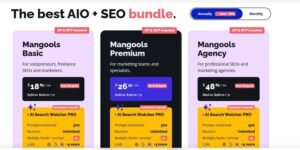
- Free tier available
- Basic: $30.50/month
- Premium: $40.50/month
- Agency: $70.50/month
- 48-hour money-back guarantee
Mangools (LinkMiner) Reviews
- G2: 4.7 out of 5 stars (95+ reviews)
- Capterra: 4.8 out of 5 stars (91+ reviews)
Users praise the clean interface, affordability, and keyword difficulty accuracy. LinkMiner specifically earns praise for making backlink analysis approachable for beginners. Common criticisms mention daily usage limits and less comprehensive data than larger platforms.
9. Screaming Frog – Best for Technical Link Audits
Best For: SEO professionals and agencies needing a desktop crawler to audit backlinks, find broken links, and fix link equity issues before campaigns launch.
How I Use It: Screaming Frog runs before every link campaign we launch, crawling a client’s site to find broken internal links, redirect chains, and orphan pages that would otherwise waste incoming link equity.
Quick Overview
Screaming Frog SEO Spider launched in 2010 out of England and has become one of the most trusted technical crawlers in SEO. While it’s primarily known as a site audit tool, its link analysis capabilities make it genuinely essential for serious link building work.
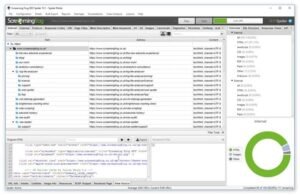
The crawler scans an entire site and returns detailed data on every URL: status codes, redirect chains, canonical tags, internal and external links, anchor text, and response times. For link building, that means finding broken outbound links across a whole site rather than checking one page at a time.
The learning curve is real. It’s a dense, technical interface built for people who already understand crawl data, but once the filters click, it becomes indispensable for audit work no browser extension handles at the same scale.
Screaming Frog Key Features
- Site-Wide Broken Link Detection: Finds every broken internal and external link across an entire site.
- Redirect Chain and Loop Identification: Maps redirects that waste link equity and slow crawl efficiency.
- Internal Link Structure Visualization: Shows how link equity flows through a site and where orphan pages exist.
- Custom Extraction with XPath and Regex: Pulls specific data like contact details or structured data from prospect sites.
- Analytics and Search Console Integration: Connects crawl data with traffic and indexing metrics.
- Scheduled Crawls and Change Detection: Automates recurring audits and flags changes between crawls.
[Image Source: Screaming Frog]
Screaming Frog Pros
- Most thorough broken link discovery at scale: Crawls entire sites rather than single pages, catching far more than page-level scanners.
- Essential for pre-campaign audits: Fixing redirect and orphan page issues protects the value of new incoming links.
- Free version is genuinely useful: Crawling up to 500 URLs at no cost suits freelancers and small teams well.
- Custom extraction opens advanced prospecting: Pulling emails or social profiles from crawled sites extends its use beyond basic auditing.
- Integrations add real context: Connecting traffic and indexing data helps prioritize targets based on actual performance.
Screaming Frog Cons
- No outreach or campaign features: It’s purely an audit tool, requiring separate platforms for contact discovery and sending.
- No built-in backlink index: Unlike Ahrefs or Majestic, it only analyzes sites you crawl directly.

Screaming Frog Pricing
- Free version available
- Paid: $279/year
Screaming Frog Reviews
- G2: 4.7 out of 5 stars (184+ reviews)
- Capterra: 4.9 out of 5 stars (133+ reviews)
SEO professionals overwhelmingly consider it essential, praising crawl depth and reliability. Common criticisms mention the learning curve, resource usage on large crawls, and the dated desktop interface.
10. Linkody – Best for Backlink Monitoring on a Budget
Best For: Freelancers, small agencies, and in-house teams needing affordable backlink monitoring with alerts and disavow management.
How I Use It: I use Linkody as a watchdog on client backlink profiles during and after active campaigns, catching removed or nofollowed links within hours instead of discovering them weeks later.
Quick Overview
Linkody is a cloud-based monitoring tool built around a single focus: track backlinks continuously and alert you the moment something changes. Unlike bundled suites, it does one job and does it well.
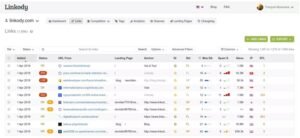
The dashboard shows new, lost, and at-risk links immediately on login, with color-coded status indicators and key metrics like authority scores, spam signals, and anchor text distribution attached to every link. For active campaigns, that means catching silent losses fast enough to follow up before months of outreach work quietly unravels.
The built-in disavow tool identifies potentially toxic links using spam scores and generates a file ready for submission, without needing a separate tool. Competitor monitoring is included on every plan, tracking up to five competitor domains and flagging their new backlinks as opportunities worth replicating.
Linkody Key Features
- 24/7 Backlink Status Monitoring: Daily checks for removal, nofollow switches, redirects, and errors, with alerts within hours.
- Built-In Disavow File Generator: Identifies harmful links and generates a submission-ready file for Search Console.
- Competitor Backlink Tracking: Monitors up to five competitor domains per project for new link opportunities.
- Anchor Text Distribution Analysis: Visualizes anchor spread to catch over-optimization risks early.
- White-Label PDF Reports: Branded reports ready to share with clients without exposing the underlying tool.
- Email Alerts: Daily or weekly digests summarizing all backlink changes.
Linkody Pros
- Daily checks catch removals fast: Immediate alerts keep campaign tracking accurate and current.
- Disavow workflow simplifies cleanup: Identifying and generating disavow files happens in one interface.
- Clean interface with minimal learning curve: Teams become productive quickly without clutter.
- Competitor monitoring reveals fresh opportunities: Real-time tracking supports targeted follow-up outreach.
- White-label reporting supports agencies: Branded reports present progress professionally.
Linkody Cons
- Limited scope beyond monitoring: Keyword research, audits, and content tools all require other platforms.
- Smaller backlink index: Some links may appear late compared to larger databases.
- No API support: Custom dashboards or external integrations aren’t supported.
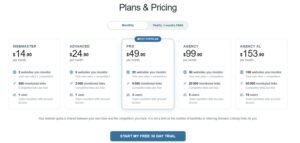
Linkody Pricing
- Webmaster: $11.20/month
- Advanced: $18.70/month
- Pro: $37.40/month
- Agency: $74.90/month
- Agency XL: $115.40/month
- 30-day free trial
Linkody Reviews
- G2: 4.5 out of 5 stars (4+ reviews)
- Capterra: 4.8 out of 5 stars (24+ reviews)
Users praise the simplicity, affordable pricing, and responsive support. Common criticisms mention the limited feature set beyond monitoring and the need to pair it with other tools for complete coverage.
11. Pitchbox – Best for Enterprise Outreach Automation
Best For: Agencies and large in-house teams running high-volume campaigns across multiple clients who need enterprise-grade prospecting, sequencing, and deliverability tools in one platform.
How I Use It: We use Pitchbox when managing outreach at scale across simultaneous client campaigns, and it’s the tool I’d recommend once a team outgrows a lighter CRM and needs more automation and deliverability control.
Quick Overview
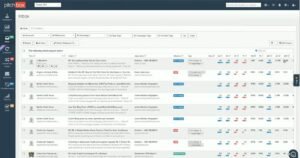
Pitchbox covers the full outreach lifecycle in one workflow: prospecting, email discovery, sequencing, follow-ups, pipeline management, and reporting. There’s no need to stitch multiple tools together to go from finding a prospect to earning a placement.
The prospecting engine integrates directly with major SEO platforms, letting you filter by authority metrics before sending a single email. The sequencing engine supports multi-step drip campaigns with conditional logic, pausing follow-ups automatically when someone replies and snoozing sequences when out-of-office replies come back.
Pitchbox has leaned into AI for personalization at scale, template assistance, and reply suggestions during negotiation. On deliverability, it includes inbox placement monitoring, blacklist tracking, and spam testing, features most competing outreach tools skip entirely.
Pitchbox Key Features
- End-to-End Outreach Workflow: Prospecting, contact discovery, sequencing, CRM, and reporting in one platform.
- Direct SEO Tool Integrations: Connects with major backlink platforms to filter prospects by domain metrics before outreach.
- AI Personalization and Reply Assistance: Generates personalized emails at scale and drafts negotiation replies.
- Advanced Deliverability Monitoring: Inbox placement tracking, blacklist checks, and spam testing built in.
- Skill-Based Team Workflow: Assigns team members to specific outreach stages based on strengths.
- Link Monitoring and Health Tracking: Verifies indexing and destination page health for earned links.
[Image Source: G2]
Pitchbox Pros
- Most complete outreach automation available: Prospecting through reporting, all in one platform, unmatched by lighter tools.
- Deliverability tools are best in class: Real deliverability control that most competitors simply don’t offer.
- SEO integrations save real time: Filtering by domain metrics directly inside Pitchbox skips manual exporting.
- AI features genuinely speed up workflow: Bulk personalization cuts manual drafting time significantly at volume.
- Scales effectively for agencies: Workspace organization and white-label reporting suit multi-client management well.
Pitchbox Cons
- Steep learning curve for new users: The feature density can overwhelm during the first few weeks.
- No backlink research features: A separate research tool is still needed for competitor and backlink data.
- Prospecting occasionally surfaces irrelevant results: Broad campaigns sometimes return sites outside the intended niche.

Pitchbox Pricing
- Pro: $165/month
- Advanced: $420/month
- Scale: $675/month
- Enterprise: custom pricing
Pitchbox Reviews
- G2: 4.7 out of 5 stars (98+ reviews)
- Capterra: 4.6 out of 5 stars (42+ reviews)
Pitchbox earns some of the highest satisfaction ratings in the outreach category, with users praising prospecting speed and support responsiveness. Criticisms mention premium pricing and the initial learning curve.
12. Respona – Best for Personalized Content Outreach

Best For: B2B SaaS companies and growth-focused agencies needing AI-powered outreach with smart prospecting and verified contact discovery in one workflow.
How I Use It: I’ve used Respona for content-driven campaigns where finding the right contact and personalizing the pitch mattered more than raw send volume.
Quick Overview
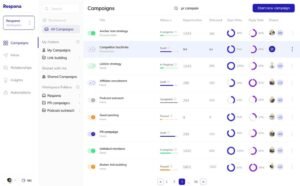
Respona takes a content-first approach to prospecting rather than starting with domain lists. It uses a built-in search engine to find relevant articles, blog posts, and podcasts in real time, then pulls backlink and authority data to filter prospects by content relevance instead of domain metrics alone.
What sets Respona apart is AI-driven personalization that goes beyond basic merge fields, analyzing prospect content to generate suggestions referencing specific details from their published work. That level of specificity tends to move reply rates meaningfully.
The email finder pulls from more than two dozen data sources with filters for job title and seniority. A shared inbox, automated sequences, and built-in analytics round out the workflow, and a done-for-you placement service is available for teams that want results without managing the platform themselves.
Respona Key Features
- Content-First Prospecting Engine: Finds relevant articles and podcasts by content relevance rather than domain metrics alone.
- AI-Driven Email Personalization: Generates tailored outreach using prospect content insights.
- Verified Contact Discovery: Finds and verifies emails across two dozen-plus sources with role filters.
- Automated Email Sequences: Multi-step campaigns that pause automatically on reply.
- Shared Inbox and Tracking: Central inbox for team collaboration and relationship status.
- Done-for-You Placement Service: Pay-per-result option handling outreach and placements directly.
[Image Source: Backlink Manager]
Respona Pros
- Content-based prospecting surfaces better fits: Contextual relevance beats generic domain list scraping.
- AI personalization genuinely lifts reply rates: Referencing specific content details reads as authentic, not templated.
- Accurate multi-source verification: Reduces bounce rates and wasted send volume.
- Podcast search is a genuine differentiator: Direct host outreach isn’t common in this category.
- Flexible usage model: Supports both self-serve campaigns and fully managed placements.
Respona Cons
- Credit costs add up on large campaigns: Usage-based pricing increases with volume.
- No API access: Custom dashboards or internal system integrations aren’t supported.
- Live campaigns aren’t editable: Fixing a template error requires duplicating the campaign.

Respona Pricing
- Starter: $100/placement
- Standard: $160/placement
- Authority: $240/placement
- Power: $400/placement
- Elite: $500/placement
Respona Reviews
- G2: 4.8 out of 5 stars (199+ reviews)
- Capterra: 4.8 out of 5 stars (61+ reviews)
Respona earns some of the highest ratings of any outreach tool, with reviewers praising personalization quality and support responsiveness. Criticisms mention credit consumption at scale and the inability to edit live campaigns.
13. BuzzStream – Best for Outreach Team Collaboration

Best For: Link building teams and digital PR agencies needing a dedicated outreach CRM to manage prospect relationships and coordinate team outreach across projects.
How I Use It: BuzzStream is our outreach command center, tracking prospect lists, personalized pitches, and follow-ups so no one on the team accidentally contacts the same person twice across different campaigns.
Quick Overview
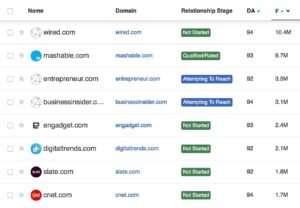
BuzzStream launched in 2008 out of Austin, built specifically to solve the operational chaos of running outreach at scale. While research tools focus on finding data, BuzzStream picks up where they leave off, managing prospecting through pitching, follow-up, and team coordination.
It functions as a CRM built specifically for outreach. Every contact carries a full profile with communication history, site metrics, and notes. If someone on the team pitched a prospect months ago on a different campaign, BuzzStream flags the overlap before a duplicate email goes out.
The BuzzMarker Chrome extension saves prospects while browsing, pulling contact details and domain metrics automatically, and lists exported from research tools can be enriched directly inside the platform. Automated sequences, open and click tracking, and project-level reporting round out a workflow built for teams sending high email volumes weekly.
BuzzStream Key Features
- Outreach CRM with Full Contact Profiles: Communication history, metrics, and notes centralized per prospect.
- Automated Email Sequences: Multi-step drip campaigns that pause automatically on reply.
- BuzzMarker Chrome Extension: Saves prospects with contact and metric data in one click.
- Team Collaboration and Duplicate Prevention: Flags prospects already contacted by teammates on other campaigns.
- Project-Level Reporting: Tracks open rates, reply rates, and template performance across campaigns.
- AI-Powered Media List Building: Researches contacts and verifies emails for faster targeted list building.
[Image Source: BuzzStream]
BuzzStream Pros
- Purpose-built for outreach workflows: Designed specifically around how link building and PR teams actually operate.
- Duplicate prevention avoids real embarrassment: Flags overlap even across different campaigns for multi-client agencies.
- Sequences maintain consistent cadence: Automatic pausing on reply keeps outreach from feeling robotic.
- Chrome extension speeds up prospecting: Save and evaluate prospects without switching tabs.
- Strong community resources: Regular industry reporting keeps practitioners current on outreach trends.
BuzzStream Cons
- Learning curve for new team members: The dated, feature-dense interface takes a few weeks to master.
- Contact data accuracy is inconsistent: Built-in scraping often returns generic addresses rather than direct contacts.
- No backlink research features: A separate platform is still needed for prospect and backlink research.
BuzzStream Pricing
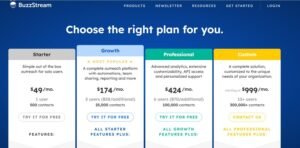
- Starter: $24/month
- Growth: $124/month
- Professional: $299/month
- Custom: from $999/month
BuzzStream Reviews
- G2: 4.2 out of 5 stars (165+ reviews)
- Capterra: 4.5 out of 5 stars (22+ reviews)
Long-time users consistently rate it as one of the most effective outreach CRMs available, with several noting significant reductions in manual tracking time. Criticisms mention the dated interface and recent pricing increases.
14. Surfer SEO – Best for Content-Led Link Attraction Planning

Best For: Content teams and SEOs who want to build genuinely link-worthy content by engineering it around what already ranks and earns links in a given topic, rather than relying purely on cold outreach to move links.
How I Use It: Before we launch outreach for a client, we often run the target linkable asset through Surfer to check whether it actually has the topical depth and structure needed to outperform what’s currently earning links in that space. A weak page rarely converts outreach effort into placements, no matter how good the pitch is.
Quick Overview
Surfer SEO launched in 2017 and built its reputation around one core idea: content that’s structured and covers a topic more thoroughly than existing top-ranking pages earns more organic visibility, and pages with stronger visibility naturally attract more backlinks over time. It’s not a backlink index or an outreach CRM. It’s a content editor and SERP analysis engine that feeds directly into link-earning strategy.
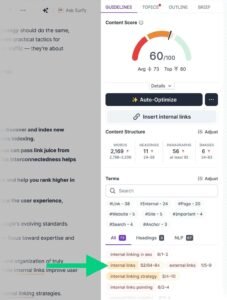
The Content Editor pulls the top-ranking pages for a target keyword and generates a data-backed brief covering word count ranges, relevant terms competitors use, heading structure, and content gaps. Writing directly inside the editor gives a live content score that updates as you add terms and structure, which takes much of the guesswork out of building a page strong enough to become a genuine linkable asset.
The Audit tool works in reverse, scoring existing content against the same benchmarks and flagging exactly what’s missing to compete for links and rankings in a topic. For campaigns built around earning links through content quality rather than volume outreach, Surfer sits upstream of everything else in this list, shaping what you’re actually asking people to link to before a single pitch goes out.
Surfer SEO Key Features
- Content Editor with Live Scoring: Generates data-backed briefs from top-ranking pages and scores content in real time as you write.
- SERP Analyzer: Breaks down ranking pages by word count, headings, and term usage to reveal what’s already earning visibility and links.
- Content Audit Tool: Scores existing pages against top-ranking benchmarks and flags specific gaps holding a page back.
- Topical Map Generator: Builds a cluster of related content ideas around a core topic to strengthen a site’s overall authority.
- AI Writing Assistant Integration: Generates draft content directly inside the editor while maintaining alignment with the target content score.
[Image Source: Backlinko]
Surfer SEO Pros
- Turns linkable asset creation into a data-backed process: Content built to Surfer’s benchmarks consistently covers a topic more completely than guesswork drafts.
- Reduces wasted outreach on weak pages: Auditing an asset before pitching it prevents burning outreach effort on content that won’t hold up to editorial scrutiny.
- Content scoring updates in real time: Writers get immediate feedback instead of waiting for a full SEO review after publishing.
- Topical Map supports authority building at scale: Planning content clusters around a core topic strengthens the site’s overall link-earning potential over time.
Surfer SEO Cons
- No backlink index or outreach features: It’s purely a content optimization tool, so prospecting and sending still require separate platforms.
- Content score can be over-relied on: Chasing a perfect score sometimes pulls focus away from genuine reader value if used without editorial judgment.
- Best results require pairing with a content strategy: The tool optimizes structure and terms, but topic selection and original insight still depend on the writer.
Surfer SEO Pricing
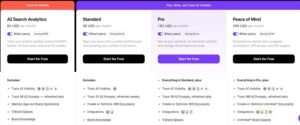
- Essential: $99/month
- Scale: $219/month
- Enterprise: custom pricing
Surfer SEO Reviews
- G2: 4.8 out of 5 stars (500+ reviews)
- Capterra: 4.8 out of 5 stars (350+ reviews)
Users consistently praise the clarity of the content briefs and the real-time scoring during writing. The most common criticisms mention the temptation to over-optimize for the score at the expense of natural writing, and the fact that it only addresses the content side of a link building strategy.
15. Qwoted – Best for Digital PR and Journalist-Sourced Backlinks

Best For: Digital PR teams, founders, and subject matter experts who want to earn editorial backlinks by responding directly to journalists actively looking for sources, rather than cold-pitching guest posts.
How I Use It: We use Qwoted for clients with genuine expertise worth quoting, monitoring live journalist requests in their industry and pitching fast, since editorial links from established publications carry weight that’s hard to replicate through standard guest post outreach.
Quick Overview
Qwoted launched as a source-matching platform connecting journalists actively working on stories with experts willing to comment, filling much of the space HARO left open as that platform changed hands and became less reliable for consistent placements. It works as a live marketplace rather than a cold outreach tool: journalists post specific requests describing exactly what they need, and registered sources pitch a response directly.
The platform organizes requests by industry and topic, so instead of scanning a single daily email digest, you can filter for relevant opportunities in real time and respond before dozens of other sources flood the same request. Building a complete source profile with credentials and past coverage improves the odds of a journalist choosing your pitch, since editors can see relevant expertise before ever opening your response.
For link building specifically, the appeal is the caliber of placement. Because responses go through vetted publications and working journalists rather than open marketplaces, the resulting backlinks tend to come from genuinely authoritative domains, and the mention reads as earned editorial coverage rather than a paid placement.
Qwoted Key Features
- Live Journalist Request Board: Real-time feed of active media requests filterable by industry, topic, and publication type.
- Source Profile Building: Credentials, past coverage, and expertise areas displayed to journalists reviewing pitches.
- Direct Pitch Submission: Respond to specific requests directly through the platform rather than cold emailing.
- Pitch and Placement Tracking: Monitor submitted pitches, journalist responses, and confirmed placements in one dashboard.
- Industry and Topic Filtering: Narrow the request feed to relevant beats instead of scanning irrelevant opportunities.
Qwoted Pros
- Earns genuinely high-authority editorial links: Placements come from working journalists at real publications rather than paid guest post slots.
- Real-time request feed beats a daily digest: Filtering live requests by topic surfaces opportunities faster than scanning one bulk email.
- Source profiles do ongoing work: A strong profile keeps generating pitch opportunities as journalists browse for experts in a niche.
- Placements read as earned, not paid: Editorial mentions carry more trust with readers and search engines than sponsored content.
- Solid free tier for testing the workflow: Teams can validate the process before committing to a paid plan.
Qwoted Cons
- Placement isn’t guaranteed: Submitting a pitch doesn’t mean a journalist selects it, so volume and speed both matter.
- Requires genuine expertise to compete: Generic pitches without real credentials or insight rarely stand out against specialized sources.
- Response windows can be tight: High-profile requests attract many pitches quickly, so slow response times cost opportunities.
Qwoted Pricing
- Free tier available for basic access
- Pro: $250/month
- Enterprise: custom pricing
Qwoted Reviews
- G2: 4.6 out of 5 stars (85+ reviews)
- Capterra: 4.5 out of 5 stars (40+ reviews)
Users praise the quality of placements earned and the speed of the live request feed compared to digest-based alternatives. The most common criticisms mention the competitiveness of high-profile requests and the learning curve in writing pitches that stand out.
Users consistently praise the simplicity, accuracy, and time savings during prospecting. The Chrome extension and bulk verification are frequently cited as standout features. Common criticisms mention regional coverage gaps and credit limitations on larger campaigns.
What’s the Best Link Building Tool for You?
The right tool depends on team size, budget, and where you need the most help in the workflow. Here’s how we’d break it down based on what’s worked across dozens of campaigns.
Best for Beginners: Mangools (LinkMiner) bundles backlink analysis, keyword research, and rank tracking into one clean interface anyone can pick up quickly, without the complexity of enterprise dashboards.
Best for Agencies: Pitchbox handles the full outreach lifecycle from prospecting to placement tracking with deliverability tools and unlimited users on higher plans, built for teams sending thousands of emails monthly across multiple clients.
Best for Budget-Conscious Teams: Linkody delivers dedicated backlink monitoring with daily alerts and disavow tools at a price that won’t strain a small budget.
Best for International Campaigns: WhitePress gives direct access to a vetted publisher marketplace across 30-plus languages, ideal for scaling link building into markets without existing outreach relationships.
Best for Content-Led Link Earning: Surfer SEO helps build the kind of thorough, well-structured content that attracts links organically, making every future outreach pitch easier to justify.
Best for Digital PR: Qwoted connects you directly with journalists actively seeking sources, earning editorial links that carry more authority than most guest post placements.
Best AI-Powered Workflow: Respona combines AI-driven personalization with content-first prospecting and a built-in email finder, automating the tedious parts of outreach while keeping pitches genuine.
Best All-Rounder: Semrush covers backlink research, competitor analysis, outreach, and monitoring inside one platform, making it a strong backbone for most campaigns from research through reporting.
Conclusion
Choosing the right link building stack comes down to matching tools to where your team actually needs help, whether that’s deeper backlink research, faster outreach, more accurate contact data, or better content to earn links organically in the first place.
No single platform on this list covers every stage perfectly, which is exactly why most serious campaigns end up running two or three tools together rather than betting everything on one subscription.
At White Label SEO Service, we help businesses build and execute link building strategies backed by the technical SEO and content foundation needed to make those links actually move rankings. If you’d rather have a team handle the research, outreach, and reporting for you, reach out and we’ll walk you through how our process fits your goals.
Frequently Asked Questions
What’s the best free link building tool?
Screaming Frog’s free version crawls up to 500 URLs at no cost, making it a strong starting point for auditing broken links before any paid tool.
How many backlinks do I need to rank?
There’s no fixed number. Relevance and authority of each link matter more than total count, and requirements vary significantly by competition level.
Is it better to buy or earn backlinks through outreach?
Earned links through content and outreach carry more long-term trust, though vetted marketplaces like WhitePress can responsibly speed up specific market entry.
How long does link building take to show results?
Most campaigns need three to six months before ranking movement becomes clear, since search engines take time to crawl and weigh new links.
Can I do link building without an outreach tool?
Yes, but manual tracking becomes unmanageable past a handful of prospects weekly, and dedicated tools prevent duplicate pitches and missed follow-ups.