The right Google Business Profile category is the single classification that tells Google which local searches your business should appear for, and choosing it incorrectly is one of the most common reasons a business never shows up in the local pack. I’ve reviewed hundreds of Google Business Profiles, and category mismatches are almost always the first thing I check when a client asks why competitors outrank them despite weaker reviews or fewer citations.
Getting this one field wrong quietly caps your visibility before you ever touch reviews, posts, or photos. Every other local SEO effort inherits whatever ceiling your category sets.
This guide covers what a GBP category actually does and how it drives local pack rankings, how to research and select the right primary and secondary categories, industry-specific rules for service-area and multi-location businesses, the mistakes that suspend or bury listings, and how to update your category and measure the results afterward.
What a Google Business Profile Category Actually Does
A Google Business Profile category is a classification field that tells Google’s local algorithm what type of business you are and which searches you should match. I think of it as the single strongest relevance signal in the entire profile, stronger than the business description or even the name in most cases.
Google uses this classification to decide which “map pack” queries your listing is eligible to appear in at all, before it even weighs proximity or prominence. A plumbing company categorized as “Contractor” instead of “Plumber” can lose eligibility for the exact searches that would have converted.
Primary vs. Secondary Category Roles
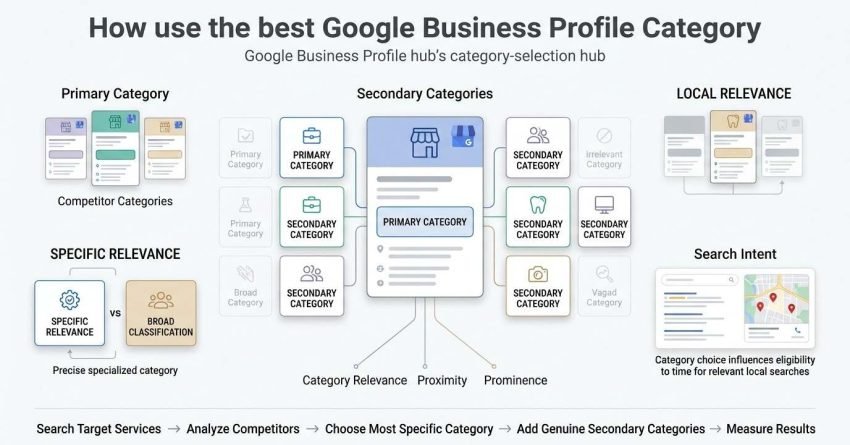
Your primary category carries the most ranking weight and should reflect the single service that represents most of your revenue. Secondary categories add supporting context without competing for that top-level relevance signal, and I typically limit clients to categories they can genuinely justify with services actually offered on-site.
How Categories Influence the Local Algorithm
Category relevance works alongside proximity and prominence as one of Google’s three core local ranking factors. A business with the exact-match category for a search query starts with a structural advantage that reviews and citations alone rarely overcome.
Primary Category vs. Secondary Categories Explained
Your primary category is the one classification Google weighs most heavily when matching your business to a local search, and you’re only allowed to select one. I always tell clients to treat this decision as close to permanent, even though it’s technically editable, because Google’s algorithm tends to reward accounts with a stable, consistent category history over frequent switching.
Why Only One Primary Category Is Allowed
Google restricts primary category selection to one option because it needs a single, unambiguous signal of what your business fundamentally is. Choosing a category that’s technically true but not your main revenue driver dilutes this signal and confuses the matching algorithm.
How Many Secondary Categories You Can Add
Google Business Profile allows up to nine secondary categories in addition to your primary category, based on Google’s official Business Profile documentation. I add secondary categories sparingly and only when the service is something the business genuinely performs, not something adjacent or aspirational.
How GBP Categories Affect Local Pack Rankings
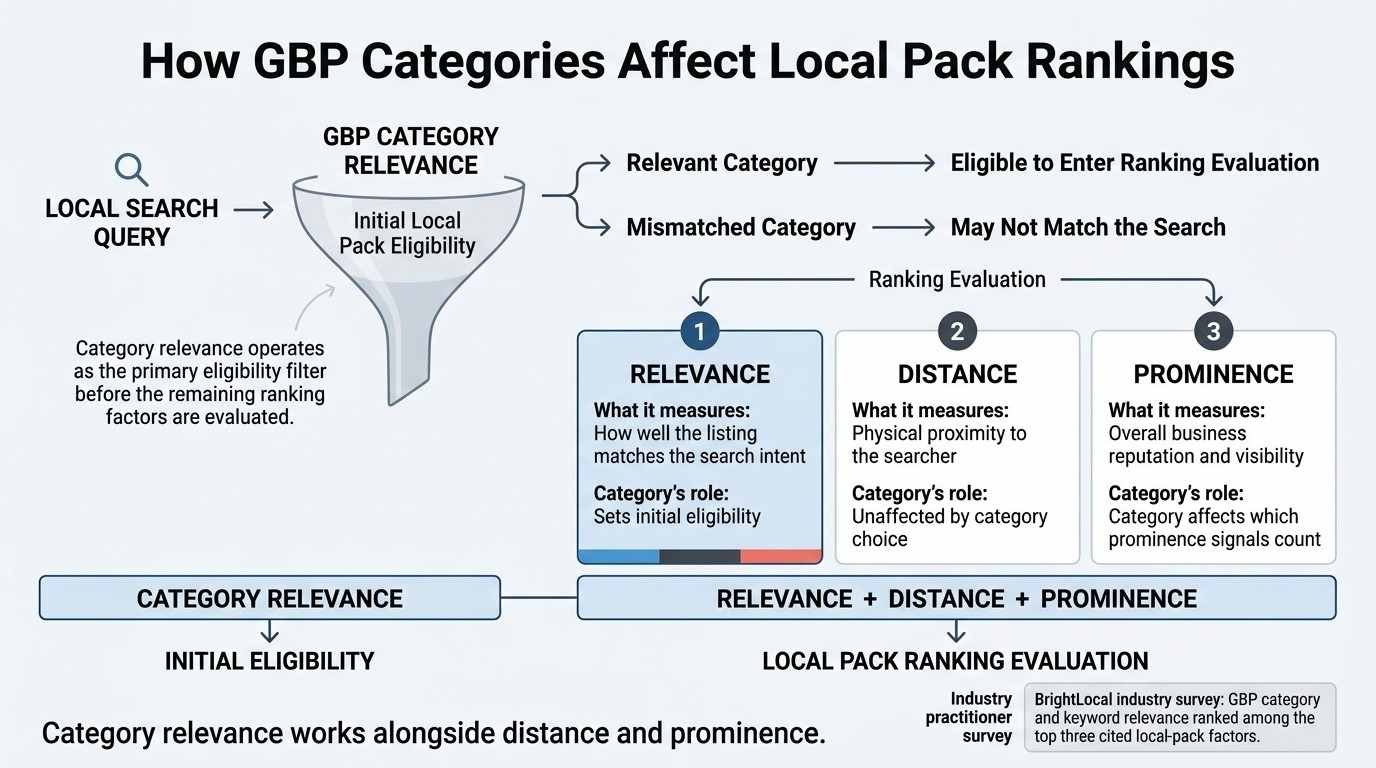
GBP category relevance directly determines whether your listing is even eligible to appear in the local pack for a given search, functioning as a filter before ranking factors are applied. I’ve watched businesses jump from page two of the map pack to the top three purely from a category correction, with zero other changes made.
Category Relevance as a Ranking Factor
| Ranking Factor | What It Measures | Category’s Role |
| Relevance | How well the listing matches the search intent | Primary driver — category sets initial eligibility |
| Distance | Physical proximity to the searcher | Unaffected by category choice |
| Prominence | Overall business reputation and visibility | Category affects which prominence signals count |
This table shows how category relevance interacts with the two other core local ranking factors rather than replacing them. A BrightLocal ranking factors survey found that Google Business Profile category and keyword relevance ranked among the top three most impactful local pack factors cited by industry practitioners.
Category Match vs. Keyword Stuffing in Business Names
Stuffing keywords into a business name field to compensate for a weak category selection violates Google’s guidelines on representing your business and risks suspension. The category field exists precisely so businesses don’t need to manipulate their name for relevance.
How to Research the Right Category for Your Business
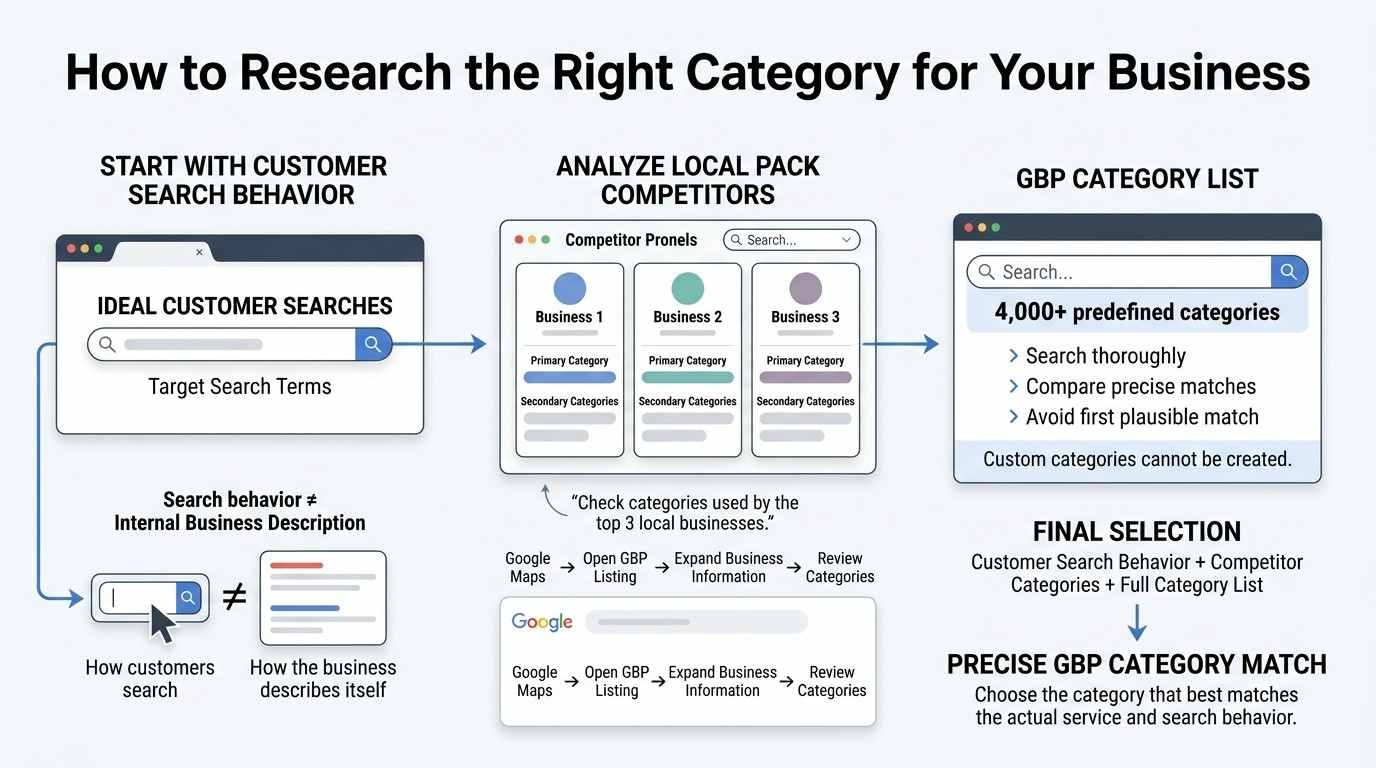
Researching the right GBP category starts with identifying exactly how your ideal customer searches for the service you provide, not how you internally describe your business. I usually start this process by pulling the categories used by the three businesses currently ranking in the local pack for my client’s target search terms.
Using Competitor Category Analysis
Competitor category research means checking which primary and secondary categories the top-ranking local businesses have selected for your target keywords. Any business owner can see a competitor’s categories by opening their GBP listing on Google Maps and expanding the business information panel.
Searching the Full GBP Category List
Google maintains a fixed list of over 4,000 predefined categories, and businesses cannot create custom ones outside this list. Searching this list thoroughly instead of settling on the first plausible match often surfaces a more precise category that better matches actual search behavior.
Industry-Specific Category Selection Considerations
Category selection rules shift depending on whether a business operates from a storefront, serves customers at their location, or manages multiple service lines under one roof. I treat service-area businesses and multi-service businesses as two entirely separate category strategies rather than variations of the same approach.
Service-Area Business Category Rules
A service-area business that doesn’t allow customer visits should hide its physical address and rely more heavily on precise category selection to establish relevance, since proximity signals work differently without a visible storefront. This makes primary category accuracy even more important for mobile and home-service businesses than for retail locations.
Multi-Service Business Category Strategy
Multi-service businesses, like a company offering both plumbing and HVAC work, need to choose the primary category based on the highest-revenue or most-searched service, then add the remaining service as a secondary category. Splitting these into separate GBP listings without separate physical locations violates Google’s guidelines and risks suspension of both profiles.
Common GBP Category Mistakes That Hurt Visibility
The most damaging GBP category mistakes involve selecting classifications that are technically defensible but too broad, too narrow, or entirely disconnected from the primary revenue-generating service. I see broad category selection most often, where a specialized business picks a generic parent category because it feels safer or more inclusive.
Choosing Categories That Are Too Broad
A category that’s too broad, like selecting “Store” instead of “Shoe Store,” dilutes relevance signals and makes it harder to rank for the specific searches that actually convert. Specificity almost always outperforms breadth in category selection, even when the broader category seems to cover more search volume.
Suspension Risks From Miscategorization
Google can suspend a listing for category misrepresentation, particularly when the selected category doesn’t match the physical business operations verified during account review. Businesses that repeatedly change categories to chase ranking trends also draw closer scrutiny from Google’s automated spam detection systems.
How to Change or Update Your GBP Category
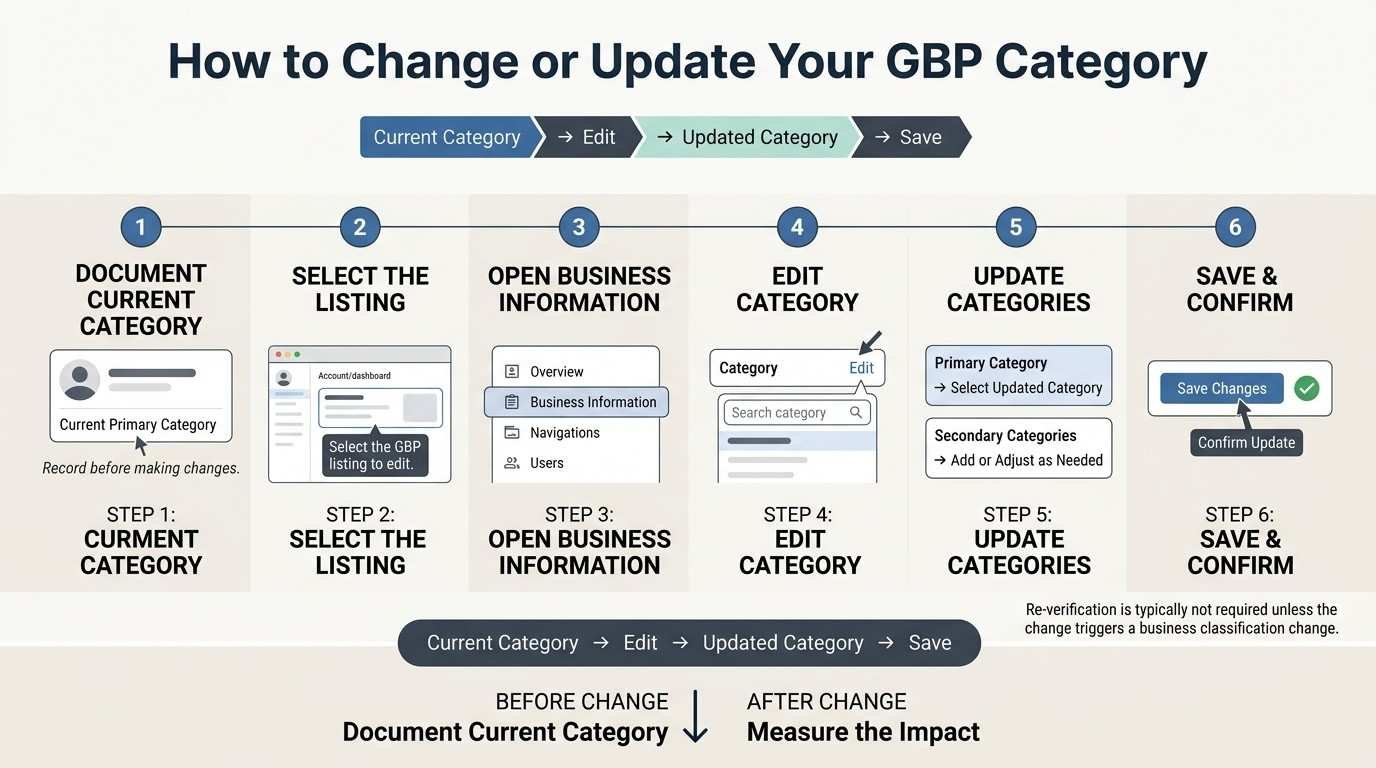
Changing a GBP category involves editing the business information section directly within the Google Business Profile dashboard, and the update typically requires no re-verification unless it triggers a business classification change. I recommend documenting the current category before making any change, so the impact can be measured accurately afterward.
Step-by-Step Category Update Process
- Log into Google Business Profile Manager and select the listing to edit
- Navigate to the “Business Information” tab
- Locate the “Category” section and click edit
- Search for and select the updated primary category
- Add or adjust secondary categories as needed
- Save the changes and confirm the update
This numbered sequence outlines the exact steps Google’s dashboard requires to update a category without triggering a re-verification request.
How Long Category Changes Take to Reflect
Category changes typically reflect in Google’s local search results within a few days to two weeks, though ranking impact can take longer to stabilize as Google re-evaluates relevance signals. I tell clients not to judge the outcome of a category change until at least three to four weeks have passed.
Measuring the Impact of a Category Change
Measuring the impact of a category change means tracking local pack position, profile views, and search query data before and after the update using Google Business Profile Insights. I always pull a baseline screenshot of rankings for target keywords the day before making any category adjustment.
Tracking Local Pack Position Before and After
Local pack position tracking compares where your listing appears for specific target searches immediately before a category change against the same searches two to four weeks later. Rank tracking tools built for local SEO give more consistent readings than manual searches, which vary by device and location.
Key Metrics to Monitor in Google Business Profile Insights
Google Business Profile Insights reports on direct searches, discovery searches, and the specific queries customers used to find your listing. A rising ratio of discovery searches relative to direct searches after a category change is one of the clearest signs the new category is expanding your relevance.
GBP Categories and Their Connection to Broader Local SEO
A GBP category is one input inside a much larger local SEO system that includes on-page signals, citation consistency, and review velocity working together to determine visibility. Category selection sets the ceiling, but the rest of a local SEO strategy determines how close a business gets to that ceiling.
Categories vs. On-Page Local SEO Signals
On-page local SEO signals, like location pages, schema markup, and NAP consistency, reinforce the relevance a category establishes but can’t substitute for choosing the wrong one in the first place. A perfectly optimized website tied to a mismatched GBP category still underperforms in the map pack.
How Categories Fit Into a Full Local SEO Strategy
Category accuracy works best as the foundation of a broader local SEO strategy that includes consistent citations, review generation, and locally-relevant content addressing the specific services tied to that category. Businesses that treat the category field as a one-time setup step rather than an ongoing strategic decision tend to plateau earlier than competitors who revisit it as their services evolve.
Conclusion
Choosing the right GBP category shapes eligibility, relevance, and ranking before any other local SEO signal comes into play. It connects directly to the broader systems of citations, reviews, and on-page optimization covered across the local SEO cluster.
We help businesses audit and correct category selection as part of a complete local SEO strategy. Reach out to White Label SEO Service to get your Google Business Profile positioned correctly from day one.
Frequently Asked Questions
What is the most important GBP category to choose?
Your primary category is the most important choice, since it carries the heaviest ranking weight in Google’s local algorithm. It should reflect the single service generating the most revenue for your business.
Can I change my Google Business Profile category anytime?
Yes, you can change your GBP category anytime through the Business Profile dashboard without re-verification in most cases. Frequent changes, however, can draw scrutiny from Google’s spam detection systems.
How many categories can I add to my GBP listing?
You can add one primary category plus up to nine secondary categories, for a total of ten. Each secondary category should reflect a service you genuinely provide.
Does my GBP category affect SEO rankings?
Yes, category selection directly affects local pack ranking eligibility by signaling relevance to Google’s algorithm. It works alongside proximity and prominence as one of the three core local ranking factors.
What happens if I choose the wrong GBP category?
Choosing the wrong category limits which searches your listing appears for, capping visibility regardless of other optimization efforts. In severe cases of misrepresentation, it can also trigger a suspension review.
Should service-area businesses use different categories?
Service-area businesses should select categories based on the services performed at customer locations, often while hiding their physical address. Category accuracy matters even more for these businesses since proximity signals work differently without a visible storefront.
How do I find competitor GBP categories?
You can find a competitor’s categories by opening their Google Business Profile on Google Maps and expanding the business information panel. This reveals both their primary and any visible secondary categories.