SERP features are the non-standard elements Google displays alongside traditional blue-link results, including featured snippets, People Also Ask boxes, local packs, and knowledge panels. I’ve watched these elements reshape click behavior across nearly every industry I’ve worked in. They matter because ranking #1 in traditional terms no longer guarantees visibility or clicks.
Search results now reward structured, extractable content over generic prose. Ignoring SERP features means losing traffic to competitors who format content correctly.
This guide covers what SERP features actually are and how Google selects them, the major result types you’ll encounter (from featured snippets and local packs to knowledge panels and AI Overviews), how to structure content to earn each one, and how to track your SERP feature performance over time. We’ll also connect this to broader SEO strategy so you know where to focus first.
What Are SERP Features?
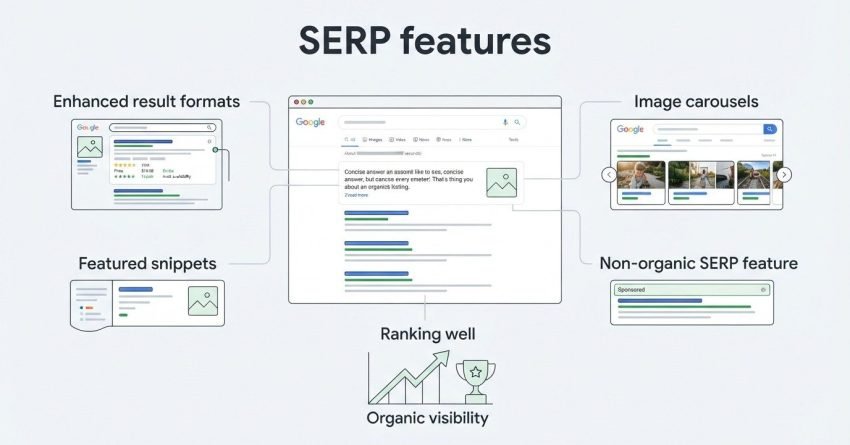
SERP features are enhanced result formats that Google inserts into search results beyond the standard ten blue links, and they include everything from featured snippets to image carousels. I think of them as Google’s way of answering a query directly on the results page instead of forcing a click.
Google has expanded these formats aggressively over the past decade. A Search Engine Land analysis found that over 70% of Google searches now trigger at least one non-organic SERP feature.
That shift changes what “ranking well” even means. A page sitting at position 3 with a featured snippet often earns more clicks than the page sitting at position 1 without one.
Why SERP Features Matter More Than Rankings Alone
Traditional rank tracking tells you where you sit in the list, but it doesn’t tell you whether you’re actually visible. I’ve seen clients hold position 4 and still capture 40% of clicks on a query because they owned the featured snippet above them.
This is why SERP feature visibility deserves its own tracking and its own strategy, separate from basic keyword rank.
How Google Decides Which SERP Features to Show
Google selects SERP features based on query intent classification, matching the searcher’s underlying need to the result format most likely to satisfy it fastest. A “how to” query triggers different features than a “buy” query or a “near me” query.
I look at intent first whenever I’m deciding which feature to target. Informational queries pull featured snippets and PAA boxes. Transactional queries pull shopping results and reviews. Local queries pull the map pack almost every time.
Query ambiguity plays a role too. Google sometimes shows multiple competing features on the same page when the intent isn’t fully clear, which is its way of hedging against misreading the searcher.
Featured Snippets
A featured snippet is a highlighted answer box that appears above the first organic result, pulling a direct quote from a ranking page to answer the query immediately. This is the single most valuable SERP feature for organic traffic because it sits at the very top of the page.
Ahrefs research on featured snippets found that pages already ranking in the top 10 capture roughly 99% of all snippets, meaning you generally need strong existing rankings before a snippet becomes attainable.
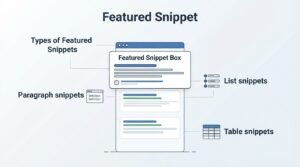
Types of Featured Snippets
Google displays three primary snippet formats depending on query structure. Paragraph snippets answer definition and explanation queries directly. List snippets answer sequential or enumerable queries like steps or rankings. Table snippets answer queries involving comparison, pricing, or structured data.
| Snippet Type | Best Query Pattern | Content Format Needed |
| Paragraph | “What is X” | 40-60 word direct definition |
| Numbered List | “How to X” / “Steps to X” | Sequential steps, one per line |
| Table | “X vs Y” / pricing/specs | Structured comparison table |
| Bullet List | “Types of X” | Short unordered list |
How to Optimize Content for Featured Snippets
I structure content for snippets by placing the direct answer in the first sentence after the heading, before adding any supporting context. Google needs to lift a clean, standalone answer without editing it.
Matching your heading to the exact query phrasing also helps. A heading like “How to Reduce Bounce Rate” pulls a different snippet trigger than “Bounce Rate Reduction Tips,” even though they mean the same thing.
People Also Ask (PAA) Boxes
People Also Ask is an expandable SERP feature that shows related questions, and clicking one reveals a short answer along with additional questions that regenerate dynamically. PAA boxes now appear on roughly half of all searches, according to Semrush’s SERP feature study.
I treat PAA as a content-expansion signal. Every question that appears reveals exactly what searchers still want answered after the main query.
How to Get Your Content Into PAA
Getting into PAA requires structuring your page with clear question-based subheadings and answering each one in two to three concise sentences immediately below. I always open with the direct answer before adding nuance or caveats.
Pages with FAQ schema markup tend to have better PAA visibility because it gives Google an explicit question-answer structure to parse.
Local Pack/Map Pack
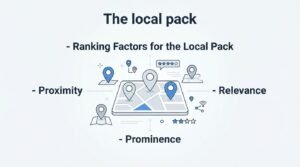
The local pack is a map-based result block showing three local business listings for queries with local intent, appearing above organic results for searches like “plumber near me.” This feature dominates local commercial queries almost entirely.
BrightLocal’s ranking factors study found that Google Business Profile signals account for the largest share of local pack ranking weight, ahead of traditional on-page factors.
Ranking Factors for the Local Pack
Three factors drive local pack rankings: proximity to the searcher, relevance of the business category and content, and prominence measured through reviews and citations. I’ve found review velocity, meaning how consistently new reviews come in, matters more than total review count alone.
Physical location relative to the searcher can’t be optimized away, which makes the other two factors the real battleground for competitive local markets.
Knowledge Panels
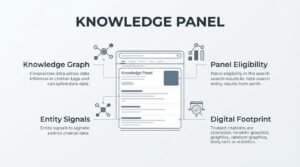
A knowledge panel is an information box that appears on the right side of desktop search results, summarizing facts about an entity pulled from Google’s Knowledge Graph. Knowledge panels typically appear for brands, people, organizations, and well-established topics.
I rarely see small businesses earn a full knowledge panel without a Wikipedia presence or substantial structured citation across the web. It rewards entities with an established digital footprint more than any single page’s optimization.
Building toward panel eligibility means investing in consistent entity signals, matching business information across every listing, and building the kind of citation profile Google trusts.
Image Pack
An image pack is a horizontal row of thumbnail images inserted into search results, typically triggered by visually-oriented queries like recipes, design references, or product searches. Ranking here depends heavily on image file naming, alt text, and surrounding page context.
I’ve found that compressed, properly labeled images with descriptive alt text outperform larger unoptimized images even when the unoptimized version is higher resolution.
Video Results & Video Carousels
A video carousel is a horizontal scrolling row of video thumbnails that appears for queries where visual demonstration helps answer the intent, and it pulls almost exclusively from YouTube and a small number of other video platforms. This makes video carousel visibility more about YouTube SEO than traditional web page optimization.
Timestamps and structured video schema improve the odds of a video earning a “key moments” breakdown directly in the SERP, which increases click-through significantly.
Top Stories / News Carousel
The Top Stories carousel is a horizontal news result block that surfaces recent articles for trending or time-sensitive queries, and it requires Google News inclusion to appear at all. Publishing speed and topical freshness weigh heavily here, more than domain authority alone.
Sites without Google News approval simply cannot compete for this feature regardless of content quality.
Site Links
Sitelinks are additional page links that appear beneath a primary organic result, typically for branded or navigational queries, and Google generates them algorithmically based on site structure and user navigation patterns. Strong internal linking and clear site architecture increase the likelihood of sitelinks appearing.
I’ve noticed that sites with a confusing navigation structure rarely earn more than one or two sitelinks even at the top ranking position.
Shopping Results (Product Listings)
Shopping results are a carousel of product listings showing images, prices, and merchant names, pulled primarily from Google Merchant Center feeds rather than organic page content. This feature dominates transactional product queries and requires a structured product feed to appear at all.
Accurate pricing, availability, and product schema markup directly influence whether a listing gets shown and how often it’s clicked.
Reviews & Star Ratings (Rich Snippets)
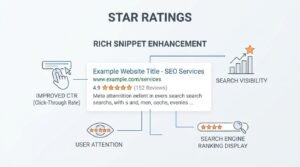
Star ratings are a rich snippet enhancement that displays aggregate review scores directly beneath an organic listing, pulled from schema markup embedded in the page. Listings with star ratings visible earn noticeably higher click-through rates than plain organic results.
A study by Search Engine Journal found review-enhanced listings saw click-through improvements of up to 35% compared to standard results on similar rankings.
Schema Markup Requirements for Review Stars
Google requires structured Review or AggregateRating schema, along with genuine, verifiable reviews, before it will display star ratings. Fake or self-authored reviews risk manual action rather than just a lost rich snippet.
I always validate schema through Google’s Rich Results Test before publishing, since a single formatting error can prevent the entire markup from being read.
Related Searches
Related searches are a list of alternative query suggestions displayed at the bottom of the results page, reflecting the broader semantic cluster surrounding the main query. This feature reveals exactly how Google groups topics together conceptually.
I mine this list constantly when planning content clusters because it shows real query variations users actually search, not just keyword tool estimates.
AI Overviews (SGE)
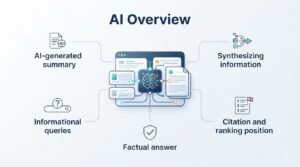
An AI Overview is an AI-generated summary that appears above traditional results, synthesizing information from multiple sources into a single conversational answer. This is the newest and fastest-growing SERP feature, and it’s reshaping how content earns visibility entirely.
Google’s own documentation confirms AI Overviews now appear on a significant share of informational queries, particularly those with a clear factual answer.
How AI Overviews Select and Cite Sources
AI Overviews tend to cite pages with clear, self-contained factual statements, especially ones that name their subject directly rather than relying on pronouns or prior context. I write every definition sentence so it works if lifted completely out of the page.
Content that already ranks well organically has a better chance of citation, but citation and ranking position don’t always correlate directly.
Social Results (Twitter/X Carousel)
A social carousel is a horizontal row of posts from platforms like X, appearing for queries about trending topics, public figures, or breaking events. This feature depends on real-time relevance rather than traditional page-level SEO signals.
Brands with active, verified social profiles occasionally see their own posts surface here for branded queries, which adds another layer of SERP real estate worth protecting.
How to Track and Measure SERP Feature Performance
Tracking SERP feature performance means monitoring which features appear for your target queries and whether your pages are the ones filling them, using tools built specifically for feature-level visibility rather than basic rank tracking. Standard rank trackers often miss this entirely.
I check Google Search Console’s performance report regularly, filtering by query to see impressions and clicks tied to specific feature types, since GSC does distinguish some feature-driven impressions from standard ones.
Dedicated SERP tracking tools display which competitors currently hold each feature for a given keyword, which helps prioritize where a genuine opportunity exists versus where a competitor is deeply entrenched.
Building an SEO Strategy Around SERP Features
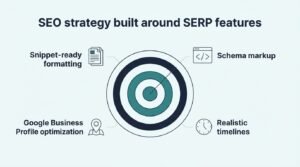
An SEO strategy built around SERP features means auditing which features appear for your priority keywords, then structuring specific pages to target the exact format each feature requires. I always start this process by mapping current SERP feature presence before writing a single word of new content.
This means prioritizing snippet-ready formatting for informational content, schema markup for anything with reviews or products, and Google Business Profile optimization for anything with local intent. Each feature type demands its own tactical approach rather than a single blanket strategy.
Realistic timelines matter here too. Snippet and PAA gains often show up within a few months of correct formatting, while knowledge panels and consistent AI Overview citations tend to take considerably longer to establish.
Conclusion
SERP features have fundamentally changed what “ranking well” means, turning snippets, PAA boxes, and AI Overviews into prime real estate beyond the traditional top ten.
Mastering each feature type, from local packs to schema-driven rich results, builds compounding visibility across the entire search results page.
We help businesses build strategies around every SERP feature that matters through White Label SEO Service, turning fragmented visibility into consistent, measurable organic growth.
Frequently Asked Questions
What is the difference between SERP features and organic rankings?
SERP features are enhanced result formats like snippets and local packs, while organic rankings refer to standard blue-link position. A page can rank lower but still dominate visibility through a featured snippet.
How many types of SERP features are there?
There are roughly 15-20 recognized SERP feature types, including featured snippets, PAA, local packs, knowledge panels, and AI Overviews. New formats continue to emerge as Google tests result layouts.
Do SERP features reduce organic click-through rates?
Yes, SERP features often reduce clicks to organic results below them by answering the query directly on the results page. This makes owning the feature itself more valuable than the organic listing beneath it.
Can small businesses realistically rank for SERP features?
Small businesses can realistically win featured snippets, PAA, and local packs since these depend on content structure and local signals rather than domain size. Knowledge panels and AI Overview citations are harder without established authority.
How long does it take to rank for a featured snippet?
Featured snippets typically take three to six months once a page reaches page one rankings and uses proper answer-first formatting. Pages with no existing top-10 ranking rarely earn snippets regardless of formatting quality.
Does schema markup guarantee a rich result?
No, schema markup makes a page eligible for rich results but doesn’t guarantee Google will display them. Content quality, accuracy, and genuine user signals still determine final selection.
What tools track SERP feature visibility?
Tools like Semrush, Ahrefs, and specialized SERP tracking platforms show which features appear for target keywords and which domains currently hold them. Google Search Console adds supplementary impression data for some feature types.