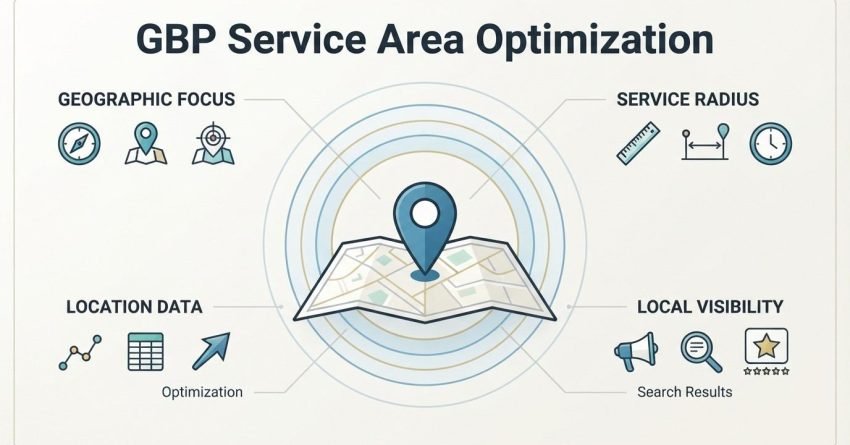
A Google Business Profile service area defines the specific cities, zip codes, or regions a business serves without a public storefront, and it directly shapes which local searches trigger that listing. I’ve watched businesses double their local pack appearances just by fixing how they’d configured this one setting. Getting it wrong quietly caps how far your visibility reaches, and most owners never realize it’s happening.
We see this mistake constantly with service-based businesses plumbers, cleaners, consultants, mobile technicians who set up their profile once and never revisit it.
This guide covers how service area businesses are classified on Google, the exact steps to set up and configure your service areas, how radius and ranking factors interact, and how to optimize the rest of your profile to convert that visibility into leads. We’ll also cover common mistakes, performance tracking, and where this fits into your wider local SEO plan.
What Is a Service Area Business on Google Business Profile?
A service area business (SAB) is a Google Business Profile classification for companies that travel to customers rather than serving them at a fixed retail location. This designation changes how your address displays, how your profile qualifies for local pack results, and which map behaviors apply to your listing.
I think of it as Google’s way of handling businesses that don’t fit the traditional storefront model: a plumber, a mobile groomer, an HVAC repair company. None of them need customers walking through a front door, so Google built a listing type around that reality.
How Service Area Businesses Differ From Storefront Listings
Storefront listings display a public address and pin on Google Maps, and customers are expected to visit that location. Service area listings can hide the address entirely, showing only the general regions served instead of a precise map pin.
This distinction matters because 28% of local searches result in a purchase within one day, and a mismatched profile type can quietly exclude a business from those searches. Storefront rules and service area rules pull from different ranking signals, which we cover in detail further in this guide.
Who Should Use the Service Area Format
Any business that travels to the customer instead of hosting them on-site should use the service area format. Home services, mobile repair, field consultants, event vendors, and cleaning companies are the clearest fits.
I’ve set this up wrong for a client once, early on, and it capped their visibility to a three-mile radius they never intended. That mistake is exactly why the setup steps below matter as much as they do.
How to Set Up Your Google Business Profile as a Service Area Business
Setting up a Google Business Profile as a service area business starts inside the profile’s business information settings, where you select “I deliver goods and services to my customers” instead of listing a public storefront address. This single toggle changes how the rest of the profile behaves.
I always tell clients to treat this as the foundational decision everything else on the profile builds on top of it.

Choosing Between Hiding Your Address and Showing a Storefront
Google gives service area businesses the option to hide their address completely or display it while still marking themselves as a service area business. Hiding the address is the right move for home-based businesses that don’t want customers showing up unannounced.
Showing the address still makes sense for a business with a small showroom or office that also travels to customers, since it adds a layer of trust without misrepresenting the model.
Selecting Your Primary Business Category
Your primary business category tells Google which searches your profile is eligible to appear in, and it carries more ranking weight than any secondary category you add afterward. Picking the closest possible match to your core service, rather than a broader umbrella term, produces measurably better local pack visibility.
I run this check on every new profile: does the primary category match the exact service someone would type into Google? If not, we change it before touching anything else.
How to Define and Add Service Areas in Your GBP Dashboard
Service areas are added inside the Google Business Profile dashboard under the “Areas” section, where you can list specific cities, zip codes, or broader regions your business serves. Each area you add expands the pool of local searches your listing becomes eligible for.
We treat this step carefully because it’s easy to either under-cover or over-extend, and both mistakes cost visibility in different ways.
Adding Cities, Zip Codes, and Regions
You can add service areas using city names, postal codes, or in some cases wider regional descriptors, and Google will suggest matching areas as you type. Mixing city names with zip codes inside overlapping regions tends to produce the cleanest results.
I usually start with the zip codes closest to the business’s home base and expand outward from there, rather than jumping straight to distant metro areas.
How Many Service Areas You Can Add
Google Business Profile allows up to 20 service areas per listing, and businesses rarely benefit from maxing that number out. A landscaping company covering three adjacent counties needs far fewer defined areas than a plumbing franchise operating across a metro region.
Google’s official guidelines state that service areas should reflect places you genuinely service, not aspirational markets you’d like to enter. Padding the list with areas you don’t actually serve creates the duplicate listing risk we cover later in this guide.
How Far Should Your Service Area Radius Extend?
A service area radius should extend only as far as your business can realistically deliver its service within a reasonable timeframe, typically no more than a one-to-two-hour drive from your base of operations. Stretching beyond that range dilutes relevance signals Google uses to match your listing to nearby searchers.
I’ve seen businesses list an entire state as their service area, thinking bigger automatically means more leads. It doesn’t; it just spreads your relevance so thin that Google stops trusting the listing for any single location.
Service Area Business vs. Storefront: Which Google Ranking Signals Apply
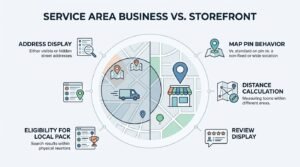
Service area businesses and storefront businesses are ranked using the same three core local ranking signals: relevance, distance, and prominence, but distance is calculated differently for each. A storefront’s distance is measured from its exact address pin, while a service area business’s distance is measured from the searcher to the business’s stated coverage zone.
| Ranking Factor | Storefront Business | Service Area Business |
| Address display | Public, pinned on map | Hidden or optional |
| Distance calculation | From exact address | From service area boundary |
| Map pin behavior | Fixed location shown | No pin, or general area shading |
| Review display | Standard | Standard, same weight |
| Eligibility for local pack | High within tight radius | Depends on defined areas |
Understanding this distinction changes how you think about optimization: a service area business can’t rely on proximity the same way a storefront does, which is why the ranking factors below matter more here than almost anywhere else in local SEO.
How Google Determines Local Pack Rankings for Service Area Businesses
Google ranks local pack results for service area businesses using three primary factors: relevance to the search query, distance from the searcher to the defined service area, and prominence based on reviews, citations, and overall web presence. All three signals work together rather than independently.
Relevance, Distance, and Prominence Explained
Relevance measures how well your profile matches what someone searched for, distance measures how close the searcher is to your service coverage, and prominence measures how well-known and well-reviewed your business is across the web. A business strong in prominence can sometimes outrank a closer competitor that’s weaker in reviews and citations.
Google’s own local ranking documentation confirms that prominence includes factors from beyond Google Business Profile itself, including a business’s presence in other parts of the web.
Why Your Business Address Still Matters for Ranking
Even with the address hidden from public view, Google still uses your actual business address internally to calculate distance for local pack rankings. This means the physical location you register still directly affects visibility, even when customers never see it.
I always confirm the registered address is accurate down to the exact building, because Google treats this as a hard data point, not a rough estimate.
Optimizing Your GBP Profile Beyond Service Areas
A fully optimized Google Business Profile combines an accurate service area setup with a complete business description, comprehensive services list, current photos, and correctly filled attributes. Each of these elements feeds into the prominence signal we covered above.
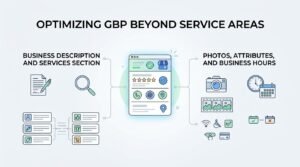
Business Description and Services Section
The business description should clearly state what you do, who you serve, and which areas you cover, written in plain language rather than keyword-stuffed phrasing. The services section should list every specific service you offer, since Google increasingly matches search queries directly against individual listed services.
Photos, Attributes, and Business Hours
Profiles with recent, high-quality photos consistently earn more clicks and calls than profiles using stock imagery or outdated shots. Attributes and accurate business hours round out profile completeness and reduce the chance a searcher bounces to a competitor over a missing detail.
Managing Customer Reviews for Service Area Businesses
Customer reviews directly influence the prominence ranking factor, making them one of the highest-leverage elements a service area business can control. Responding to every review, positive or negative, signals active management to both customers and Google.
I make it a habit to respond within 48 hours whenever possible, since prospective customers read owner responses almost as closely as the reviews themselves.
Using Google Posts and Q&A to Strengthen Local Visibility
Google Posts let a business share updates, offers, and service announcements directly inside the profile, keeping the listing active in Google’s eyes. The Q&A section lets past customers and prospects ask questions publicly, and answering them promptly adds another layer of engagement signal.
We treat unanswered Q&A threads as a red flag during audits, since an abandoned Q&A section reads as a stale, unmanaged profile.
How Multiple Service Areas Affect Duplicate Listings and Google Guidelines
Creating multiple Google Business Profile listings to cover different service areas violates Google’s guidelines unless each listing represents a genuinely separate business location or legal entity. A single business trying to rank in multiple cities should expand its service area settings rather than create duplicate profiles.
Google’s guidelines on business location explicitly restrict service area businesses to one listing per legally distinct business entity. Violating this risks suspension of some or all of the duplicate listings involved.
Tracking Performance: Key Metrics for Service Area GBP Listings
Google Business Profile Insights provides direct measurement of how a service area listing performs, tracking metrics like search queries, customer actions, and photo views. These numbers reveal whether the service area configuration is actually reaching the intended audience.
Understanding GBP Insights Data
Insights breaks down performance into discoverable metrics like how customers found the listing, what actions they took, and which search terms triggered an appearance. A sudden drop in discovery searches often points directly back to a service area or category misconfiguration.
| Metric | What It Measures | Why It Matters |
| Discovery searches | Searches not using your business name | Reveals category and area reach |
| Direct searches | Searches using your business name | Shows brand recognition |
| Customer actions | Calls, direction requests, website clicks | Measures conversion intent |
| Photo views | Engagement with profile images | Correlates with click-through rate |
Connecting GBP Performance to Local Search Console Data
Pairing GBP Insights with Google Search Console data shows the fuller picture of how local searches convert into website traffic once someone clicks through from the profile. This connection helps confirm whether service area changes are producing measurable downstream traffic gains.
Common Service Area Setup Mistakes That Hurt Local Reach
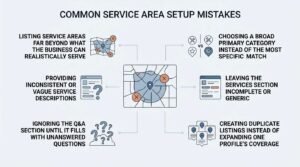
Service area businesses commonly lose visibility through a handful of repeatable, avoidable mistakes rather than complex technical failures. Recognizing these patterns early prevents months of quietly reduced reach.
The most frequent mistakes I see include:
- Listing service areas far beyond what the business can realistically serve
- Choosing a broad primary category instead of the most specific match
- Leaving the services section incomplete or generic
- Ignoring the Q&A section until it fills with unanswered questions
- Creating duplicate listings instead of expanding one profile’s coverage
How Service Area Optimization Fits Into a Broader Local SEO Strategy
Service area optimization is one component of local SEO, which also includes citation consistency, on-page local signals, and localized content strategy across the website itself. A well-configured GBP service area amplifies the effect of these other efforts, but it doesn’t replace them.
I treat GBP as the visibility layer, and the website as the conversion layer; both need attention for local search to translate into actual revenue.
Conclusion
Service area configuration, ranking factors, and profile completeness all work together to determine local visibility. Understanding how Google weighs relevance, distance, and prominence puts control back in your hands.
Local SEO extends well beyond Google Business Profile into citations, content, and site-wide signals worth exploring further. Getting the foundation right here sets up everything else.
We help businesses turn this foundation into consistent local leads. Partner with White Label SEO Service to build a local strategy that performs.
Frequently Asked Questions
Can a service area business hide its address on Google?
Yes, service area businesses can hide their address on Google Business Profile. This option is available specifically for businesses that travel to customers rather than hosting them on-site.
How many service areas can I add to my Google Business Profile?
Google Business Profile allows up to 20 service areas per listing. Most businesses perform better focusing on fewer, genuinely served areas rather than maximizing the count.
Does expanding my service area help me rank in more cities?
Expanding your service area can increase eligibility for searches in new locations, but only if you can realistically serve those areas. Overextending dilutes relevance and often reduces rankings in your core areas instead.
Can I have multiple GBP listings for the same business in different areas?
No, a single legal business entity should maintain one Google Business Profile listing. Multiple listings for the same entity violate Google’s guidelines and risk suspension.
What happens if my service area overlaps with a competitor’s?
Overlapping service areas are normal and expected in most industries. Google ranks each business independently based on relevance, distance, and prominence rather than penalizing overlap itself.
How often should I update my service areas on Google Business Profile?
Service areas should be reviewed whenever your actual coverage changes, such as expanding operations or discontinuing service to a region. Reviewing them roughly every six months catches most needed updates.
Will adding more service areas hurt my local ranking?
Adding more service areas can hurt rankings if the added areas are too far from your actual base of operations. Distance still factors into ranking even when service areas are broadly defined.