An SEO penalty is a drop in search visibility caused by a manual action from Google or an algorithmic reassessment of a site’s quality, links, or user experience. I’ve seen traffic fall 40% overnight and take months to explain, and almost every time, the cause was hiding in data the site owner already had access to but never checked. Recovering from a penalty isn’t about guessing what went wrong.
It’s about running the right diagnostic tools in the right order. Skipping this step wastes months chasing symptoms instead of causes, and every week without a diagnosis is a week of lost revenue.
This guide covers how to confirm you actually have a penalty, the core diagnostic tools for traffic, links, and technical health, how to audit content and site performance issues, and what to do once you’ve found the cause. I’ll also cover recovery timelines and how to prevent this from happening again.
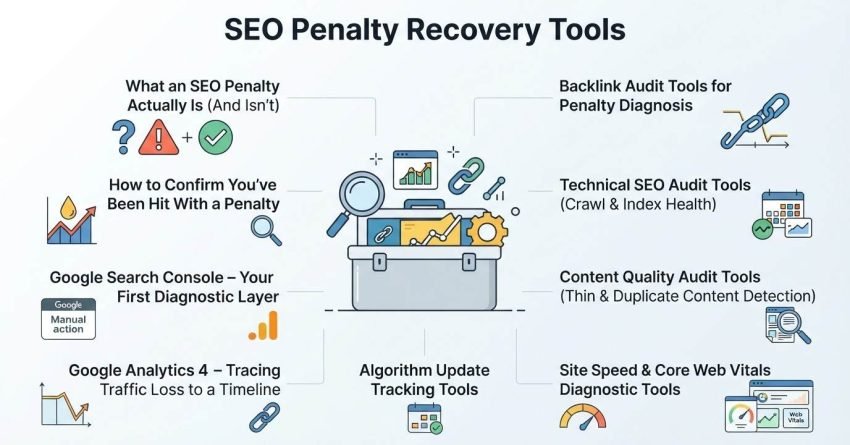
What an SEO Penalty Actually Is (And Isn’t)
An SEO penalty is either a manual action taken by a Google reviewer or an algorithmic devaluation triggered by a broad core update, both of which suppress a site’s rankings. These are two fundamentally different problems with different fixes. A manual action shows up as an explicit notice inside Search Console, while an algorithmic hit shows up only as a traffic graph that falls off a cliff.
Manual actions and algorithmic suppression get treated as the same emergency by most site owners, but they require completely different diagnostic paths. A manual action penalty has a documented reason attached to it. Algorithmic suppression, by contrast, requires cross-referencing your own analytics against public update rollout dates to even confirm it happened.
The symptoms overlap enough to cause confusion. Sudden ranking drops, de-indexed pages, and falling impressions in Search Console all show up in both scenarios, which is why the diagnostic stack matters more than the symptom itself.
How to Confirm You’ve Been Hit With a Penalty
Confirming a penalty starts with separating a sudden traffic drop from normal seasonal or competitive fluctuation using at least 90 days of historical data. I always pull up a year-over-year comparison first, because a drop that lines up with last year’s pattern is rarely a penalty. A drop that breaks from every prior pattern is a different story.
Traffic drop patterns tell you a lot before you open a single tool. A gradual decline over months usually points to content decay or competitive displacement, while a sharp overnight collapse points toward either a manual action or a core update rollout. Mapping the exact date of the drop against known update timelines narrows the cause considerably.
Manual action notices are the more straightforward case because Google tells you directly. These arrive inside Google Search Console’s Manual Actions report, and they name the specific violation, whether that’s unnatural links, thin content, or a user-generated spam issue. No notice means the drop is very likely algorithmic rather than manual, which changes the entire recovery approach.
Google Search Console – Your First Diagnostic Layer
Google Search Console is Google’s free webmaster tool that reports manual actions, indexing status, and search performance data directly from Google’s own systems. It’s the first place I check on any penalty investigation because it’s the only tool that shows Google’s direct assessment of a site rather than a third-party estimate.
The Manual Actions report lives under the Security & Manual Actions section and lists any violation Google has flagged, along with the affected URLs or the entire site. If this report is empty, the drop is almost certainly algorithmic, and the investigation shifts toward core update correlation instead.
Search performance and index coverage data fill in the rest of the picture. A sudden spike in “Crawled currently not indexed” pages alongside falling impressions often signals a content quality reassessment rather than a links problem. Cross-referencing which query clusters lost visibility narrows down whether the hit affected the whole site or just a specific content category.
Google Analytics 4 – Tracing Traffic Loss to a Timeline
Google Analytics 4 traces organic traffic loss to an exact date range, which is the anchor point for every other diagnostic step that follows. I export the daily organic sessions trend and overlay it against a known list of confirmed algorithm rollout windows before touching anything else.
Correlating traffic drops with algorithm update dates turns a vague “traffic went down” into a specific, testable hypothesis. If the drop aligns within a day or two of a confirmed core update rollout, algorithmic suppression becomes the leading theory, and the audit shifts toward content quality and E-E-A-T signals rather than technical errors.
Algorithm Update Tracking Tools
Algorithm update tracking tools log the rollout dates, volatility levels, and affected industries for every confirmed and unconfirmed Google update. These trackers pull data from ranking volatility across thousands of tracked keywords, giving a second, independent confirmation beyond your own analytics.
Cross-referencing update rollouts with your own ranking drops is how a suspicion becomes a diagnosis. A drop that lines up with a broad core update, combined with no manual action notice, points toward a site-wide quality reassessment rather than an isolated technical bug. This correlation step is what separates confident recovery planning from guesswork.
Backlink Audit Tools for Penalty Diagnosis
A backlink audit tool scans a site’s full link profile to flag spammy, low-quality, or unnatural links that could trigger a manual action or algorithmic link-based penalty. I run this any time a penalty investigation doesn’t point clearly at content or technical issues, since link-based penalties rarely announce themselves through traffic patterns alone.
Identifying toxic or spammy link patterns means looking past raw link counts and into placement context, anchor text over-optimization, and domains with no topical relevance to the linked site. A sudden spike in exact-match anchor text links from unrelated foreign-language domains is a classic red flag that most audits will catch quickly.
Disavow file preparation is the output of this audit stage, and it’s a document, not a guess. The file lists every domain or URL you’re asking Google to discount, and it only gets submitted once the toxic link pattern is clearly confirmed rather than assumed, since disavowing legitimate links can do more harm than the penalty itself.
Technical SEO Audit Tools (Crawl & Index Health)
A technical SEO audit tool crawls a website the way a search engine bot does, surfacing indexation errors, broken architecture, and duplicate content that can trigger algorithmic suppression. These crawlers simulate Googlebot’s path through a site and flag every point where that path breaks down.
Crawlability and indexation errors show up as blocked resources, orphaned pages, or a bloated crawl budget wasted on low-value URLs. A site with thousands of thin, near-duplicate pages competing for the same crawl budget often looks, from Google’s side, indistinguishable from a low-quality content farm.
Site architecture and duplicate content issues compound each other. Poor internal linking hierarchy buries important pages under layers of clicks, while duplicate or near-duplicate content across category and filter pages dilutes topical authority across a dozen weak URLs instead of concentrating it on one strong one.
Content Quality Audit Tools (Thin & Duplicate Content Detection)
A content quality audit tool scores existing pages against thin content, duplication, and relevance benchmarks to identify what’s dragging down a site’s overall quality assessment. This step matters most after a confirmed core update correlation, since Google’s broad core updates are largely content quality reassessments.
Identifying low-value or cannibalized pages means finding content that either provides too little unique value to rank or directly competes with another page on the same site for the same query. Both patterns tell Google the site can’t clearly signal which page deserves to rank, which suppresses both.
Site Speed & Core Web Vitals Diagnostic Tools
A Core Web Vitals diagnostic tool measures loading performance, interactivity, and visual stability against Google’s published ranking thresholds. Performance-based suppression rarely causes a penalty on its own, but it compounds an existing content or link-quality issue into a steeper drop.
Isolating performance-based ranking suppression means checking whether Core Web Vitals scores degraded around the same time as the traffic drop, or whether they’ve been consistently poor for months. A long-standing performance issue that suddenly starts mattering usually means a core update shifted how heavily Google weighs it, rather than something breaking on your site.
Structured Data & Schema Validation Tools
A schema validation tool checks structured data markup against Google’s required and recommended properties for each content type. Broken schema doesn’t cause a penalty by itself, but it can silently remove a page from rich result eligibility, which looks like a visibility drop even when rankings haven’t moved.
Running a validation pass after any site migration, CMS update, or template change catches broken markup before it compounds into a bigger visibility problem.
Security & Malware Scanning Tools
A security scanning tool detects malware injections, hacked content, and unauthorized redirects that trigger Google’s Security Issues warnings. This audit step gets skipped constantly, and it shouldn’t, because a hacked content penalty produces a traffic collapse that looks identical to an algorithmic hit until you actually check.
Detecting hacked content penalties usually starts with the Security Issues report inside Search Console, which flags injected spam pages, malware distribution, or deceptive content added without the site owner’s knowledge. Foreign-language spam pages suddenly appearing in your site’s index is one of the clearest signs this is the actual cause.
Building Your Penalty Recovery Audit Stack (Tool Comparison)
A complete penalty recovery audit stack combines free Google tools with paid third-party platforms to cover manual actions, backlinks, technical health, and content quality in one workflow. No single tool covers every diagnostic angle, which is why relying on just one almost always misses the actual cause.
| Tool Category | Free Option Covers | Paid Tier Adds |
| Search Performance | Search Console (manual actions, indexing) | Historical data retention, API access |
| Backlink Analysis | Basic link reports | Toxic scoring, disavow file generation |
| Technical Crawl | Limited page crawls | Full-site crawls, scheduled monitoring |
| Content Quality | Manual review | Automated thin/duplicate detection at scale |
Free vs. paid tool tiers usually come down to site size and urgency. A small site can often diagnose a penalty using free tools alone, while a large site with thousands of URLs needs paid crawl and backlink tools just to process the volume of data involved.
How to Prioritize Fixes After Diagnosis
Fixes should be prioritized by confirmed cause first, scope of impact second, and implementation speed third. A confirmed manual action always outranks a suspected algorithmic issue, because manual actions have documented, specific violations that must be resolved before any recovery request can succeed.
Site-wide technical errors typically get fixed before page-level content issues, since a crawl or indexation problem can mask the impact of every other fix made underneath it. Sequencing matters here. Fixing content quality on pages Google can’t even crawl properly wastes the effort.
Submitting a Reconsideration Request
A reconsideration request is a formal submission to Google asking a human reviewer to lift a manual action after the underlying violation has been fixed. This request only applies to manual actions. Algorithmic suppression has no submission process. It resolves only through the next core update refresh once quality issues are genuinely fixed.
The request needs to document exactly what was wrong, what was changed, and evidence of the fix, such as a disavow file submission date or removed spam content. Vague or incomplete requests get rejected and cost another review cycle, which can add weeks to recovery.
How Long SEO Penalty Recovery Takes
Manual action recovery typically takes a few days to a few weeks after a successful reconsideration request, while algorithmic recovery can take anywhere from one to several core update cycles. Core updates roll out every few months, which means algorithmic recovery timelines are largely out of a site owner’s direct control.
This timeline difference is why confirming which type of penalty occurred matters so much early in the process. Spending weeks perfecting a reconsideration request for a problem that was actually algorithmic wastes the exact time that should have gone into fixing content and technical quality instead.
Preventing Future Penalties With Ongoing Monitoring
Ongoing monitoring means checking Search Console, backlink profiles, and Core Web Vitals on a recurring schedule rather than only after a traffic drop already happened. Most penalties are preventable simply because the warning signs sit in data most sites never look at until something breaks.
Setting monthly link profile reviews and quarterly technical audits catches small quality issues before they accumulate into something that triggers a core update reassessment.
Conclusion
Recovering from an SEO penalty comes down to correctly diagnosing whether a manual action or algorithmic suppression caused the drop. Search Console, backlink audits, and technical crawls each answer a different piece of that question.
Every recovery timeline depends on getting that diagnosis right the first time. Ongoing monitoring keeps the same issues from resurfacing after a core update refresh.
We help businesses build the audit stack and recovery plan that gets rankings back. Talk to White Label SEO Service about diagnosing your site today.
Frequently Asked Questions
How do I know if I have a Google manual action or an algorithm penalty?
A manual action appears directly inside Google Search Console’s Manual Actions report with a specific violation listed. An algorithmic penalty shows no such notice, only a traffic drop that lines up with a known core update date.
Can I recover from an SEO penalty without professional help?
Yes, smaller and clearly diagnosed penalties are often fixable independently using free diagnostic tools. Complex or large-scale link and content penalties usually recover faster with experienced help.
How long does Google take to respond to a reconsideration request?
Google typically responds within a few days to a few weeks, though complex cases can take longer. Response times aren’t officially guaranteed or published by Google.
Will disavowing links guarantee penalty recovery?
No, disavowing links only removes toxic link signals and does not guarantee recovery on its own. It must be paired with fixing any other confirmed causes, like content or technical issues.
Can a website recover from an algorithmic penalty without waiting for an update?
Rarely. Algorithmic suppression generally requires the next relevant core update rollout to reflect fixed quality signals, since there’s no manual review process for algorithmic changes.
Do all traffic drops mean a penalty occurred?
No, seasonal shifts, competitor movement, and tracking errors cause traffic drops that mimic penalties. Comparing year-over-year data before assuming a penalty is essential.
What’s the first tool I should check after a sudden ranking drop?
Google Search Console should be checked first, since it directly shows manual actions, indexing errors, and performance data straight from Google’s own systems.