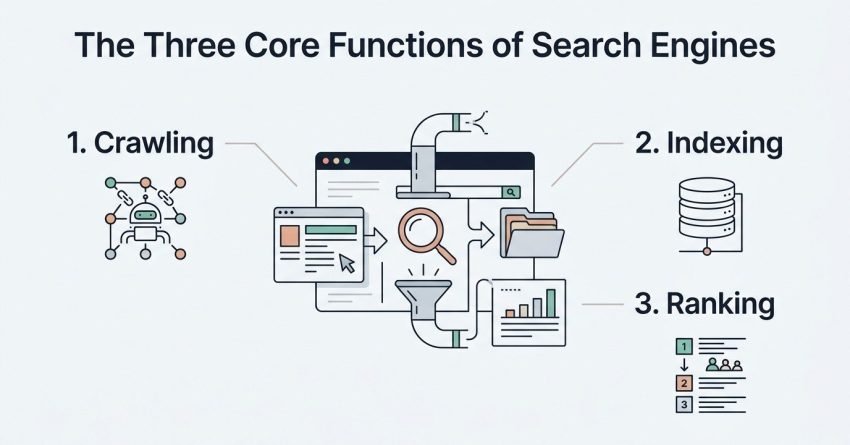
Search engines find, store, and rank web pages through three distinct processes: crawling, indexing, and ranking. Crawling is how bots discover your pages, indexing is how those pages get stored in a searchable database, and ranking determines the order they appear in results. I’ve spent years watching businesses confuse these three stages, and that confusion usually costs them traffic.
Getting any one stage wrong quietly kills your visibility. A page that isn’t crawled can’t be indexed, and a page that isn’t indexed can never rank, no matter how good the content is.
This guide covers how the three-stage discovery process works, the crawl controls and sitemaps that guide search engines through your site, how indexing decisions get made and diagnosed, the on-page, off-page, and technical factors that drive rankings, and what realistic timelines look like once everything is working together.
How Search Engines Work: The Three-Stage Process
Search engines use three sequential stages, crawling, indexing, and ranking, to turn raw web pages into ordered search results. I think of it as a pipeline: nothing moves to stage two without clearing stage one first.
What Is a Search Engine Algorithm?
A search engine algorithm is a set of automated rules a search engine uses to retrieve, organize, and rank web pages in response to a query. Google’s algorithm alone weighs hundreds of signals at once. We work with these signals daily, and they’re never static. Google runs thousands of algorithm updates a year, most too small to notice individually.
Crawling vs Indexing vs Ranking – Key Differences
Crawling discovers pages, indexing stores and organizes them, and ranking orders them for a specific search query. These three stages happen in strict sequence, never in parallel for a single page.
- Crawling: bots request and download your page content
- Indexing: the search engine analyzes and stores the page in its database
- Ranking: the algorithm scores and orders indexed pages for each query
A page stuck at stage one never reaches stage three. I’ve audited sites where teams optimized content for weeks before realizing the pages weren’t even being crawled.
Crawling: How Search Engines Discover Your Pages
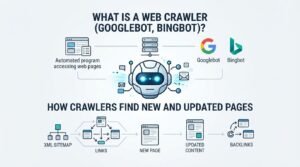
Crawling is the process by which automated bots systematically browse the web to discover new and updated pages. Every search engine runs its own crawler, and understanding how they behave shapes everything downstream.
What Is a Web Crawler (Googlebot, Bingbot)?
Googlebot is Google’s web crawling bot; that is, a software program that requests pages, follows links, and downloads content for indexing. Bingbot performs the same function for Microsoft’s search engine. Both bots respect the same core signals: internal links, sitemaps, and crawl directives.
How Crawlers Find New and Updated Pages
Crawlers discover new pages primarily through links, both internal and external, and through submitted sitemaps. We see this constantly in client accounts: a page with zero internal links sits undiscovered for months, even on an otherwise healthy site.
Search engines rely on link discovery as their primary crawling mechanism, meaning orphaned pages, those with no internal links pointing to them, are the single most common crawling failure I encounter.
Crawl Budget and Crawl Efficiency
Crawl budget is the number of pages a search engine will crawl on your site within a given timeframe. For most small sites, this rarely matters. For sites above 10,000 pages, it becomes one of the first things I check.
What Determines Your Crawl Budget?
- Site authority: higher-authority sites earn more frequent crawling
- Site health: slow server response times shrink your crawl allowance
- Crawl demand: how often your content changes and how popular it is
- Duplicate content volume: wasted crawls on near-identical pages reduce budget available for unique ones
Crawl budget optimization becomes a real priority once a site crosses into the tens of thousands of URLs, and the tactics involved deserve their own dedicated treatment. Sites with excessive duplicate content waste a measurable share of their available crawl allowance on pages that add no unique value.
Robots.txt and Crawl Control
A robots.txt file is a text file placed at a site’s root that tells search engine crawlers which pages or sections they should not request. It’s a suggestion to well-behaved bots, not a security mechanism, a distinction that trips up a lot of business owners.
What Is a Robots.txt File?
| Directive | Function |
| User-agent | Specifies which crawler the rule applies to |
| Disallow | Blocks crawling of a specified path |
| Allow | Explicitly permits crawling within a disallowed path |
| Sitemap | Points crawlers to the XML sitemap location |
A misconfigured robots.txt file has blocked entire sites from Google by accident more times than I can count, usually from a single misplaced disallow rule left over from a staging environment.
XML Sitemaps and Crawl Guidance
An XML sitemap is a file that lists a website’s important URLs to help search engines find and crawl them more efficiently. It doesn’t guarantee indexing, but it removes the discovery guesswork for large or complex sites.
Sitemaps matter most on sites with deep architecture, pages more than three or four clicks from the homepage, where crawlers might otherwise take a long time to stumble onto them naturally.
Indexing: How Search Engines Store and Organize Your Content
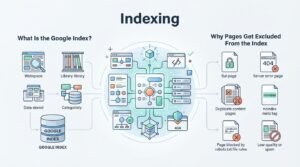
Indexing is the process of analyzing, categorizing, and storing crawled web pages in a search engine’s database so they can be retrieved for relevant queries. Not every crawled page makes it into the index, and that gap surprises a lot of site owners.
What Is the Google Index?
The Google index is a massive database of web pages that Google has crawled and deemed eligible to appear in search results. Google’s index contains hundreds of billions of pages, and inclusion is never guaranteed just because a page was crawled.
Why Pages Get Excluded From the Index
- Thin or low-value content
- Duplicate or near-duplicate pages
- Noindex tags applied intentionally or by mistake
- Poor internal linking signaling low importance
We regularly find noindex tags left active from a site’s development phase, quietly excluding entire sections that should be earning traffic.
Canonicalization and Duplicate Content
A canonical tag is an HTML element that tells search engines which version of a duplicate or similar page should be treated as the primary one. Ecommerce sites with filtered product listings run into this constantly.
Getting canonicalization wrong can split ranking signals across multiple duplicate URLs instead of consolidating them into one authoritative page. A full canonical strategy involves URL parameters, pagination, and cross-domain scenarios that go well beyond what a single section can responsibly cover.
Index Coverage Reports and Diagnostics
The Index Coverage report in Google Search Console shows which of a site’s pages are indexed, excluded, or generating errors. It’s the single most useful diagnostic tool I open when a client asks why traffic dropped.
- Open Google Search Console and navigate to the Pages report
- Review the “Why pages aren’t indexed” breakdown
- Cross-reference excluded URLs against your sitemap
- Prioritize fixes based on page value, not just error count
Ranking: How Search Engines Order Results
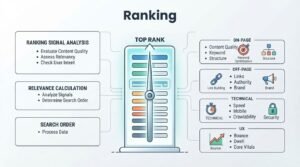
Ranking is the process by which a search engine scores and orders indexed pages to determine their position for a specific search query. This is where most of the SEO industry’s attention lives, often at the expense of the crawling and indexing fundamentals that make ranking possible in the first place.
What Is a Ranking Algorithm?
A ranking algorithm is the specific set of weighted signals a search engine uses to compare indexed pages against each other for a given query. Google has confirmed it uses hundreds of ranking signals, though the exact weighting is never fully disclosed.
Core Ranking Factor Categories
| Category | Examples |
| On-page | Content quality, keyword relevance, page structure |
| Off-page | Backlinks, brand mentions, domain authority |
| Technical | Page speed, mobile-friendliness, security (HTTPS) |
| User experience | Core Web Vitals, dwell time, bounce rate |
On-Page Ranking Factors
On-page ranking factors are the elements within a page itself that search engines evaluate to determine relevance and quality. Title tags, header structure, content depth, and internal linking all fall into this category.
We see the strongest ranking gains when on-page optimization aligns tightly with search intent rather than simply targeting a keyword. A dedicated on-page SEO framework covers title tag structure, header hierarchy, and content optimization in the depth this topic deserves.
Off-Page Ranking Factors (Backlinks and Authority)
Off-page ranking factors are signals earned outside a website, primarily backlinks, that indicate a page’s authority and trustworthiness to search engines. A single link from a highly authoritative, topically relevant site often outweighs dozens of weak ones.
Backlinks remain one of the top three ranking factors Google’s own search advocates have publicly confirmed, and building them ethically takes considerably longer than most business owners expect going in.
Technical Ranking Factors (Core Web Vitals, Mobile, Security)
Technical ranking factors are site-level performance and infrastructure signals, including page speed, mobile usability, and HTTPS security, that affect how search engines evaluate a page. Core Web Vitals specifically measure loading performance, interactivity, and visual stability.
| Core Web Vital | What It Measures |
| LCP (Largest Contentful Paint) | Loading performance |
| INP (Interaction to Next Paint) | Responsiveness |
| CLS (Cumulative Layout Shift) | Visual stability |
Google’s own research shows pages meeting Core Web Vitals thresholds see measurably lower bounce rates, which is why we treat technical performance as a ranking factor, not just a UX nicety.
How Search Engines Use AI and Machine Learning Today
Modern search engines use machine learning systems to better interpret query intent and page relevance beyond simple keyword matching. These systems have fundamentally changed how content gets evaluated over the past decade.
What Is RankBrain?
RankBrain is a machine learning system Google uses to help interpret ambiguous or unfamiliar search queries and match them to relevant results. It was one of the first major AI systems Google confirmed using directly in its ranking process.
Common Crawling and Indexing Problems (and Their Signals)
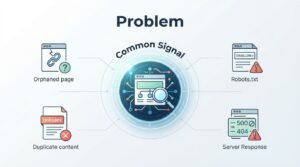
Crawling and indexing problems typically show up as pages missing from search results despite appearing healthy on the surface. Catching these early prevents months of invisible traffic loss.
| Problem | Common Signal |
| Orphaned pages | Zero internal links pointing to the page |
| Blocked by robots.txt | Page excluded despite being live |
| Noindex tag present | Page crawled but excluded from index |
| Duplicate content | Multiple URLs competing for the same query |
| Slow server response | Reduced crawl frequency over time |
How to Monitor Crawling, Indexing, and Ranking Performance
Monitoring crawling, indexing, and ranking requires regularly reviewing Google Search Console and Google Analytics data rather than checking rankings in isolation. I run this review monthly at minimum for every active account.
- Check the Index Coverage report for crawl errors and exclusions
- Review Search Performance data for impressions, clicks, and average position
- Cross-reference organic traffic trends in Google Analytics (GA4)
- Monitor Core Web Vitals reports for technical regressions
Realistic SEO Timelines: When You’ll See Results
Most websites see meaningful organic traffic growth within four to twelve months of consistent SEO work, depending on competition and starting authority. This range surprises clients expecting overnight results, and I’d rather set that expectation early than lose trust later.
| Site Stage | Typical Timeline to Meaningful Growth |
| New domain, low authority | 9–12+ months |
| Established site, moderate authority | 4–8 months |
| High-authority site, technical fixes only | 1–3 months |
An Ahrefs study of over two million keywords found that even top-ranking pages took an average of nearly two years to reach page-one positions, underscoring why sustainable SEO is a long-game investment rather than a quick fix.
Conclusion
Crawling, indexing, and ranking work as one connected system, each stage depending entirely on the one before it. We’ve walked through how search engines discover, store, and score pages across the full technical and strategic picture.
This foundation connects directly to the deeper technical, content, and authority-building work that sustainable organic growth requires over time.
We help businesses turn this system into measurable traffic and leads. Talk to White Label SEO Service about building your strategy today.
Frequently Asked Questions
How long does it take Google to crawl a new website?
Google typically crawls a new website within a few days to a few weeks of discovery. Submitting an XML sitemap through Search Console speeds this up considerably.
Why isn’t my page showing up in Google search results?
A page usually fails to appear because it wasn’t crawled, was crawled but not indexed, or carries a noindex tag. Checking the Index Coverage report identifies the exact cause.
What is the difference between crawling and indexing?
Crawling is discovering a page’s existence, while indexing is analyzing and storing that page in the searchable database. A page can be crawled without ever being indexed.
How do I know if Google has indexed my page?
Search “site:yourdomain.com/page-url” directly in Google, or check the URL Inspection tool in Search Console. Both confirm indexing status instantly.
Can a page be indexed but not ranked?
Yes, an indexed page simply means it’s eligible to appear in results, not that it will rank well for any given query. Ranking depends on separate, ongoing competitive factors.
How often does Google recrawl a website?
Recrawl frequency depends on site authority, update frequency, and crawl budget, ranging from daily on high-authority sites to weeks on smaller ones. Fresh, frequently updated content gets recrawled faster.
What’s the fastest way to get a new page indexed?
Submitting the URL directly through Google Search Console’s URL Inspection tool is the fastest method. Strong internal linking from already-indexed pages also accelerates discovery.