Apple Maps SEO is the practice of optimizing a business’s Apple Maps listing so it appears prominently when people search for local businesses on iPhones, iPads, Macs, and Siri. I treat it as a distinct discipline from Google Business Profile optimization, even though the two overlap in places.
Apple’s ecosystem now touches well over a billion active devices worldwide, and every one of those devices defaults to Apple Maps for local search. Ignoring it leaves real visibility on the table.
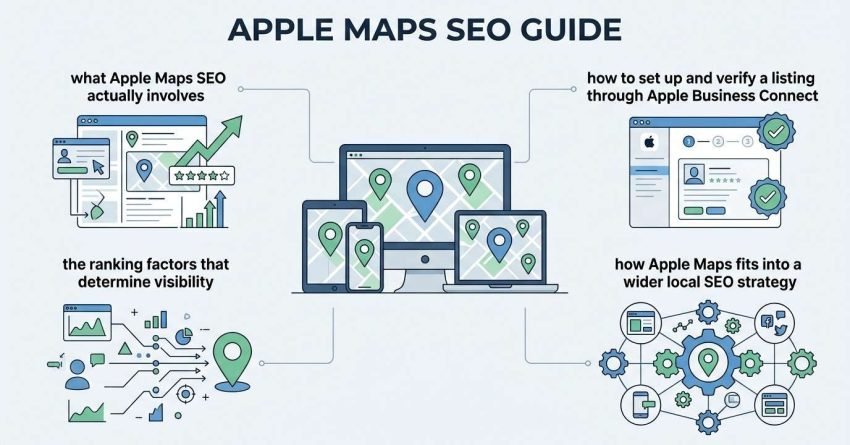
This guide covers what Apple Maps SEO actually involves, how to set up and verify a listing through Apple Business Connect, the ranking factors that determine visibility, and how Apple Maps fits into a wider local SEO strategy. I’ll walk through the technical setup first, then move into the factors that actually move rankings.
What Is Apple Maps SEO?
Apple Maps SEO is the process of optimizing a business listing’s information, structure, and engagement signals so it ranks higher in Apple Maps search results and Siri responses. I define it this way because it’s genuinely a separate optimization target, not a subset of general local SEO.
Apple Maps draws from a mix of first-party data and third-party providers, which means the listing itself is only part of the equation. We still find that the businesses with the cleanest, most complete data consistently outperform competitors with sparse listings.
The practice includes claiming and verifying a listing, keeping business information accurate, managing reviews, and monitoring performance through Apple’s own analytics. Each of those pieces plays a role in how Apple decides which businesses to surface first.
Why Apple Maps Matters for Local SEO in the US
Apple Maps matters for local SEO because it’s the default navigation and search app across every iPhone, iPad, and Mac sold in the US, and Apple devices hold a significant share of the American smartphone market. I’ve watched clients dismiss this channel simply because it isn’t Google, and that’s a mistake.
Every Siri voice search for “restaurants near me” or “plumbers open now” pulls results from Apple Maps, not Google. That means a business absent from Apple’s system is invisible to a meaningful chunk of mobile searchers, regardless of how well it ranks elsewhere.
I also see this matter more for service businesses and retail locations, where “near me” searches drive immediate action. A missing or outdated Apple Maps listing costs those businesses real foot traffic and calls.
How to Set Up Your Apple Maps Business Listing
Setting up an Apple Maps listing starts with creating a free account on Apple Business Connect, Apple’s dashboard for managing business information across its ecosystem. I always start here because it’s the single entry point Apple now uses for all listing management.
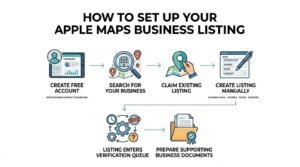
From there, you search for your business to see if it already exists in Apple’s system, since many listings are auto-generated from third-party data providers. If it exists, you claim it. If it doesn’t, you create it manually with your business name, address, phone number, and category.
Once submitted, the listing enters Apple’s verification queue before it goes live. I recommend having your business documents ready at this stage, since verification often asks for supporting proof.
Apple Business Connect: The Platform Behind Apple Maps Listings
Apple Business Connect is the free platform Apple provides for businesses to manage how their information appears across Apple Maps, Siri, Wallet, and other Apple apps. It replaced Apple’s older, more limited listing tools with a single centralized dashboard.
Through Apple Business Connect, I can update hours, add photos, respond to reviews, create promotional showcases, and view basic performance metrics, all from one place. The platform ties directly into how Apple surfaces information across its entire device ecosystem, not just the Maps app.
Apple Business Connect setup takes most businesses under twenty minutes for a single location, though multi-location brands need considerably more time to manage bulk uploads properly.
Apple Maps Business Verification Process
Apple Maps verification confirms that the person managing a business listing is authorized to represent that business, and it typically completes within a few business days to two weeks. I tell clients to expect the longer end if their business type requires additional documentation.
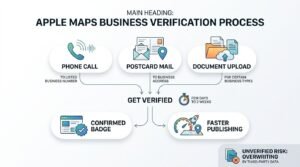
Apple generally verifies through one of a few methods: a phone call to the listed business number, a postcard mailed to the business address, or document upload for certain business categories. The method offered depends on the business type and the information already on file.
Once verified, the listing shows a confirmed badge internally in Apple Business Connect, and changes you make going forward publish far faster than they did pre-verification. Unverified listings can still appear in Apple Maps, but they’re more vulnerable to being overwritten by third-party data.
Required Business Information for Apple Maps
A complete Apple Maps listing needs a business name, physical address, phone number, website URL, business category, and hours of operation at minimum. Missing any of these fields creates gaps that Apple’s algorithm and third-party data providers can fill in with inaccurate information.
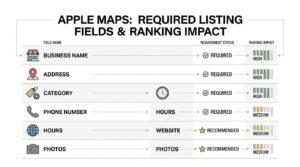
I’ve seen the category field cause the most ranking damage when handled carelessly, since Apple maps searches heavily to category matching. A locksmith listed under “hardware store” simply won’t surface for locksmith searches, no matter how strong the rest of the listing looks.
| Field | Required | Ranking Impact |
| Business Name | Yes | High |
| Address | Yes | High |
| Phone Number | Yes | Medium |
| Category | Yes | High |
| Hours | Yes | Medium |
| Website | Recommended | Medium |
| Photos | Recommended | Medium |
NAP Consistency and Apple Maps
NAP consistency refers to keeping a business’s name, address, and phone number identical across every online platform where it appears. I flag this early because Apple Maps pulls from third-party data aggregators, and mismatched NAP data across those sources actively confuses which listing is authoritative.
When a business’s NAP information differs between its website, Google Business Profile, and data broker listings, Apple’s system sometimes creates duplicate or conflicting entries. That fragmentation dilutes ranking signals across multiple weaker listings instead of consolidating them into one strong one.
I always audit NAP consistency across major data providers before troubleshooting any Apple Maps ranking issue, since inconsistent data is often the root cause.
Key Apple Maps Ranking Factors
Apple Maps ranking factors include listing completeness, category accuracy, proximity to the searcher, review volume and rating, and data consistency across third-party providers. I rank these roughly in order of impact based on what I’ve observed across client accounts.
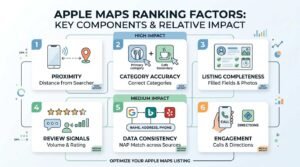
Proximity carries enormous weight in Apple Maps, arguably more than it does in Google’s local algorithm, since Apple leans heavily on device location data from iPhones already in the searcher’s pocket.
| Ranking Factor | What It Measures | Relative Weight |
| Proximity | Distance between searcher and business | High |
| Category Accuracy | Correct primary/secondary categories | High |
| Listing Completeness | Filled fields, photos, hours | High |
| Review Signals | Volume, rating, recency | Medium |
| Data Consistency | NAP match across sources | Medium |
| Engagement | Calls, direction requests via listing | Medium |
Reviews and Ratings’ Role in Apple Maps Rankings
Reviews influence Apple Maps rankings by signaling trust and relevance, with both the star rating and review volume factoring into visibility. I’ve seen listings with fewer but more recent reviews outperform competitors sitting on a large volume of stale, years-old reviews.
Apple currently pulls reviews from Yelp and other third-party sources rather than hosting a fully native review system the way Google does. That means review management for Apple Maps often means managing your presence on those underlying platforms directly.
Recency matters here too. A steady stream of new reviews signals an active, trustworthy business, while a stagnant review count reads as a warning sign to Apple’s ranking system.
Apple Maps Connect vs Google Business Profile: Key Differences
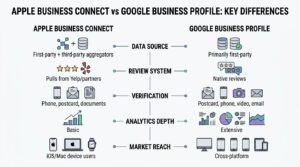
Apple Business Connect and Google Business Profile both manage local listings, but they pull from different data sources, use different verification methods, and weight ranking factors differently. I manage both for nearly every local client now, since neither one substitutes for the other.
| Aspect | Apple Business Connect | Google Business Profile |
| Data Source | First-party + third-party aggregators | Primarily first-party |
| Review System | Pulls from Yelp/partners | Native reviews |
| Verification | Phone, postcard, documents | Postcard, phone, video, email |
| Analytics Depth | Basic | Extensive |
| Market Reach | iOS/Mac device users | Cross-platform |
The biggest practical difference I run into is data sourcing. Google mostly trusts what you tell it directly, while Apple cross-references multiple third-party providers, which makes consistency across the wider web far more important for Apple Maps specifically.
Apple Maps SEO for Multi-Location Businesses
Multi-location businesses manage Apple Maps listings through location groups inside Apple Business Connect, which allow bulk updates to hours, categories, and promotional content across all locations at once. I recommend this structure the moment a client passes three or four locations.
Without a location group setup, franchise and multi-branch businesses end up manually updating dozens of individual listings every time hours change for a holiday, which invites inconsistency fast.
Bulk management also helps maintain the NAP consistency I mentioned earlier, since a centralized system reduces the chance of a regional manager entering slightly different address formatting for one location.
Common Apple Maps Listing Errors and How to Fix Them
The most common Apple Maps listing errors include duplicate listings, incorrect category assignments, outdated hours, and address mismatches pulled from stale third-party data. I see duplicates most often with businesses that moved locations or rebranded without updating every data source.
- Duplicate listings: Usually caused by third-party data providers creating a second entry; resolve by claiming and merging through Apple Business Connect
- Wrong category: Directly limits which searches the listing appears in; update immediately in the dashboard
- Outdated hours: Common after seasonal changes; set recurring holiday hours in advance to avoid this
- Address mismatch: Often traces back to inconsistent formatting across data brokers
Most of these errors resolve within a few days of correction once the listing is verified, though unverified listings can take longer since third-party data may keep overwriting your changes.
Tracking Apple Maps Performance and Insights
Apple Business Connect provides performance insights showing how many people viewed a listing, requested directions, called the business, or visited the website through Apple Maps. These metrics live directly inside the dashboard and update on a rolling basis.
I check these numbers alongside Google Business Profile insights and site analytics to get a full picture of local visibility, since Apple Maps traffic won’t show up cleanly in most standard analytics platforms without proper UTM tagging on the listing’s website link.
The insight data is lighter than what Google provides, but it’s still enough to spot trends in search volume, direction requests, and engagement over time.
How Apple Maps SEO Fits Into a Broader Local SEO Strategy
Apple Maps SEO works best as one component of a complete local SEO strategy that also includes Google Business Profile optimization, citation building, and on-site local content. I never treat it as a standalone channel for clients serious about local visibility.
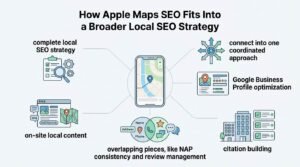
The overlapping pieces, like NAP consistency and review management, reinforce each other across platforms rather than competing for attention. Getting the foundational data right once tends to strengthen every listing simultaneously.
Businesses that want a fuller local SEO strategy benefit from looking at how these individual channels connect into one coordinated approach, rather than optimizing each platform in isolation.
Conclusion
Apple Maps SEO now sits alongside Google as a real local visibility channel, built on accurate listings, verification, and consistent data.
As Apple’s ecosystem grows, businesses that treat Apple Maps as core infrastructure, not an afterthought, will keep gaining ground here.
We help businesses build complete local visibility strategies. Reach out to White Label SEO Service to get your Apple Maps presence working alongside the rest of your SEO.
Frequently Asked Questions
Is Apple Maps important for SEO?
Yes, Apple Maps is important for local SEO because it’s the default map and search app across all Apple devices. Ignoring it means missing a significant share of mobile local searches entirely.
How do I add my business to Apple Maps?
You add a business to Apple Maps through Apple Business Connect, Apple’s free listing management platform. Create an account, search for your business, and claim or create the listing.
How long does Apple Maps verification take?
Apple Maps verification typically takes a few business days to two weeks, depending on the method used. Phone verification is usually fastest, while postcard verification takes longer.
Is Apple Business Connect free?
Yes, Apple Business Connect is completely free to use for managing your business listing. There are no paid tiers required to claim, verify, or update your information.
Does Apple Maps ranking affect Google rankings?
No, Apple Maps and Google rankings operate on separate algorithms and data systems. Strong performance on one platform doesn’t directly influence rankings on the other.
Can I manage multiple locations on Apple Maps?
Yes, Apple Business Connect supports location groups for managing multiple business locations. This allows bulk updates to hours, categories, and content across all listings at once.
What happens if my Apple Maps listing has incorrect information?
Incorrect information can hurt rankings and confuse potential customers searching for your business. Correct it directly in Apple Business Connect, and verified listings update faster than unverified ones.