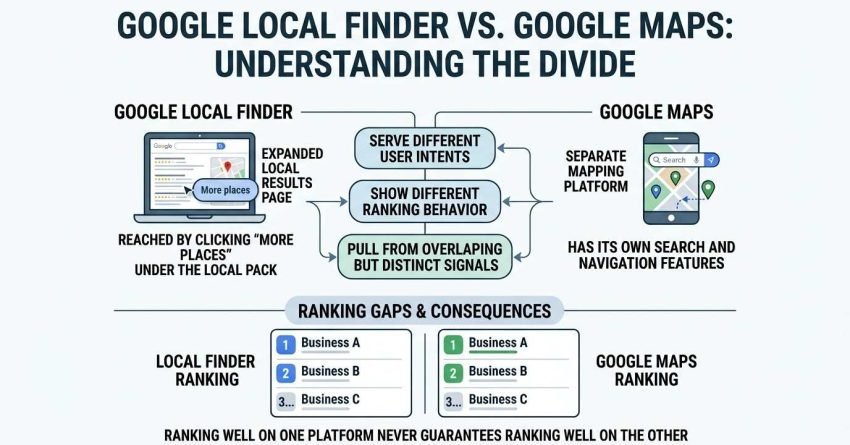
Google Local Finder is the expanded local results page users reach by clicking “More places” under the Local Pack, while Google Maps is a separate mapping platform with its own search and navigation features. Both surface local business data, but they serve different user intents, show different ranking behavior, and pull from overlapping but distinct signals. I’ve watched businesses rank on page one in Maps and nowhere near the top in Local Finder for the exact same query.
That gap confuses business owners constantly, and it costs visibility when nobody accounts for it. Ranking well on one platform never guarantees ranking well on the other.
This guide covers what each platform actually is and where it shows up, how their ranking systems work and where they diverge, the shared signals that influence both, and practical ways to track and optimize performance across the two. We’ll also flag the mistakes I see most often.
What Is Google Local Finder?
Google Local Finder is the full local search results page that appears after a user clicks “More places” beneath the Local Pack in Google Search. It shows a larger, scrollable list of local businesses tied to the same query, along with a map, filters, and sorting options. I think of it as the overflow room for local intent that didn’t fit in the top three.
Local Finder pulls its results from the same Google Business Profile database as the Local Pack, but it displays far more listings and gives users filtering tools like hours, ratings, and categories. This matters because a business excluded from the 3-pack still has a real shot at visibility here.
Where Local Finder Appears in Search Results
Local Finder only appears after a user actively clicks through from the Local Pack; it doesn’t have its own standalone entry point in search. It lives entirely within Google Search, not within the Google Maps app.
This placement means Local Finder traffic comes from users who are already deep in local research mode. They didn’t stop at the first three results, which signals stronger buying or decision intent.
Key Features of the Local Finder Interface
Local Finder includes a persistent map alongside the list, category filters, hour-based filters, and a “sort by” option for relevance or distance. Each listing shows the business name, category, rating, review count, and hours.
The interface is built for comparison shopping. Someone scanning fifteen dentists side by side behaves differently than someone glancing at a 3-pack and clicking the first result.
What Is Google Maps?
Google Maps is Google’s standalone mapping and navigation platform that also functions as a local business search engine across the web, mobile app, and in-car systems. It exists independently of Google Search, though the two share underlying business data. I treat it as its own ecosystem with its own ranking behavior, not a mirror of search results.
Maps handles navigation, real-time traffic, saved places, and reviews in addition to business discovery, which broadens its use cases well beyond a single search query.
Where Google Maps Appears (App vs Browser vs SERP)
Google Maps exists as a dedicated mobile app, a browser-based site at maps.google.com, and an embedded map module inside Google Search results. Each surface can show slightly different result orders for the same query.
Mobile app usage tends to carry the strongest local and proximity weighting, since the device’s real-time GPS location plays a much bigger role there than it does in a desktop browser search.
Key Features of the Google Maps Platform
Google Maps includes turn-by-turn navigation, live traffic data, saved lists, offline maps, and a full business profile view with photos, reviews, Q&A, and posts. Street View and popular-times data also live here.
None of these navigation-first features exist inside Local Finder, which stays focused purely on the search-and-compare experience rather than getting someone from point A to point B.
Google Local Finder vs Google Maps: Core Differences
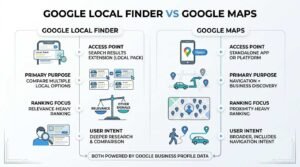
The core difference between Google Local Finder and Google Maps is that Local Finder is a search results extension inside Google Search, while Maps is a standalone navigation and discovery platform with its own app. Both draw from the same Google Business Profile data, but the ranking weight given to each signal shifts between them.
| Factor | Google Local Finder | Google Maps |
| Access point | Click-through from Local Pack | Dedicated app, browser, or embedded SERP module |
| Primary use case | Comparing multiple local options | Navigation + business discovery |
| Result volume | Larger scrollable list | Varies by zoom/search radius |
| Ranking weight | Relevance-heavy | Proximity-heavy (especially mobile) |
| Filters available | Category, hours, rating | Category, hours, rating, plus route/distance |
| User intent stage | Deeper research/comparison | Broader, includes navigation intent |
Because these platforms weigh signals differently, a business can rank in the Local Pack for a search query while sitting lower in Local Finder’s expanded list, and higher or lower still inside the Maps app depending on the searcher’s exact GPS position.
How Google Local Finder Rankings Work
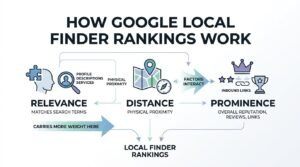
Google Local Finder rankings are determined primarily by relevance, distance, and prominence, with relevance carrying more weight here than it typically does in the Local Pack. Since users have already opted into a longer list, Google leans harder on matching the specific query to profile categories, descriptions, and services.
Relevance, Distance, and Prominence Explained
Relevance measures how well a business profile matches the search terms used. Distance measures physical proximity to the searcher or the searched location, and prominence reflects overall business reputation, including review volume and inbound links.
These three factors interact rather than stack independently. A highly prominent business with weak relevance to a specific query can still rank behind a less-known competitor whose profile matches the search intent more precisely.
Why Local Finder Rankings Differ From the 3-Pack
The Local Pack shows only three results and tends to favor businesses with strong overall prominence and proximity, since Google is making a tight, high-confidence selection. Local Finder’s expanded list has room to surface relevance-matched businesses that didn’t make that initial cut.
This is why a business can legitimately rank fourth or fifth for a query. It appears prominently once someone clicks through, but never shows in the initial three-result snapshot.
How Google Maps Rankings Work
Google Maps rankings lean more heavily on real-time proximity and mobile GPS data than either the Local Pack or Local Finder do. A searcher’s literal physical location at the moment of the query carries outsized weight, especially inside the Maps mobile app.
Proximity and Real-Time Location Signals
Maps factors in the device’s actual GPS coordinates, not just the city or area typed into a search bar. Two people standing three blocks apart searching the identical term can see meaningfully different result orders.
This live-location weighting doesn’t apply the same way on desktop Maps searches, where the signal defaults closer to the entered location rather than a real GPS fix.
Reviews and Engagement Signals in Maps
Review count, average rating, and review recency all factor into Maps rankings, alongside engagement signals like click-throughs to calls, direction requests, and website visits from the profile. Google’s own guidance on ranking factors confirms relevance, distance, and prominence apply across both Search and Maps, though the weighting shifts by surface.
Businesses that actively collect reviews and respond to them tend to see steadier Maps visibility than those that only optimize on-page profile fields and ignore ongoing engagement.
Google Business Profile’s Role in Both Platforms
Google Business Profile is the free business listing tool that supplies the underlying data both Google Local Finder and Google Maps pull from to generate their results. Every category selection, service description, photo, and review lives in this single profile, regardless of which surface eventually displays it.
A single, well-optimized Google Business Profile feeds both platforms simultaneously. Neglecting profile completeness weakens performance across the Local Pack, Local Finder, and Maps all at once, since none of them maintain a separate data source.
Local Pack vs Local Finder vs Maps: Where Each One Shows Up
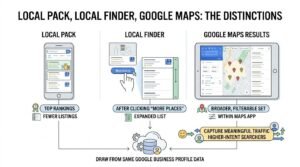
The Local Pack, Local Finder, and Google Maps each occupy a distinct position in the search journey, moving from a compact three-result snapshot to an expanded list to a full navigation platform. Understanding where each one lives helps explain why the same business can look completely different depending on which surface a customer lands on.
| Surface | Location | Result Count | Typical Trigger |
| Local Pack | Top of Google Search results | 3 listings | Local-intent keyword search |
| Local Finder | Full page after “More places” click | 20+ listings | User clicks through from Pack |
| Google Maps | Dedicated app/site | Varies by zoom | Direct app open or map search |
A business owner checking only the Local Pack gets an incomplete picture. Real visibility performance requires checking all three surfaces for the same core queries.
Key Ranking Factors That Influence Both Platforms
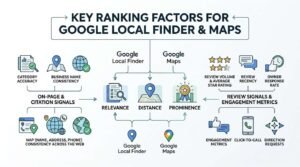
Relevance, distance, and prominence influence rankings across Google Local Finder and Google Maps alike, though the platforms apply different weight to each factor. Beyond these three pillars, a set of supporting signals shapes how consistently a business shows up across both.
On-Page and Citation Signals
Category accuracy, business name consistency, and NAP (name, address, phone) consistency across the web all reinforce prominence and relevance scoring. Citation consistency in particular helps confirm to Google that a listing represents a real, stable business.
Inconsistent NAP data across directories creates confusion that can quietly suppress rankings on both platforms, even when the Google Business Profile itself looks complete.
Review Signals and Engagement Metrics
Review volume, average star rating, review recency, and owner response rate all factor into prominence scoring on both surfaces. A BrightLocal survey of consumer review habits found that 98% of consumers read online reviews for local businesses, reinforcing why these signals carry real ranking weight.
Engagement metrics, including click-to-call and direction requests, add another layer that pure review counts don’t capture, and both platforms appear to factor this real-world interaction data into visibility.
How Search Intent Differs Between Local Finder and Maps Users
Users reaching Google Local Finder are typically in an active comparison phase, while Google Maps users span a wider range of intents from comparison to active navigation. Someone clicking “More places” has already decided the top three results weren’t enough, signaling deeper research behavior.
Maps users, by contrast, might be actively driving somewhere, checking a business’s current hours mid-errand, or simply browsing nearby options with no firm decision made yet. That range of intent means Maps content and profile completeness needs to satisfy both quick-glance and deep-research visitors at once.
Common Ranking Discrepancies Between Local Finder and Maps
A business commonly ranks differently between Google Local Finder and Google Maps because each surface applies its own weighting to proximity versus relevance versus prominence. I regularly see clients rank third in the Local Pack, seventh in Local Finder, and second in the Maps app for the identical search term, all at the same time.
These discrepancies usually trace back to real-time location data. Maps’ heavier reliance on live GPS positioning means a searcher standing closer to a competitor’s physical address can flip the entire results order compared to what Local Finder shows the same person minutes later.
Category mismatches also drive discrepancies. A business tagged under a broad category might satisfy Maps’ looser matching but underperform in Local Finder’s more relevance-sensitive expanded list.
How to Track Performance Across Both Platforms
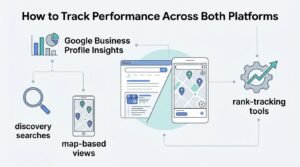
Tracking performance across Google Local Finder and Google Maps requires monitoring Google Business Profile Insights alongside rank-tracking tools that check both surfaces separately. Relying on a single ranking check misses half the picture entirely.
Google Business Profile’s built-in Insights panel shows how customers found the listing, including direct searches, discovery searches, and map-based views. Pairing that data with third-party local rank trackers that ping both Search and Maps results gives a fuller performance picture than either source alone.
Why These Differences Matter for Local SEO Strategy
These platform differences matter for local SEO strategy because a business optimizing for only one surface leaves visibility and leads on the table on the other. Treating the Local Pack, Local Finder, and Maps as one identical ranking environment leads to blind spots that competitors exploit.
A strategy built around Google Business Profile completeness, consistent citations, active review generation, and category precision tends to lift performance across all three surfaces simultaneously, since they share the same underlying data source. Businesses that understand realistic local SEO timelines set expectations correctly instead of expecting overnight shifts across every surface at once.
Common Mistakes Businesses Make With Local Finder and Maps
The most common mistake businesses make is optimizing only for the Local Pack and assuming Local Finder and Maps rankings will automatically follow. That assumption breaks down constantly, since the platforms weigh signals differently enough to produce genuinely different outcomes.
Vague or overly broad category selection is another frequent issue, since it can help Maps’ looser matching while actively hurting relevance-based Local Finder placement. Ignoring review response rates and letting NAP data drift out of sync across directories rounds out the most damaging, and most avoidable, mistakes I see repeated across industries.
Conclusion
Google Local Finder and Google Maps share the same underlying business data but rank listings using different weightings of relevance, distance, and prominence. Understanding both systems prevents visibility gaps that cost real customers.
Local SEO success depends on treating every surface as connected, not identical, and building a profile strategy that performs consistently across the Local Pack, Local Finder, and Maps together.
We help businesses build that full-surface visibility strategy. Talk to White Label SEO Service about strengthening your local search presence today.
Frequently Asked Questions
Is Google Local Finder the same as Google Maps?
No, Google Local Finder is an expanded results page within Google Search, while Google Maps is a separate navigation and discovery platform. They share business data but rank listings differently.
Why does my business rank differently on Local Finder vs Maps?
Ranking differences happen because each platform weighs relevance, distance, and prominence differently. Maps leans more heavily on real-time GPS proximity than Local Finder does.
Does Google Local Finder use the same algorithm as the Local Pack?
Local Finder and the Local Pack pull from the same core ranking factors but apply different weighting since Local Finder shows far more results. Relevance often carries more influence in Local Finder’s expanded list.
How often does Google update Local Finder rankings?
Google updates Local Finder rankings continuously as new reviews, engagement data, and profile changes get processed. There’s no fixed schedule, since rankings respond to ongoing signal changes.
Can I optimize separately for Google Maps and Local Finder?
You can’t create separate profiles, but category precision, review generation, and citation consistency influence both platforms through the same Google Business Profile. Strengthening these fundamentals lifts performance on both surfaces.
What causes a business to appear on Maps but not Local Finder?
This usually happens when relevance signals, like category match or service descriptions, are weaker than competitors, even if proximity and prominence are strong. Maps’ broader matching tolerates that gap more than Local Finder does.
Which platform matters more for local SEO: Maps or Local Finder?
Neither platform matters more universally, since each captures a different stage of user intent. A complete local SEO strategy accounts for visibility across both rather than prioritizing one over the other.