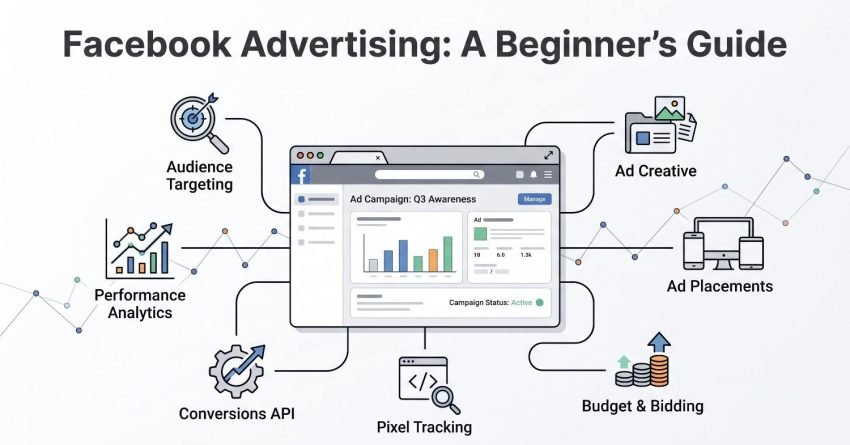
Facebook advertising is a paid marketing channel that lets businesses place targeted ads across Meta’s platforms, including Facebook, Instagram, Messenger, and the Audience Network, using an auction system that prices each impression based on bid, estimated action rate, and ad quality.
I have watched businesses waste thousands on boosted posts before understanding what a campaign objective even does. That gap between spending money and spending it deliberately costs owners real revenue every single month.
This guide covers what Facebook advertising is and why it still works, how to set up your account and tracking properly, how objectives, structure, targeting, formats, and creative fit together, what budgets and costs actually look like, how to launch, measure, optimize, and scale, and how paid social sits alongside your other channels.
What Facebook Advertising Is and How It Works
Facebook advertising is a paid media channel where advertisers bid in a real-time auction to show ads to specific audiences across Meta’s platforms. Every time someone opens their feed, Meta runs an auction in milliseconds to decide which ad they see.
The auction does not simply award the slot to the highest bidder. Meta scores each eligible ad on three inputs and serves the one with the highest total value.
I explain this early because it reframes everything else in this guide. Your creative, your audience, and your landing page all feed back into that score, which means better ads genuinely cost less to run.
The Auction System Behind Every Ad
Meta’s ad auction ranks ads by total value, calculated from advertiser bid, estimated action rate, and ad quality. Estimated action rate predicts how likely a given person is to take your desired action.
Ad quality draws on user feedback signals and post-click experience. A well-matched ad with strong engagement wins impressions against a higher bid with weak signals.
This is why I push new advertisers toward creative quality before bid strategy. The auction rewards relevance more reliably than it rewards spending.
Where Facebook Ads Appear
Facebook ad placements include the Facebook Feed, Instagram Feed and Reels, Stories, Marketplace, Messenger, Search results, and the Meta Audience Network of third-party apps and sites. Advantage+ placements let Meta distribute budget across all of them automatically.
Each placement has its own dimensions, cost profile, and user mindset. Feed placements typically carry higher intent, while Audience Network delivers cheaper impressions with weaker engagement.
Why Facebook Advertising Still Matters for Small Businesses
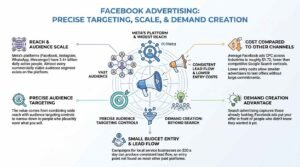
Facebook advertising matters because it delivers precise audience targeting at a scale and cost per impression that few other paid channels match. Meta’s platforms remain the widest single-buy reach available to a small budget.
I have run campaigns for local service businesses on $20 a day that produced consistent lead flow. That entry point does not exist on most other paid platforms.
The real advantage is demand creation. Search advertising captures people already looking, while Facebook ads put your offer in front of people who did not know they wanted it yet.
Reach and Audience Scale
Meta’s own reporting puts its family of apps at more than 3.4 billion daily active people across Facebook, Instagram, WhatsApp, and Messenger. That scale means almost every commercially viable audience segment exists somewhere on the platform.
Scale alone does not sell anything. The value comes from combining that reach with the audience targeting controls that narrow it to people who plausibly want what you sell.
Cost Compared to Other Paid Channels
WordStream’s benchmark data puts the average Facebook ads cost per click across industries at roughly $1.72, well below Google Search averages in competitive verticals like legal and insurance. Lower entry costs let smaller advertisers test offers without large commitments.
Cheaper clicks do not automatically mean cheaper customers. Facebook traffic usually converts at lower rates than high-intent search traffic, so I judge channels on cost per acquisition rather than cost per click.
Setting Up Meta Business Suite and Your Ad Account
Meta Business Suite is the management platform that houses your Facebook Page, Instagram account, ad accounts, Pixel, catalogs, and user permissions in one place. Setting it up correctly before you spend a dollar prevents the access problems that plague businesses later.
I have inherited too many accounts built on someone’s personal profile. When that person leaves, the business loses its ad history, its audiences, and sometimes its Page.
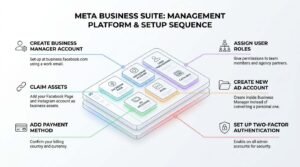
Here is the setup sequence I use with every new client:
- Create a Meta Business Manager account at business.facebook.com using a work email
- Claim your Facebook Page and Instagram account as business assets
- Create a new ad account inside Business Manager rather than converting a personal one
- Add your payment method and confirm your billing country and currency
- Assign user roles to team members and any agency partners
- Set up two-factor authentication on all admin accounts
Business Manager vs. Personal Ad Account
A personal ad account is tied to an individual Facebook profile, while a Business Manager ad account is owned by the business entity itself. Business Manager accounts survive staff turnover and support multiple users, multiple ad accounts, and partner access.
Currency and time zone cannot be changed after an ad account is created. I set both deliberately at creation because getting it wrong means starting over.
Payment Methods and Billing Thresholds
Meta bills advertisers on a rolling threshold system, charging your payment method each time your unpaid balance reaches a set amount or on your monthly billing date, whichever comes first. New accounts start with low thresholds that rise as payment history builds.
Add a backup payment method immediately. A declined card pauses every active campaign, and restarting a paused campaign resets its learning phase.
User Roles and Access Permissions
Business Manager offers admin and employee roles at the business level, with separate asset-level permissions for each Page, ad account, and Pixel. Admin access grants full control, including the ability to remove other admins.
I give agency partners partner access rather than adding them as employees. Partner access keeps ownership with the business and makes removal clean.
Installing the Meta Pixel and Conversions API
The Meta Pixel is a snippet of tracking code placed on your website that reports visitor actions back to Meta for measurement, optimization, and audience building. Without it, Meta cannot optimize toward purchases, leads, or any other on-site event.
Pixel installation is the single step beginners skip most often. Running conversion campaigns without conversion tracking means Meta optimizes blindly and your reporting shows nothing useful.
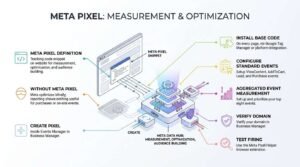
The standard installation runs as follows:
- Create a Pixel inside Events Manager in Business Manager
- Install the base code on every page, via Google Tag Manager or a platform integration
- Configure standard events such as ViewContent, AddToCart, Lead, and Purchase
- Set up Aggregated Event Measurement and prioritize your top eight events
- Verify your domain in Business Manager
- Test firing with the Meta Pixel Helper browser extension
What the Pixel Tracks
The Pixel records page views, standard events, custom events, and parameter data such as value and currency. That event data powers conversion optimization, custom audience creation, and retargeting.
Event value parameters matter more than most beginners realize. Passing purchase value lets you optimize for return on ad spend rather than raw conversion count.
Why the Conversions API Now Matters
The Conversions API is a server-side tracking method that sends event data directly from your server to Meta, bypassing browser restrictions that block or degrade Pixel data. Apple’s App Tracking Transparency framework and browser cookie limits have made browser-only tracking increasingly incomplete.
Running the Pixel and Conversions API together with proper event deduplication recovers conversion data that browser tracking loses. I treat this as standard setup now rather than an advanced option.
Understanding Facebook Campaign Objectives
A Facebook campaign objective is the business outcome you select at campaign creation, which tells Meta’s delivery system which users to find and which action to optimize toward. Meta consolidated its objectives into six options: Awareness, Traffic, Engagement, Leads, App Promotion, and Sales.
Choosing the wrong objective is the most expensive beginner mistake I see. Selecting Traffic when you want purchases tells Meta to find people who click, not people who buy, and those are different audiences.
The table below shows what each objective optimizes for and when I use it.
| Objective | Optimizes For | Best Used When |
| Awareness | Reach, impressions, ad recall | Launching a brand or product to a cold market |
| Traffic | Link clicks, landing page views | Driving readers to content with no on-site conversion |
| Engagement | Reactions, comments, video views, messages | Building social proof or starting Messenger conversations |
| Leads | Form submissions, calls, sign-ups | Collecting contact details for a sales follow-up |
| App Promotion | Installs, in-app events | Growing a mobile app user base |
| Sales | Purchases, catalog sales, ROAS | Selling products directly with Pixel tracking in place |
Awareness Objectives
Awareness campaigns optimize for the cheapest possible reach among people most likely to remember your ad. Meta measures success in impressions, reach, and estimated ad recall lift rather than clicks or conversions.
I reserve awareness budgets for businesses with a genuine brand-building mandate. Small advertisers with limited budgets almost always get better returns from Leads or Sales objectives.
Consideration Objectives
Consideration objectives, covering Traffic and Engagement, optimize for mid-funnel actions like clicks, video views, and message replies. These campaigns build the warm audiences you later retarget with conversion offers.
Traffic campaigns have a specific trap. Optimizing for link clicks rather than landing page views buys you clicks from people who never wait for your page to load.
Conversion Objectives
Conversion objectives, covering Leads and Sales, optimize toward tracked events on your site or in a Meta-hosted form. They require a working Pixel or Conversions API data to function properly.
Meta needs roughly 50 conversion events per ad set per week to exit the learning phase and deliver stably. Below that volume, I optimize for an upper-funnel event like Add to Cart and let purchase volume build.
How Facebook Ad Structure Works: Campaign, Ad Set, Ad
Facebook ad structure operates on three levels, where the campaign holds the objective, the ad set holds targeting, budget, placement, and schedule, and the ad holds the creative and copy. Every setting lives at exactly one level, and knowing which level controls what makes troubleshooting straightforward.
Beginners often build one ad set per audience with a single ad inside it. That structure fragments your data and starves each ad set of the conversion volume it needs.
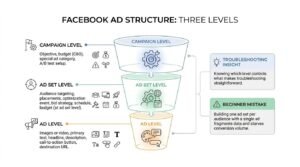
Here is what each level controls:
- Campaign level: objective, budget when using Campaign Budget Optimization, special ad category declaration, A/B test setup
- Ad set level: audience targeting, placements, optimization event, bid strategy, schedule, budget when set at ad set level
- Ad level: images or video, primary text, headline, description, call-to-action button, destination URL
What Lives at Each Level
The optimization event sits at the ad set level, not the campaign level, which surprises most beginners. Two ad sets inside a Sales campaign can optimize toward different events entirely.
Placements also live at the ad set level. That separation lets you run one ad set on Feed only and another on Advantage+ placements to compare delivery cost.
Common Structural Mistakes
Audience overlap between ad sets is the most common structural error, and it makes your own ad sets compete against each other in the auction. Meta’s Audience Overlap tool inside Ads Manager shows the percentage of shared users between any two saved audiences.
Too many ad sets is the second error. I consolidate rather than fragment, because five ad sets splitting a $50 daily budget each get $10, which is rarely enough to exit the learning phase.
Facebook Audience Targeting Explained
Facebook audience targeting is the set of controls that define who sees your ads, built from demographic filters, interests and behaviors, your own customer data, and algorithmically expanded lookalike groups. Meta offers three primary audience types, and mature accounts use all three together.
Targeting has shifted meaningfully in the last few years. Meta’s machine learning now finds converters inside broad audiences more effectively than manual interest stacking did, particularly once conversion data accumulates.
This table compares the main audience types and where each fits.
| Audience Type | Built From | Temperature | Typical Use |
| Core / Detailed | Demographics, interests, behaviors | Cold | Initial prospecting with no data |
| Custom | Your customer list, site visitors, engagers | Warm | Retargeting and exclusion |
| Lookalike | A source custom audience | Cold | Scaled prospecting that mirrors buyers |
| Advantage+ / Broad | Minimal constraints, Meta-driven | Cold | Accounts with strong conversion signal |
Core Audiences and Detailed Targeting
Core audiences are built from location, age, gender, language, and Meta’s detailed targeting options covering interests, behaviors, and demographics. Detailed targeting expansion lets Meta reach beyond your selections when it predicts better results.
I keep interest stacks broad rather than narrow. Layering four interest filters onto a small geography produces an audience too small to optimize against.
Custom Audiences
A Custom Audience is an audience built from data you already own, including customer email lists, website visitors captured by the Pixel, video viewers, Instagram engagers, and lead form openers. Website Custom Audiences are the foundation of every retargeting campaign I build.
Custom Audiences are also your exclusion tool. Excluding recent purchasers from prospecting campaigns stops you from paying to acquire people you already converted.
Lookalike Audiences
A Lookalike Audience is a Meta-generated audience of users who resemble a source Custom Audience across thousands of behavioral signals. Source quality determines lookalike quality, so I build from purchasers rather than from all site visitors.
Lookalike size is set as a percentage of the country population, from 1% to 10%. A 1% lookalike is tightest and most similar, while wider percentages trade precision for reach.
Advantage+ Audience and Broad Targeting
Advantage+ Audience uses your Pixel data, past conversions, and ad interactions to find buyers with minimal manual targeting input. You supply optional audience suggestions, and Meta treats them as a starting point rather than a hard limit.
Broad targeting works when your account feeds Meta enough conversion events to learn from. New accounts with no conversion history still benefit from tighter initial targeting until data accumulates.
Facebook Ad Formats and When to Use Each
Facebook ad formats are the creative templates available for your ads, including single image, single video, carousel, collection, and Instant Experience. Format choice affects both cost and conversion rate, because each one suits a different message and placement.
Video consistently earns the cheapest attention on the platform. Static images still win for offers that need no explanation and for retargeting audiences who already understand the product.
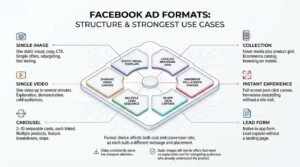
The table below matches formats to their strongest use cases.
| Format | Structure | Strongest Use Case |
| Single Image | One static visual, copy, CTA | Simple offers, retargeting, fast testing |
| Single Video | One video up to several minutes | Explanation, demonstration, cold audiences |
| Carousel | 2–10 swipeable cards, each linked | Multiple products, feature breakdowns, steps |
| Collection | Cover media plus product grid | Ecommerce catalog browsing on mobile |
| Instant Experience | Full-screen post-click canvas | Immersive storytelling without a site visit |
| Lead Form | Native in-app form | Lead capture without a landing page |
Image and Video Ads
Single image ads are the fastest format to produce and the easiest to test at volume. I launch most new accounts with three to five image variants before investing in video production.
Video ads carry more information and typically produce cheaper thumb-stop rates on Reels and Stories placements. The first three seconds decide whether the rest of the video gets watched at all.
Carousel and Collection Ads
Carousel ads display two to ten cards that users swipe through, each with its own image, headline, and destination link. They work well for showing a product range or breaking a process into sequential cards.
Collection ads pair a cover image or video with a product grid pulled from your catalog. They open into an Instant Experience, keeping the browsing journey inside the app.
Instant Experience and Lead Ads
An Instant Experience is a full-screen mobile destination that loads instantly after a tap, built from images, video, text blocks, and buttons inside Meta’s editor. It removes landing page load time as a drop-off point.
Lead ads capture contact details in a native form pre-filled with Meta profile data. Conversion rates run high, but lead quality drops unless you add qualifying questions or switch the form to higher intent.
Writing Facebook Ad Copy and Creative That Converts
Facebook ad copy converts when it names a specific problem in the first line, proves the claim quickly, and asks for one clear action. The scroll gives you roughly a second to earn the second line.
I write to the audience temperature rather than to a formula. Cold audiences need the problem framed before the offer, while retargeting audiences need the objection handled and the friction removed.
Strong creative shares a few consistent traits:
- The hook names a specific situation, not a generic benefit
- The visual makes sense with the sound off
- The offer is stated plainly, including price or terms where relevant
- One call to action, repeated in copy and button
- Social proof appears as a number, name, or result rather than an adjective
The Hook, Body, and Call to Action
The hook is the first line of primary text and the opening frame of your visual, and it carries the entire job of stopping the scroll. Feed placements truncate primary text after roughly 125 characters, so the promise must land before the “See more” cut.
The body earns belief with specifics: numbers, timeframes, named outcomes, or a short proof point. The call to action then removes ambiguity about what happens next.
Creative Testing Fundamentals
Creative testing means running multiple distinct creative concepts against the same audience and objective to find which message wins. I test concepts before I test variations, because a different angle moves results far more than a different button color.
Change one meaningful variable at a time and let each test gather enough conversions to mean something. Killing a creative after eight conversions tells you almost nothing about its real performance.
Facebook Ads Budgeting and Bidding
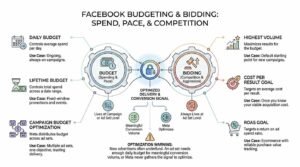
Facebook budgeting sets how much you spend and how fast, while bidding controls how aggressively Meta competes for each impression. Budget lives at either the campaign or ad set level, and bid strategy always lives at the ad set level.
New advertisers underfund campaigns more often than they overspend. An ad set needs enough daily budget to generate meaningful conversion volume, or Meta never gathers the signal it needs to optimize.
Here is how the main budget and bid decisions compare.
| Setting | What It Controls | When I Use It |
| Daily budget | Average spend per day | Ongoing, always-on campaigns |
| Lifetime budget | Total spend across a date range | Fixed-window promotions and events |
| Campaign Budget Optimization | Meta distributes budget across ad sets | Multiple ad sets, one objective, trusting delivery |
| Highest Volume | Maximum results for the budget | Default starting point for new campaigns |
| Cost Per Result Goal | Targets an average cost per result | Once you know your viable acquisition cost |
| ROAS Goal | Targets a return on ad spend ratio | Ecommerce with reliable purchase value tracking |
Daily vs. Lifetime Budgets
A daily budget instructs Meta to spend an average of that amount each day, with flexibility to spend up to 25% more on high-opportunity days and less on others. Lifetime budgets spread a fixed total across a scheduled date range and unlock dayparting.
I default to daily budgets for evergreen campaigns. Lifetime budgets suit promotions with a hard end date where total spend matters more than daily pacing.
Campaign Budget Optimization
Campaign Budget Optimization, now called Advantage Campaign Budget, sets one budget at campaign level and lets Meta allocate it across ad sets based on predicted performance. It reduces manual reallocation work and generally finds the winning ad set faster than I would.
The tradeoff is control. Meta will starve an ad set it judges weak, even when that ad set holds an audience you strategically want to reach.
Bid Strategies and Cost Controls
Highest Volume bidding spends the full budget to get the most results possible, with no cost ceiling. Cost Per Result Goal instructs Meta to keep average cost near a target, and ROAS Goal targets a revenue-to-spend ratio.
Setting a cost cap too low simply stops delivery. I launch on Highest Volume, learn the natural cost per result, then apply a goal slightly above that number.
How Much Do Facebook Ads Cost?
Facebook ads cost varies widely by industry, audience, and objective, but WordStream’s cross-industry benchmarks place the average cost per click at roughly $1.72 and average cost per thousand impressions between $8 and $12. Cost per lead and cost per acquisition swing far more dramatically by vertical.
Your costs are not fixed inputs. They are outputs of your creative quality, audience competition, seasonality, and conversion rate, all of which you can influence.
The table below shows typical ranges I see across common metrics.
| Metric | Typical Range | Primary Driver |
| CPM (cost per 1,000 impressions) | $8–$25 | Audience competition and seasonality |
| CPC (cost per link click) | $0.50–$3.50 | Creative relevance and click-through rate |
| CTR (click-through rate) | 0.9%–2.5% | Hook strength and offer match |
| Cost per lead | $5–$100+ | Industry, form friction, lead quality bar |
| ROAS (ecommerce) | 1.5x–5x | Margin, AOV, retargeting maturity |
CPM, CPC, and CPA Benchmarks
CPM is what you pay Meta for delivery, and it rises with audience competition rather than with your performance. Q4 CPMs routinely run 30% to 50% above Q2 levels as retail advertisers flood the auction.
CPC and CPA are performance metrics you control. A creative that doubles click-through rate roughly halves cost per click at the same CPM.
What Drives Your Costs Up or Down
Costs rise with narrow audiences, saturated frequency, weak creative, competitive seasons, and restricted verticals like finance and health. Costs fall with strong click-through rates, fresh creative, broader audiences, and improved post-click conversion rates.
Landing page performance is the lever most advertisers ignore. Doubling your landing page conversion rate halves your cost per acquisition without touching the ad account at all.
Launching Your First Facebook Ad Campaign
Launching a Facebook campaign means selecting an objective, defining an audience and budget at the ad set level, uploading creative, and publishing for review. The technical process takes twenty minutes, and the preparation before it determines whether the campaign works.
I want the tracking, the offer, and the destination page settled before anything gets built in Ads Manager. Fixing those after launch means restarting the learning phase and discarding early data.
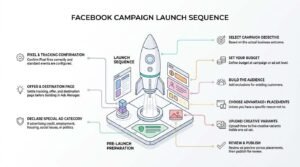
Here is the launch sequence:
- Confirm the Pixel fires correctly and standard events are configured
- Select your campaign objective based on the actual business outcome
- Declare a special ad category if you advertise credit, employment, housing, social issues, or politics
- Set your budget at campaign or ad set level
- Build the audience, adding exclusions for existing customers
- Choose Advantage+ placements unless you have a specific reason not to
- Upload three to five creative variants inside one ad set
- Review the ad preview across placements, then publish
The Pre-Launch Checklist
Before publishing, verify that the destination URL loads fast on mobile, that UTM parameters are attached, that the offer on the ad matches the offer on the page, and that your Pixel records a test conversion. A mismatch between ad promise and landing page is the fastest way to burn budget.
Confirm your billing threshold and payment method too. A declined payment mid-learning-phase resets delivery.
The Learning Phase
The learning phase is the period after launch when Meta’s delivery system explores audiences and placements to find reliable results, ending once an ad set records roughly 50 optimization events within a seven-day window. Performance during this window is unstable and unrepresentative.
Editing budget, targeting, creative, or optimization event restarts the learning phase. I hold edits for the first three to five days regardless of how the numbers look.
Measuring Facebook Ad Performance
Measuring Facebook ad performance means tracking cost and volume against a defined business outcome, rather than judging campaigns by reach, engagement, or impressions. Ads Manager reports dozens of columns, and most of them do not matter for most advertisers.
I build a custom column set for every account before launch. Default columns bury cost per result under vanity metrics.
This table separates the metrics that drive decisions from the ones that describe activity.
| Metric | What It Tells You | Decision It Drives |
| Cost per result | Efficiency against your objective | Kill, keep, or scale |
| ROAS | Revenue returned per dollar spent | Budget allocation |
| CTR (link) | Creative and offer resonance | Creative refresh timing |
| Frequency | Times the average person saw the ad | Audience expansion timing |
| CPM | Auction cost of delivery | Seasonality and competition context |
| Landing page views vs. clicks | Page load and intent quality | Site speed and traffic quality fixes |
Metrics That Actually Matter
Cost per result and return on ad spend are the two numbers that determine whether a campaign continues. Everything else diagnoses why those numbers move.
Frequency deserves attention on small audiences. Once frequency passes roughly 3 within a week on a cold audience, cost per result usually climbs and creative fatigue has set in.
Attribution Windows and iOS Tracking Limits
An attribution window is the period after an ad click or view during which a conversion is credited to that ad, with Meta defaulting to 7-day click and 1-day view. Apple’s App Tracking Transparency prompt reduced the share of iOS users Meta can track deterministically, which shrank reported conversions.
Compare Ads Manager against your own analytics and revenue records rather than trusting either alone. I treat Meta’s numbers as directional for optimization and my backend numbers as truth for profitability.
Reading Ads Manager Reports
Ads Manager lets you break down results by placement, age, gender, region, time, and device to find where performance concentrates. Breakdown reporting exposes waste that campaign-level averages hide.
Run breakdowns weekly once volume allows. A campaign averaging acceptable cost per lead often contains one placement quietly consuming a third of budget at triple the cost.
Optimizing and Scaling Facebook Campaigns
Optimizing Facebook campaigns means systematically removing what underperforms and reinforcing what works, using conversion volume rather than daily fluctuation as your decision trigger. Scaling means increasing spend without destroying efficiency.
Most beginners optimize far too frequently. Daily edits keep ad sets locked in the learning phase permanently, which guarantees unstable delivery.
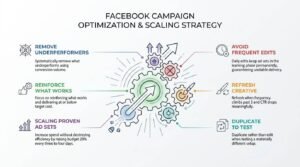
My decision rules stay simple:
- Kill an ad that has spent 2–3x your target cost per result with zero conversions
- Keep anything delivering at or below target cost, and leave it untouched
- Scale a proven ad set by raising budget 20% every three to four days
- Refresh creative when frequency climbs past 3, and CTR drops meaningfully
- Duplicate rather than edit when you want to test a materially different setup
When to Kill, Keep, or Scale
Judge an ad on conversion volume, not on spend alone. An ad that has spent $40 against a $30 target cost per acquisition with no conversions has not yet produced a reliable signal in most accounts.
Scaling works best gradually. Raising budget more than roughly 20% at once resets the learning phase and often spikes cost per result for several days.
Vertical vs. Horizontal Scaling
Vertical scaling increases budget on an existing winning ad set, while horizontal scaling duplicates the winning setup into new audiences, placements, or geographies. Vertical scaling is faster but hits diminishing returns as audience saturation builds.
I scale vertically until cost per result degrades, then expand horizontally into lookalikes and adjacent markets. Combining both extends a winning creative’s useful life considerably.
Facebook Advertising Policies and Common Rejections
Meta’s advertising policies govern what can be promoted, how claims can be made, and what landing page experience is acceptable, with automated review checking every ad before delivery. Most rejections come from a handful of repeat causes rather than obscure rule breaches.
Rejections are appealable and usually resolved within a day. Repeated violations, though, restrict the account itself, which is a far harder problem to fix.
Common rejection triggers include:
- Personal attributes: implying you know the viewer’s health, race, finances, or personal situation
- Unrealistic outcome claims, particularly around income, weight loss, or health results
- Before-and-after imagery
- Restricted goods: alcohol, supplements, gambling, cryptocurrency without permission
- Landing pages that mismatch the ad or contain excessive interstitials
- Excessive text or misleading buttons within the creative image
Restricted and Prohibited Categories
Prohibited categories are banned outright and include illegal products, tobacco, weapons, adult content, and deceptive practices. Restricted categories, including alcohol, dating, gambling, financial services, and pharmaceuticals, are permitted with written permission, age gating, or geographic limits.
Check the policy before building creative if you operate in a restricted vertical. Building a full campaign only to discover the category needs pre-approval wastes a production cycle.
Special Ad Categories
Special Ad Categories cover credit, employment, housing, social issues, elections, and politics, and advertisers must self-declare when a campaign falls into one. Declared campaigns lose detailed targeting by age, gender, ZIP code, and many interest categories.
Failing to declare correctly risks account restriction. I declare whenever there is genuine ambiguity, because the targeting cost is smaller than the account risk.
Facebook Ads vs. Google Ads vs. Organic Search
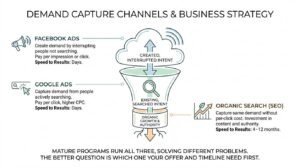
Facebook Ads create demand by interrupting people who were not searching, Google Ads capture demand from people actively searching, and organic search captures that same demand without per-click cost but with a longer timeline. Each channel solves a different problem, and mature programs run all three.
Businesses frequently ask me which one to pick. The better question is which one their offer and timeline actually need first.
| Channel | Intent | Speed to Results | Cost Model |
| Facebook Ads | Created, interrupted | Days | Pay per impression or click |
| Google Ads | Existing, searched | Days | Pay per click, higher CPC |
| Organic Search (SEO) | Existing, searched | 4–12 months | Investment in content and authority |
Demand Capture vs. Demand Creation
Demand capture serves people who already know they have a problem and are searching for a solution, which describes Google Ads and organic search. Demand creation introduces the problem or the product to people who were not looking, which is Facebook advertising’s core strength.
Products with existing search volume usually monetize faster on search channels. Genuinely new products often have no search volume at all, which makes paid social the only viable acquisition route early on.
How Paid Social and SEO Compound Together
Paid social and search engine optimization compound because paid campaigns generate immediate audience data, branded search volume, and content performance signals that inform organic strategy. Facebook campaigns reveal which messages convert within days, and that answer takes months to learn through organic testing alone.
Branded search lift is the clearest crossover effect. Awareness campaigns raise branded query volume, and those branded searches convert at rates cold traffic never reaches.
Common Facebook Advertising Mistakes Beginners Make
The most common Facebook advertising mistakes come from impatience, fragmentation, and skipping measurement setup. I see the same handful repeat across almost every new account I audit.
Each one is avoidable with a decision made before launch rather than a fix applied after.
- Boosting posts instead of building campaigns: boosting offers almost no objective, targeting, or placement control.
- Skipping Pixel installation: conversion campaigns cannot optimize without conversion data.
- Choosing the wrong objective: Traffic campaigns find clickers, not buyers
- Editing campaigns daily: every meaningful edit restarts the learning phase
- Splitting budget across too many ad sets; each one starves below the volume it needs
- Running one creative: creative fatigue arrives within days on small audiences
- Ignoring the landing page: a slow or mismatched page wastes every click you buy
- Judging results before 50 conversions: early data is noise, not signal
Building a Repeatable Facebook Advertising Strategy
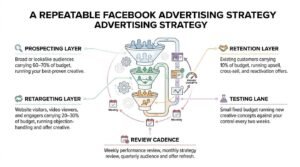
A repeatable Facebook advertising strategy sequences audience temperature, creative testing, and budget allocation into a system you run continuously rather than a campaign you launch once. The goal is a machine that keeps finding new customers as old audiences saturate.
I structure almost every mature account into three continuous layers running at the same time.
The sequence works like this:
- Prospecting layer: broad or lookalike audiences carrying 60–70% of budget, running your best-proven creative
- Retargeting layer: website visitors, video viewers, and engagers carrying 20–30% of budget, running objection-handling and offer creative
- Retention layer: existing customers carrying 10% of budget, running upsell, cross-sell, and reactivation offers
- Testing lane: a small fixed budget running new creative concepts against your control every two weeks
- Review cadence: weekly performance review, monthly strategy review, quarterly audience and offer refresh
The testing lane is what keeps the system alive. Every winning creative eventually fatigues, and the only defense is a pipeline of new concepts already proven at small scale.
Conclusion
You now understand how Facebook’s auction works, how campaigns, ad sets, and ads fit together, and how targeting, creative, budget, and measurement drive results.
Facebook advertising rewards patience and systems over quick launches, and it compounds hardest when paired with organic search and disciplined performance tracking.
We build paid and organic growth programs that work together. Talk to White Label SEO Service about turning these fundamentals into measurable, sustainable acquisition.
Frequently Asked Questions
How much should a beginner spend on Facebook ads?
Start at $20 to $50 per day per campaign. That range generates enough conversion volume for Meta to exit the learning phase within a reasonable timeframe.
How long does it take for Facebook ads to work?
Expect three to seven days before results stabilize. Meta needs roughly 50 optimization events per ad set weekly to deliver predictably.
Do I need a Facebook Page to run ads?
Yes, a Facebook Page is required to run ads on Meta platforms. The Page acts as the identity behind every ad you publish.
What is a good ROAS for Facebook advertising?
A 3x return on ad spend is a common ecommerce benchmark. Your actual target depends entirely on product margin and repeat purchase value.
Why did my Facebook ad get rejected?
Most rejections involve personal attribute references, unrealistic claims, or restricted product categories. Appeal directly in Account Quality, since automated reviews frequently reverse.
Should I boost posts or use Ads Manager?
Use Ads Manager. Boosting gives almost no control over objective, targeting, placements, or optimization events.
Are Facebook ads still effective in 2025?
Yes, Facebook ads remain effective, though tracking limits have raised the importance of proper Conversions API setup. Creative quality now drives performance more than targeting precision.