I started using Ahrefs years ago because it was one of the few tools built specifically for SEO professionals instead of trying to be everything at once. It’s stayed sharp and focused ever since, and for a long time it was the first tool I opened every morning.
But running SEO campaigns for real businesses means testing what else is out there, and over time I’ve worked with a long list of tools that match or beat Ahrefs for specific jobs. Some cover more ground. Some cost less. A few specialize in exactly one thing Ahrefs treats as a side feature.
This guide covers ten tools I’ve actually run client work through, not demo accounts. I’ll walk through what each one does well, where it falls short, what it costs, and who should actually use it. I’ll cover the all-in-one suites first, then the specialists: a content-optimization platform, a continuous monitoring tool, and a pure backlink-index specialist before helping you match a tool to your actual situation.
Here’s what I looked at across all ten: data accuracy, feature depth, pricing transparency, ease of use, and whether the tool scales past a handful of small sites into real agency workloads.
Summary Table: 10 Ahrefs Alternatives
Before the full breakdowns, here’s the fast version. This table gives you the shape of all ten tools at a glance so you can jump straight to the ones worth a closer look.
| Tool Name | Best For | Free Access | Notes |
| Semrush | All-in-one SEO & marketing | Free Trial | Broadest feature set of the group. Strong for teams needing more than pure SEO tooling. Data holds up consistently across markets. |
| SE Ranking | Combined SEO and GEO with reporting | Free Trial | Reporting is genuinely agency-ready out of the box. Interface stays clean even as feature count grows. |
| Mangools | Keyword research simplicity | Free Trial | Fastest onboarding of any tool here. Keyword difficulty numbers hold up well against real rankings. Backlink depth is thin. |
| Ubersuggest | Solo marketers on a budget | Free Trial | Cheapest full toolkit on this list. Covers the basics competently, not built for enterprise-scale work. |
| Moz Pro | Domain authority tracking | Free Trial | Domain Authority is still the most recognized authority metric in client conversations. Backlink index trails the bigger players. |
| Serpstat | Multi-regional campaigns | Free Trial | Deep international keyword coverage at a fair price. Interface takes longer to learn than most on this list. |
| SpyFu | Competitor PPC & SEO research | Free Account | Unmatched historical ad and keyword data. SEO side is functional, not deep. |
| Surfer SEO | AI content optimization paired with SEO data | Free Trial | Pairs live SERP data with content scoring while you write. Narrow scope outside content workflows. |
| Sitechecker | Continuous technical SEO monitoring | Free Trial | Watches your site around the clock instead of waiting for a manual crawl. Backlink and keyword tools are secondary features here. |
| Majestic | Pure backlink index depth | Free Trial | Trust Flow and Citation Flow give a genuinely different read on link quality. No keyword research or content tools at all. |
Each tool solves a different part of the problem. The right one depends on what you actually need to accomplish and how much of a full suite you’re willing to pay for.
What to Look for in the Best Ahrefs Alternatives
Every tool on this list gets judged against the same short checklist. These are the factors that separate a tool I’ll keep running client work through from one that looks fine in a demo and falls apart under real use.
Data Accuracy
I test this by cross-checking keyword volume and backlink counts against what actually shows up in Google Search Console. A tool that consistently reports numbers that don’t line up with reality stops being useful for strategy decisions, no matter how polished its dashboard looks.
Feature Set
Some platforms try to cover keyword research, backlink analysis, technical audits, and rank tracking all in one place. Others pick one job and do it exceptionally well. Neither approach is automatically better; it depends on whether the feature set actually matches the work you need done.
Pricing
I care less about the sticker price and more about what’s hidden behind it. Credit caps, gated features on lower tiers, and per-seat charges can quietly double your real monthly cost. A transparent pricing page tells me a lot about how a company treats its customers.
Ease of Use
A tool packed with functionality is worthless if it takes a new hire three weeks to find anything. I judge this by how fast someone unfamiliar with the platform can pull a usable report without opening a help doc.
Integrations
Standalone data is only half the value. I look for clean connections to Google Analytics, Search Console, and whatever project management stack a team already runs on, because manual exports eat hours every single week.
Scalability
A tool that works beautifully on a 20-page site can choke the moment you point it at something with 50,000 URLs. I specifically stress-test with larger sites and multiple simultaneous projects before trusting a platform with recurring client work.
How I Selected the Best Ahrefs Alternatives
I’ve run technical audits on sites well past 10,000 pages, tracked rankings across more than a dozen countries, and built keyword strategies pulling from datasets covering billions of monthly search queries. That volume of real usage separates tools that hold up from tools that only look good in a fifteen-minute demo.
Every platform on this list got put through actual client work content audits, backlink campaigns, rank tracking, and competitive research not a quick sign-up and a poke around the dashboard.
Data Reliability
Every number gets checked against Google Search Console and Analytics before I trust it. I also track how often each platform refreshes its index. Some backlink databases update daily; others lag by weeks, which matters enormously if you’re actively monitoring a link-building campaign.
Real-World Performance
I run each tool against genuinely heavy workloads: full-site crawls past 50,000 URLs, competitor backlink pulls on domains carrying six-figure link counts, and keyword exports running into the tens of thousands of terms. A tool that stalls, times out, or throttles requests under that load gets dropped from consideration immediately.
Value for Money
I look past the sticker price to what you actually get access to. Some tools price high but genuinely earn it through data depth and reliability. Others gate core functionality behind an upsell and charge a premium for features that should be standard. I also check whether costs scale sanely as you add projects or team seats.
Ease of Use
Speed to a usable result matters more than feature count. I track how quickly someone can generate a real report, apply filters, or run a bulk action without digging through documentation. Tools with buried menus or clunky navigation slow down every single workflow built on top of them.
Client Results
None of this matters if a tool doesn’t contribute to actual outcomes. I track which platforms surfaced content gaps that turned into new rankings, which backlink data uncovered outreach opportunities that converted, and which rank trackers gave early warning on algorithm volatility. A tool earns its spot on this list by contributing to real, measurable wins.
10 Best Ahrefs Alternatives in 2026 (Free + Paid)
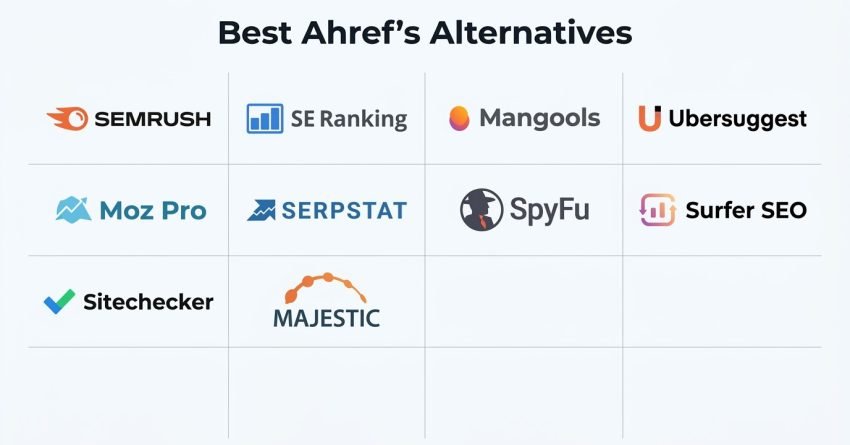
Here are the ten Ahrefs alternatives I’ve personally tested and used across real campaigns. Each one brings something different, whether that’s raw affordability, a gentler learning curve, or a specialty Ahrefs simply doesn’t cover.
- Semrush: best for all-in-one SEO
- SE Ranking: best for combined SEO and GEO with reporting
- Mangools: best for beginner keyword research
- Ubersuggest: best for tight budgets
- Moz Pro: best for Domain Authority tracking
- Serpstat: best for international SEO campaigns
- SpyFu: best for competitor PPC research
- Surfer SEO: best for AI content optimization paired with SEO data
- Sitechecker: best for continuous technical SEO monitoring
- Majestic: best for pure backlink index depth
Let’s get into what actually makes each one worth considering.
1. Semrush – Best for All-in-One SEO
Best For: Teams that need keyword research, backlink analysis, site audits, rank tracking, and competitor intelligence sitting inside one login.
Semrush built its reputation as a competitive research tool and has since grown into a genuinely complete marketing platform spanning SEO, PPC, content, and social. That growth is exactly what separates it from Ahrefs, which stays laser-focused on backlinks and site exploration.
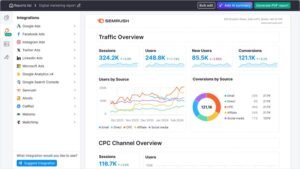
What you get with Semrush that Ahrefs doesn’t offer at the same depth is breadth: keyword clustering at scale, position tracking spanning 200-plus countries, editorial workflow tools, and advertising research sitting right next to the SEO features. The interface asks for a real onboarding period, and the price climbs fast once you add projects or seats. But once a team knows where things live, the platform moves efficiently through even complex, multi-market work.
Semrush Key Features
- Keyword research at scale: Generate thousands of keyword variations from a single seed term, complete with search volume, difficulty scoring, and intent classification. This kind of output is what makes building a full content roadmap from scratch realistic instead of a weeks-long manual slog.
- Position tracking across 200+ countries: Daily rank monitoring with SERP feature detection, device-level splits, and side-by-side competitor comparison. Genuinely useful for any brand operating across more than one national market.
- Technical site audits: Crawls flag broken links, duplicate content, crawlability issues, and Core Web Vitals problems, with a prioritization layer that separates the fixes worth doing first from the noise.
- Backlink analytics: Full link profile visibility covering new and lost backlinks, referring domains, anchor distribution, and toxic-link flagging, backed by one of the largest indexed link databases on the market.
- Content strategy tooling Surfaces content gaps, tracks published-content performance, and layers in real-time writing recommendations, which matters a lot for teams scaling content production across multiple writers.
- Organic competitor research reveals which keywords a competitor ranks for, their strongest pages, and how their visibility has shifted over time a fast way to size up a new client’s competitive landscape.
Semrush Pros
- Database coverage spans nearly every market I’ve needed, across well over a hundred countries, with consistent accuracy whether the target is a niche B2B brand or a global e-commerce operation.
- Keyword difficulty scoring tracks closely with actual ranking outcomes, which makes planning content investment far less of a guessing game.
- Historical data stretches back multiple years, useful for spotting seasonal patterns or diagnosing a traffic drop that traces back to an old algorithm shift rather than a recent mistake.
- Daily rank tracking runs unattended, surfacing winners, losers, and SERP feature shifts without requiring a manual check-in every morning.
- The content workflow tooling consolidates calendar planning, performance tracking, and writer collaboration into one place, cutting out several separate point tools most teams juggle otherwise.
- Client reporting requires minimal manual editing, which meaningfully cuts down the hours spent building monthly deliverables by hand.
- API access supports genuinely custom dashboard builds, pulling Semrush data alongside Analytics and Search Console into a single unified view.
Semrush Cons
- The learning curve is real. New team members often need several weeks before the platform stops feeling overwhelming, especially if all they actually need is basic keyword research.
- Pricing scales upward quickly as projects, seats, and tracked keywords grow, which can put the higher tiers out of reach for smaller teams or solo operators.
- Certain advanced tools sit buried deep in submenus, and even experienced users occasionally have to search for where a specific feature lives.
- Backlink index refresh cycles run slower than some link-focused competitors, which matters if you need near-real-time visibility into new links as they get built.
Semrush Pricing
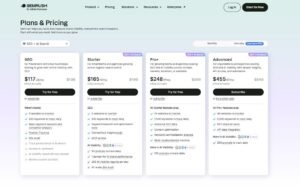
- 7-day free trial
- Starter: $165.17/month
- Pro+: $248.17/month
- Advanced: $455.67/month
Semrush Reviews
- G2: 4.5 out of 5 stars (3,379+ reviews)
- Capterra: 4.6 out of 5 stars (2,317+ reviews)
Reviewers consistently point to depth of features and data reliability as the standout strengths. Pricing and the initial learning curve show up repeatedly as the main friction points. The strongest reviews tend to come from agencies and enterprise teams that use enough of the platform to justify the investment.
2. SE Ranking – Best for Combined SEO and GEO with Reporting

Best For: Agencies running multiple client accounts that need dependable rank tracking across both traditional and AI-driven search, with API access included from the start.
SE Ranking has expanded well past basic rank tracking into a full platform covering keyword research, backlink analysis, technical audits, competitor intelligence, and a dedicated module for tracking visibility inside AI-generated answers.
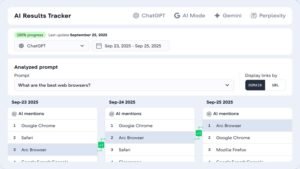
That last piece is what genuinely sets it apart in this comparison. SE Ranking tracks brand mentions and citations across major AI assistants and Google’s AI-generated results alongside standard organic rankings, all inside the same report. Add in a Data API and a Project API bundled into every plan, and you get a platform built for agencies that need professional deliverables and automation without a separate enterprise contract.
SE Ranking Key Features
- White-label reporting: Fully branded reports with custom logos, colors, and domains that require minimal editing before they’re client-ready, which removes one of the most time-consuming parts of agency account management.
- Multi-country rank tracking: Daily position monitoring with SERP feature detection across more than a hundred countries and multiple locations per project.
- AI search visibility tracking: Monitors brand mentions and citations across major AI chat assistants and Google’s AI-generated answer features, giving clients a concrete look at how they show up in AI-generated responses.
- Competitor SEO analysis: Competitor keyword rankings, traffic estimates, and keyword gap identification cover most standard competitive research needs without requiring a second tool.
- Site audit tooling: Crawls surface technical SEO issues with clear prioritization, catching duplicate content, missing tags, and Core Web Vitals problems.
- Bundled API and MCP access: Both the Data API and Project API ship on every plan tier, plus a remote MCP server that lets AI assistants query the platform’s data directly in plain language.
SE Ranking Pros
- White-label reporting genuinely eliminates hours of manual report-building work per client, turning what used to be a multi-hour task into something that runs on a schedule.
- The interface stays intuitive even as feature depth grows, which makes onboarding new team members dramatically faster than on some competing platforms.
- Rank tracking accuracy consistently lines up with manual spot-checks and Search Console data within a couple of positions, which is all the precision most workflows actually need.
- API access ships standard on every tier, making custom dashboard builds and automated workflows accessible without an enterprise upsell.
- Built-in AI search tracking answers a question more clients are asking every quarter, without requiring a completely separate tool subscription.
SE Ranking Cons
- The backlink database trails Ahrefs in raw referring-domain coverage, which shows up if you’re running an aggressive, high-volume link-building campaign.
- International keyword coverage is strong in major markets but noticeably thinner in smaller countries or less common languages.
- Teams that only need rank tracking will find the platform broader than necessary; the extra modules add value for full-service agency work but go mostly unused for a single-purpose tracker.
SE Ranking Pricing
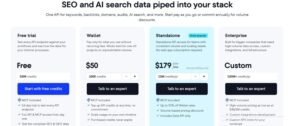
- Free trial available
- Core: $129/month
- Growth: $279/month
- Enterprise: custom pricing
- API and MCP access included on every plan
SE Ranking Reviews
- G2: 4.7 out of 5 stars (2,330+ reviews)
- Capterra: 4.7 out of 5 stars (296+ reviews)
Reviewers consistently praise the reporting quality and rank-tracking accuracy. The most repeated criticism is backlink index size relative to Ahrefs for high-volume link builders. Overall, it’s a strong match for agencies that want polished deliverables, AI search visibility, and API access without paying extra for any of it separately.
3. Mangools – Best for Beginner Keyword Research

Best For: Solo marketers, bloggers, and small businesses who want accurate keyword research without a steep learning curve standing in the way.
Mangools built its reputation on KWFinder before expanding into a small suite that includes SERP analysis, rank tracking, and backlink checking, all designed around one core idea: simplicity without sacrificing accuracy.
What sets it apart is the interface itself. Everything is visual and built for people who don’t live inside SEO tools every day. The keyword difficulty scoring is genuinely one of the more reliable metrics I’ve tracked against real ranking outcomes, and the learning curve is close to nonexistent. Most people are productive within minutes of their first login.
Mangools Key Features
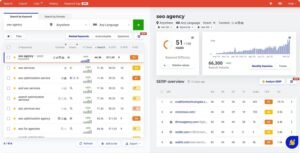
- Keyword research: Enter a single seed term and get back hundreds of related keywords complete with search volume, difficulty scoring, and trend data that holds up well against real ranking outcomes.
- Visual SERP analysis: See the top ten ranking pages for any keyword along with their authority scores, backlink counts, and social signals, making it fast to judge whether a keyword is realistically winnable.
- Simplified rank tracking: A clean, straightforward interface for monitoring position changes over time, well-suited to tracking a focused list rather than thousands of terms across dozens of projects.
- Backlink checking: Analyze the backlink profile of any domain, with a browser extension that surfaces link metrics while you browse, which speeds up quick outreach prospecting.
- Historical volume trends: Search volume history helps spot seasonal keyword patterns before you commit content resources to a term that only spikes for a few weeks a year.
- Location-specific keyword data: Search volume and difficulty broken out by geography, which matters directly for local SEO work or regional campaign targeting.
Mangools Pros
- The interface is the easiest in the category, full stop. Clean, colorful, and genuinely pleasant to work inside, which makes keyword research feel far less like a chore.
- Keyword difficulty scoring holds up consistently against real-world ranking results across a wide range of niches and competition levels.
- Results load fast with no lag, whether you’re running a single keyword search or pulling a full SERP breakdown.
- Historical trend data prevents wasted content investment on keywords that only spike seasonally, which has saved real budget on more than one project.
- The browser extension makes on-the-go competitive checks genuinely convenient without needing to open the full platform.
Mangools Cons
- The backlink database is noticeably smaller than what Ahrefs or Semrush carries, which limits its usefulness for serious link-building campaigns.
- Keyword tracking limits fill up faster than expected, even on higher-tier plans, which becomes a real constraint for anyone managing multiple sites.
- There’s no technical site audit functionality at all, meaning you’ll need a separate crawler for that part of the workflow.
- Competitor analysis stays fairly surface-level compared to dedicated competitive research suites, useful for a quick check but not deep strategic work.
Mangools Pricing
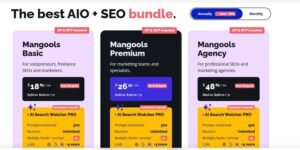
- Free
- Basic: $30.50/month
- Premium: $40.50/month
- Agency: $70.50/month
- 48-hour money-back guarantee
Mangools Reviews
- G2: 4.7 out of 5 stars (95+ reviews)
- Capterra: 4.8 out of 5 stars (91+ reviews)
Users consistently highlight ease of use and how precise the keyword difficulty rating feels in practice. The trade-offs show up around tracking limits and backlink database depth. It’s the clearest choice for beginners who want accuracy without wading through complexity.
4. Ubersuggest – Best for Tight Budgets

Best For: Solopreneurs and small businesses who need working SEO data at the lowest realistic price point.
Ubersuggest has grown from a basic keyword suggestion tool into a genuinely functional budget SEO suite. It’s not built to match Ahrefs or Semrush on depth, but at a fraction of the price, it covers the core fundamentals competently.
What separates it from purely free tools is that the data is actually useful in practice. Search volumes land in a reasonable range, keyword suggestions stay relevant, and the built-in site audit catches the issues that genuinely matter. It’s not professional-grade across the board, but it’s a meaningful step up from having nothing.
Ubersuggest Key Features
- Keyword research: Search volume, SEO difficulty, paid difficulty, and CPC data for any keyword, covering major markets adequately for most small-business use cases.
- Content idea generation: Surfaces top-performing content for any given keyword along with social share counts, backlink data, and estimated traffic, useful for understanding what format tends to win.
- Basic site audits: Crawls flag broken links, missing meta tags, and slow-loading pages; not exhaustive, but it catches the obvious technical problems.
- Backlink data: Shows who links to your site and your competitors, with a smaller index than premium tools but decent coverage of the backlinks that matter most, plus outreach suggestions.
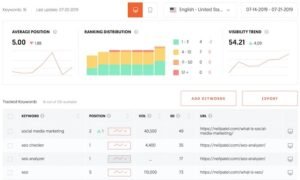
- Rank tracking: Straightforward position monitoring for a target keyword list, without advanced extras like SERP feature detection or localized rank variation.
- Browser extension: Quick domain, keyword, and backlink lookups while browsing, without needing to open the full platform.
Ubersuggest Pros
- It’s the lowest entry price for a genuinely functional all-in-one SEO toolkit, removing much of the financial barrier for anyone just testing whether SEO tooling is worth the investment.
- A one-time lifetime purchase option exists, which is rare in this space and can eliminate recurring fees entirely for long-term users.
- Built-in training content gives newer users a starting point for actually applying the data instead of just staring at numbers.
- The simplicity works in its favor for non-technical users; there’s no steep documentation dive required to get value from the core features.
- Keyword suggestions surface question-based queries directly, which speeds up building out FAQ sections and content angles.
Ubersuggest Cons
- Data accuracy runs noticeably looser than premium tools when compared against Search Console figures, so the numbers work better as directional guidance than precise planning inputs.
- The backlink index is significantly smaller than what Ahrefs indexes, which becomes a real limitation for serious competitive link analysis.
- Entry-tier plans cap daily searches, reports, and tracked keywords tightly enough that any serious ongoing SEO work will hit the ceiling fast.
Ubersuggest Pricing
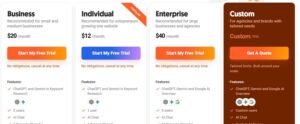
- Individual: $12/month
- Business: $20/month
- Enterprise: $40/month
Ubersuggest Reviews
- G2: 4.2 out of 5 stars (149+ reviews)
- Capterra: 4.4 out of 5 stars (93+ reviews)
Reviewers consistently praise the price point and simplicity, while flagging data precision and feature depth as the trade-off. It’s a solid entry point for anyone working with a genuinely limited budget.
5. Moz Pro – Best for Domain Authority Tracking

Best For: SEO professionals who need Domain Authority metrics, strong local SEO tooling, and reliable link analysis.
Moz has one of the longest track records in this space and is responsible for creating Domain Authority in the first place. Whatever your opinion of the metric itself, it remains the most widely recognized authority score across the entire SEO industry, and that recognition alone gives it real practical value in client conversations.
The platform makes the most sense for agencies that need client-friendly metrics, teams focused on local SEO, and anyone who prioritizes clean, filtered data quality over sheer database size. The interface feels mature and stable rather than flashy, which fits a tool built for long-term consistency.
Moz Pro Key Features
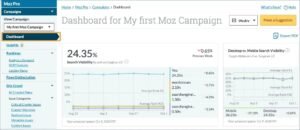
- Domain Authority and Page Authority: Industry-standard authority scoring used constantly for assessing link opportunities and explaining SEO potential to clients who don’t need the technical detail behind it.
- Keyword Explorer: Search volume, organic CTR estimates, priority scoring, and SERP analysis, with difficulty scores that stay reliable and a priority metric that helps surface quick-win opportunities.
- Link Explorer: Backlink profile analysis complete with spam scoring, anchor text distribution, and new/lost link tracking, with data quality that stays high even though the index runs smaller than Ahrefs.
- Weekly site crawls: Technical audits covering crawlability, duplicate content, missing tags, and page speed, with visualization that makes site architecture easy to understand at a glance.
- Local rank tracking: Position monitoring with SERP feature detection and city-level local rank variation, a genuine strength for location-based campaigns.
- On-page optimization guidance: Page-specific recommendations covering title tags, content structure, links, and technical elements, more actionable than generic site-wide audit findings.
Moz Pro Pros
- Domain Authority is universally understood across the industry, which makes explaining growth targets to non-technical clients dramatically easier than with a lesser-known metric.
- The platform prioritizes data quality over raw volume, filtering out spam and low-quality links more aggressively than most competitors, which produces a cleaner backlink picture overall.
- Local SEO tooling is genuinely excellent, with city-level rank tracking and local SERP analysis that outperforms most general-purpose SEO platforms.
- Every backlink carries a spam score, which speeds up link-audit work considerably by immediately flagging potentially harmful links.
- The browser extension surfaces authority and link metrics on any page instantly, making it a constant companion for quick competitive checks.
Moz Pro Cons
- The backlink index runs smaller than Ahrefs, meaning fewer referring domains show up, particularly newer links or ones from smaller sites.
- Backlink data refreshes less frequently, which matters if you’re actively monitoring a live link-building campaign and want near-real-time visibility.
- Keyword database coverage has gaps, especially for long-tail terms and international markets, compared to larger competitors.
- The interface, while functional, hasn’t evolved visually at the same pace as newer platforms on this list.
Moz Pricing
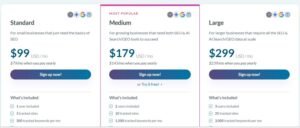
- Standard: $79/month
- Medium: $143/month
- Large: $239/month
Moz Pro Reviews
- G2: 4.3/5 (605+ reviews)
- Capterra: 4.5/5 (349+ reviews)
Reviewers consistently praise the strength of Domain Authority as a metric and the depth of educational resources available. The trade-off is a smaller backlink index and pricing that feels steep relative to what’s included. It’s a strong fit for agencies leaning on DA and local SEO work, less so for backlink-heavy campaigns.
6. Serpstat – Best for International SEO Campaigns

Best For: SEO professionals running campaigns across multiple countries and languages who need affordable, genuinely deep international data.
Serpstat built its position as an affordable, all-in-one platform with unusually strong international coverage. It’s matured into a solid option for agencies and in-house teams working across borders where other tools either ignore smaller markets or charge a premium to access them.
What sets it apart is the sheer breadth of international keyword data at a reasonable price point. You get keyword research, rank tracking, and competitor analysis covering markets that plenty of other platforms treat as an afterthought. The interface has a bit of a learning curve, but nothing unreasonable for what it delivers.
Serpstat Key Features
- International keyword database: Local search volume data across more than 200 countries, with consistent coverage extending well beyond the usual major markets into smaller regions.
- Bulk keyword analysis: Upload large keyword batches and get search volume, competition, and CPC data back all at once, saving significant time on large-scale content audits or migrations.
- Missing keywords report: Surfaces keywords competitors rank for that your site doesn’t, one of the fastest ways to spot content gaps during a competitive audit.
- Multi-region rank tracking: Monitor rankings across different countries and cities simultaneously, essential for campaigns that need to distinguish performance between specific metro areas.
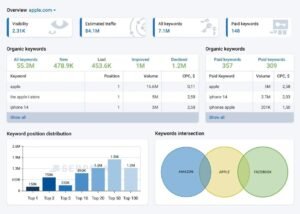
- Batch domain comparison: Compare traffic estimates, keyword overlap, and visibility across multiple competitor domains at once, useful when mapping a crowded competitive landscape.
- Site structure visualization: A tree-view breakdown of site architecture that makes it easier to spot content silos and structural issues affecting crawlability.
Serpstat Pros
- International data coverage genuinely outperforms several pricier competitors for clients operating outside the US and UK core markets.
- Pricing stays competitive relative to the feature set, making it accessible for smaller agencies and independent consultants who can’t justify enterprise-tier spend.
- Bulk analysis tools save real hours on large-scale projects, processing thousands of keywords or dozens of competitor domains faster than running individual queries one at a time.
- The missing keywords report identifies content gaps almost instantly, without requiring a manual side-by-side comparison of competitor rankings.
- API access ships on every plan tier, including the entry level, which adds real flexibility for custom dashboard or integration work.
- Team collaboration tools, shared projects, and permission controls are included without needing to jump to an enterprise-priced tier.
Serpstat Cons
- Navigation isn’t always intuitive, and some features sit in less obvious places than on more polished competing platforms.
- The backlink database runs smaller than Ahrefs, adequate for monitoring your own link profile but limited for deep competitive backlink research.
- Data accuracy is strongest in core markets like the US, UK, and major European countries, with smaller markets occasionally showing questionable volume figures worth cross-referencing.
- Entry-tier plans cap daily report generation, which becomes a real constraint for anyone managing multiple active client accounts.

Serpstat Pricing
- Individual: $44/month
- Team: $83/month
- Agency: $319/month
Serpstat Reviews
- G2: 4.6 out of 5 stars (463+ reviews)
- Capterra: 4.7 out of 5 stars (170+ reviews)
Reviewers consistently praise the international coverage and bulk analysis tooling. The most common complaints center on interface usability and support responsiveness. The overall consensus positions it as the strongest value option for international SEO work, particularly across multiple simultaneous markets.
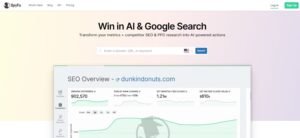
7. SpyFu – Best for Competitor PPC Research
Best For: PPC specialists and SEO professionals who need historical competitor data spanning both paid and organic search.
SpyFu built its foundation on competitive intelligence for paid search and has since layered in SEO features, though its real strength remains historical data stretching back well over a decade. That depth of history is genuinely unique in this category.
What separates SpyFu is the ability to look backward. You can see exactly which keywords a competitor bid on years ago, which ad variations they tested, and how their budget and strategy shifted over time. No other platform in this comparison offers that level of historical PPC visibility.
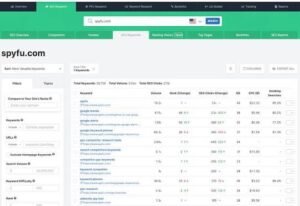
SpyFu Key Features
- Historical PPC data: Complete visibility into every keyword a competitor has bid on and every ad variation tested over more than a decade, useful for understanding what strategies actually held up long-term versus what got abandoned.
- Ad copy library: Thousands of competitor ad variations with estimated impressions and click-through data, useful for identifying proven angles before writing new campaigns from scratch.
- Keyword overlap analysis: Compares your keyword profile against multiple competitors simultaneously, surfacing where you’re directly competing and where clear gaps exist.
- Combat reports: Visual competitive landscape mapping across both organic and paid rankings, making it fast to identify which competitors actually matter.
- Backlink outreach suggestions: Surfaces sites linking to competitors but not to you, prioritized with contact details included for outreach.
- Branded vs. organic rank splitting: Filters branded search traffic out of rank tracking, giving a cleaner read on genuine organic performance.
SpyFu Pros
- The historical depth is genuinely unmatched; more than a decade of competitor PPC history reveals what actually converted over time rather than what looked good in a single snapshot.
- PPC competitive intelligence goes well beyond what’s available inside Google Ads alone, surfacing competitor budgets and proven ad copy before you commit your own spend.
- Combat reports simplify what would otherwise be a tedious one-by-one competitor comparison into a single visual read.
- Data exports are unrestricted, which makes building custom reports or feeding data into other systems far easier than on platforms that lock everything behind their own interface.
- API access supports custom dashboard builds that merge SpyFu’s competitive data with actual live campaign performance.
SpyFu Cons
- SEO functionality trails dedicated SEO platforms considerably; usable, but not deep enough to be a primary tool if organic search is the main focus.
- Estimate accuracy for smaller advertisers is less reliable than for major, high-spend competitors, so smaller-account data should be treated as directional.
- The backlink checker exists but isn’t competitive with dedicated link tools, fine for a quick prospecting glance but inadequate for serious link analysis.
- International coverage is weak outside the US, with other English-speaking markets covered decently and non-English markets left thin.
SpyFu Pricing
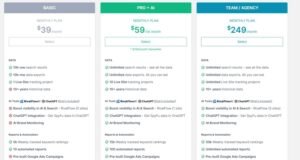
- Basic: $39/month
- Pro+AI: $59 first month, $119/month thereafter
- Team/Agency: $249/month
SpyFu Reviews
- G2: 4.6 out of 5 stars (516+ reviews)
- Capterra: 4.5 out of 5 stars (144+ reviews)
Reviewers consistently highlight the value of the historical PPC data and competitive research depth, while noting the dated interface and limited SEO functionality. It’s genuinely indispensable for PPC-focused analysts, less suited as a primary tool for SEO-first workflows.
8. Surfer SEO – Best for AI Content Optimization Paired with SEO Data

Best For: Content teams and SEO writers who need live SERP data feeding directly into on-page content scoring while they draft.
None of the tools above treat content optimization as a first-class feature; it’s usually a bolt-on inside a broader suite. Surfer SEO takes the opposite approach: it builds its entire platform around scoring content against what’s actually ranking, in real time, while a writer is still working on the draft.
The core workflow pulls live SERP data for a target keyword, analyzes word count, heading structure, and term usage across the top-ranking pages, then hands the writer a content score that updates as they type. For teams producing content at volume, that immediate feedback loop closes a gap that Ahrefs and most general SEO suites simply don’t address, since their content tools tend to stop at keyword suggestions rather than live optimization scoring.
Surfer SEO Key Features
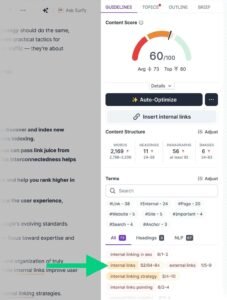
- Content Editor with live scoring: Real-time content scoring against top-ranking competitors for a target keyword, updating as the writer edits headings, body copy, and term usage.
- SERP Analyzer: Breaks down the top-ranking pages for any keyword by word count, heading structure, image usage, and key terms, giving a data-backed template before a single word gets written.
- Audit tool for existing content: Scores published pages against current SERP data to flag underperforming content that needs a refresh rather than a full rewrite.
- AI-assisted drafting: Generates outline and paragraph-level suggestions inside the same editor, keeping content creation and optimization in a single workflow instead of switching between tools.
- Keyword research module: Search volume and clustering data feeds directly into the content brief, closing the loop between keyword targeting and the actual page being written.
- Site Audit for technical basics: A lighter technical crawl than dedicated audit tools, but enough to flag major on-page and structural issues alongside content work.
Surfer SEO Pros
- The live content scoring genuinely changes how fast a writer can hit a competitive content structure, since the feedback is immediate rather than arriving after publishing and waiting weeks for ranking data.
- SERP Analyzer output gives a concrete, data-backed brief instead of a vague “write about this topic” instruction, which cuts revision cycles significantly for teams producing content at scale.
- The content audit feature is genuinely useful for prioritizing which existing pages need a refresh, based on actual SERP drift rather than guesswork.
- Keeping keyword research and content drafting inside one workflow removes a real amount of tool-switching friction for content teams.
- Onboarding is fast for writers specifically, since the interface is built around the content creation task rather than broad SEO administration.
Surfer SEO Cons
- The scope is narrow by design. Outside of content optimization, it doesn’t come close to matching Ahrefs or Semrush on backlink analysis, technical audits, or competitive research depth.
- Content scores can encourage keyword-matching behavior that occasionally produces text that reads as optimized for the algorithm rather than for the reader, requiring editorial judgment to rein in.
- The SERP-matching approach works best for competitive, high-volume topics; it adds less value for niche queries with thin or inconsistent SERPs.
- Teams need a separate tool for serious backlink work and technical monitoring, since Surfer doesn’t attempt to cover either category with real depth.
Surfer SEO Pricing
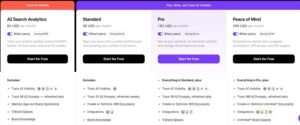
- Free trial available
- Essential: around $89/month
- Scale: around $219/month
- Higher usage and team tiers available on request
Surfer SEO Reviews
- G2: 4.8 out of 5 stars (490+ reviews)
- Capterra: 4.8 out of 5 stars (350+ reviews)
Reviewers consistently praise the content scoring accuracy and how directly it speeds up the writing-to-publishing pipeline. The most common criticism is the narrow scope outside of content work, meaning teams generally run it alongside a broader SEO platform rather than as a standalone replacement.
9. Sitechecker – Best for Continuous Technical SEO Monitoring

Best For: Teams that need ongoing, automated technical SEO monitoring instead of running manual crawls on a schedule.
Every tool covered so far treats a site audit as something you trigger manually and review after the fact. Sitechecker approaches the problem differently by watching a site continuously and sending alerts the moment something breaks, whether that’s a spike in 404 errors, a sudden ranking drop, or a critical page accidentally getting deindexed.
That distinction matters more than it sounds. A monthly crawl can miss a broken redirect chain or an accidental noindex tag for weeks before anyone notices the traffic drop. Continuous monitoring catches it within hours, which is the entire value proposition here and something none of the broader suites above are actually built to do as their primary function.
Sitechecker Key Features
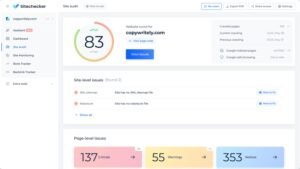
- Continuous site monitoring: Ongoing crawls that detect changes between scheduled full audits, flagging new technical issues as they appear rather than waiting for the next manual run.
- Real-time alerts: Notifications sent immediately when critical issues occur, including server errors, accidental noindex tags, broken redirects, or sudden ranking drops on tracked keywords.
- Technical SEO audit: Full-site crawls covering crawlability, duplicate content, page speed, and structured data issues, with a prioritized fix list ranked by impact.
- Rank tracking with alerting: Daily position monitoring that triggers a notification the moment a tracked keyword moves significantly, rather than requiring a manual check-in.
- Backlink monitoring: Tracks new and lost backlinks with alerts on toxic link spikes, useful as an early warning system rather than a full competitive backlink research tool.
- White-label reporting: Branded, automated reports suited for agencies managing monitoring across multiple client sites simultaneously.
Sitechecker Pros
- The continuous monitoring approach catches problems within hours instead of weeks, which has genuinely prevented real traffic loss on sites where a broken deployment slipped past a manual review cycle.
- Real-time alerting means technical issues surface to the right person immediately rather than sitting unnoticed until the next scheduled audit.
- The interface stays clean and focused, since the platform doesn’t try to be a full keyword research or content suite on top of the monitoring core.
- White-label reporting works well for agencies that need to demonstrate ongoing technical health to clients without manually compiling status updates.
- Setup is fast, and the alerting thresholds are straightforward to configure without needing a technical SEO background to get useful output.
Sitechecker Cons
- Keyword research functionality is basic compared to dedicated tools, so it works better as a monitoring layer alongside a stronger research platform than as a standalone keyword tool.
- Backlink data depth doesn’t come close to Ahrefs or even Moz, useful for alerting purposes but not for comprehensive competitive link analysis.
- Smaller sites with low change frequency may not see enough value from continuous monitoring to justify it over a monthly manual crawl.
- The competitive research features feel like an afterthought relative to the monitoring core, so teams needing deep competitor analysis will still need a second tool.
Sitechecker Pricing
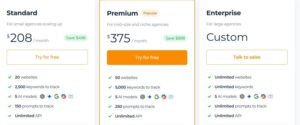
- Free trial available
- Basic: around $23/month
- Team plans starting around $58/month
- Agency and custom tiers available for larger monitoring needs
Sitechecker Reviews
- G2: 4.8 out of 5 stars (330+ reviews)
- Capterra: 4.7 out of 5 stars (120+ reviews)
Reviewers consistently highlight the speed of the alerting system and how much anxiety it removes from managing multiple sites simultaneously. The main criticism centers on the lighter keyword and backlink research depth, positioning it clearly as a monitoring specialist rather than an all-in-one replacement.
10. Majestic – Best for Pure Backlink Index Depth
Best For: Link builders and SEO professionals who want a dedicated backlink index without paying for keyword research, content tools, or rank tracking bundled in.
Every other tool in this comparison treats backlinks as one feature among many. Majestic does the opposite: it exists almost entirely to index and analyze links, and has been doing exactly that long before most of the platforms above existed. If the specific reason you’re leaving Ahrefs is link data depth or a different way of scoring link quality, this is the tool built around solving precisely that.
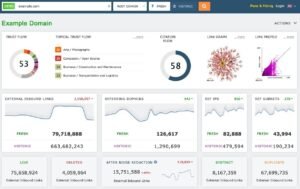
The standout here is the Trust Flow and Citation Flow framework, which scores links on quality and quantity separately instead of collapsing both into a single authority number. That separation gives a genuinely different, and in some cases more useful, read on whether a link actually carries ranking weight or just adds to a raw count.
Majestic Key Features
- Trust Flow and Citation Flow scoring: Separates link quality from link quantity into two distinct metrics, giving a clearer picture of whether a backlink profile is built on authoritative sources or just volume.
- Historic and Fresh index options: Choose between a massive historical link index spanning years or a Fresh index reflecting only recently crawled links, depending on whether you need long-term context or current link velocity.
- Backlink Checker: Full link profile analysis for any domain, including anchor text distribution, referring domain counts, and link acquisition trends over time.
- Site Explorer: Deep-dive analysis into a domain’s link profile at the page level, useful for identifying exactly which pages are earning the strongest external links.
- Bulk Backlink Checker: Analyze link profiles for multiple domains simultaneously, useful for large-scale competitive link audits across a full list of competitors.
- Link Context: Shows the actual surrounding content and topical relevance of a backlink, not just the raw anchor text and destination URL.
Majestic Pros
- Trust Flow and Citation Flow provide a genuinely different lens on link quality than a single blended authority score, which sharpens decision-making during link audits and outreach prioritization.
- The historical index depth is substantial, given the platform’s singular focus on links since well before most competitors existed.
- Bulk analysis tools make large-scale competitive backlink audits considerably faster than running domains one at a time.
- Link Context adds real value during manual link audits by showing topical relevance rather than just a bare anchor-and-URL pairing.
- Pricing reflects the narrow scope, making it a genuinely affordable specialist tool compared to paying for a full suite just to access deep link data.
Majestic Cons
- There’s no keyword research functionality at all, so teams need a separate tool entirely for that side of SEO work.
- Rank tracking and technical site auditing are both absent, meaning Majestic only ever covers one piece of a full SEO workflow.
- The interface feels dated next to newer platforms, and reporting takes more manual assembly than tools with built-in white-label options.
- Trust Flow and Citation Flow require a bit of a learning curve to interpret correctly, especially for anyone coming from a background using Ahrefs’ Domain Rating as their primary reference point.
Majestic Pricing
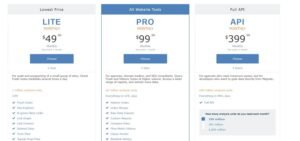
- Free trial available
- Lite: around $49.99/month
- Pro: around $99.99/month
- API: around $399.99/month
Majestic Reviews
- G2: 4.4 out of 5 stars (180+ reviews)
- Capterra: 4.3 out of 5 stars (60+ reviews)
Reviewers consistently point to Trust Flow and Citation Flow as genuinely differentiated metrics worth having alongside more common authority scores. The recurring criticism is the dated interface and the need for a separate tool to cover everything outside of link analysis. It’s the clear pick specifically for link-data depth, not for teams wanting a single consolidated platform.
Which Ahrefs Alternative is Right for You?
Ten tools reviewed. The right one depends on what specifically pushed you to look beyond Ahrefs in the first place.
Here’s how I’d decide.
You need the most complete replacement.
Go with Semrush.
This is the honest answer for most people reading this far. Semrush covers essentially everything Ahrefs does and adds meaningful ground Ahrefs doesn’t touch in 2026, including AI search visibility and a genuinely broad marketing suite beyond core SEO. The backlink database runs slightly smaller, but the overall platform goes deeper.
The free trial gives full feature access for seven days, which is enough time to know whether it replaces your Ahrefs workflow entirely.
You’re an agency watching margins closely.
Go with SE Ranking.
With white-label reporting included from the entry tier, SE Ranking delivers the core functionality most agencies actually need without an enterprise price tag attached. Rank tracking, technical audits, competitor research, and client-ready deliverables cover the large majority of what daily agency work actually requires, even if backlink depth doesn’t fully match Ahrefs.
You’re new to SEO and find Ahrefs overwhelming
Go with Mangools.
Mangools is built around clarity rather than raw depth. A clean interface, reliable keyword difficulty scoring, and a learning curve measured in hours rather than weeks make it the tool that builds confidence instead of overwhelming a newer marketer before they know what they actually need.
You’re running campaigns across multiple countries.
Go with Serpstat.
The international keyword database here is genuinely strong. If you’re tracking rankings across five or more markets at once, Serpstat handles that geographic complexity more capably than most tools at a comparable price point.
You need a link-index specialist, not a suite
Go with Majestic.
If the specific reason you’re leaving Ahrefs is link data depth or a different way of evaluating link quality, paying for a full suite just to reach the backlink module doesn’t make sense. Majestic’s Trust Flow and Citation Flow framework gives a genuinely distinct read on link value at a fraction of what a bundled platform costs.
You want AI-assisted content scoring alongside SEO data
Go with Surfer SEO.
For teams producing content at volume, the live scoring against real SERP data closes a gap that general SEO suites treat as a minor feature. Pairing it with a lighter research tool for keyword data covers the full content workflow without paying for backlink or technical modules you won’t touch.
Still not sure?
Start with Semrush. The free trial costs nothing, and the platform covers nearly every use case on this list. If it turns out to be more than you actually need, you’ll know within a week, and every other tool here becomes a clearer next step once you understand exactly what’s missing.
Conclusion
Ahrefs remains a genuinely capable tool. But capable isn’t always the right answer when the pricing doesn’t match your budget or the feature set doesn’t match your actual workflow.
Every alternative on this list solves a specific, real problem. Some cost less. Some are simpler to learn. Some go broader than Ahrefs ever tried to, and a few go narrower on purpose, doing one job better than any general-purpose suite could.
Working through SEO strategy for businesses across technical foundations, content, and authority building means matching the tool to the actual job rather than defaulting to whichever platform has the biggest name. Sustainable organic growth comes from the strategy and execution behind these tools, not the tool itself, and a full-service approach to SEO means knowing which platform earns its place in that workflow and which one is just overhead.
Start with a free trial on whichever tool from this list matches your situation. The data from actually using it will make the decision far more clearly than any comparison table can.
Frequently Asked Questions
Is Semrush really better than Ahrefs in 2026?
Semrush covers more ground overall, including AI search visibility tracking that Ahrefs doesn’t match. Ahrefs still edges ahead on raw backlink index depth and update speed.
Which Ahrefs alternative is cheapest for a solo marketer?
Ubersuggest starts at $12/month and covers core keyword research and basic audits. It won’t match enterprise-tier data depth, but it’s functional for smaller sites.
Do any of these tools track AI search visibility like ChatGPT or AI Overviews?
Yes. SE Ranking includes a dedicated AI Search Visibility module tracking brand mentions across major AI assistants and Google’s AI-generated answer features.
Can I use a free tool instead of paying for Ahrefs or an alternative?
Free tiers from Ubersuggest, Mangools, or SpyFu handle basic keyword checks, but they cap volume quickly. Ongoing campaign work generally needs a paid tier eventually.
Which tool is best if I only care about backlink data?
Majestic is built specifically for backlink analysis, with its Trust Flow and Citation Flow metrics offering a more granular read on link quality than most bundled suites provide.