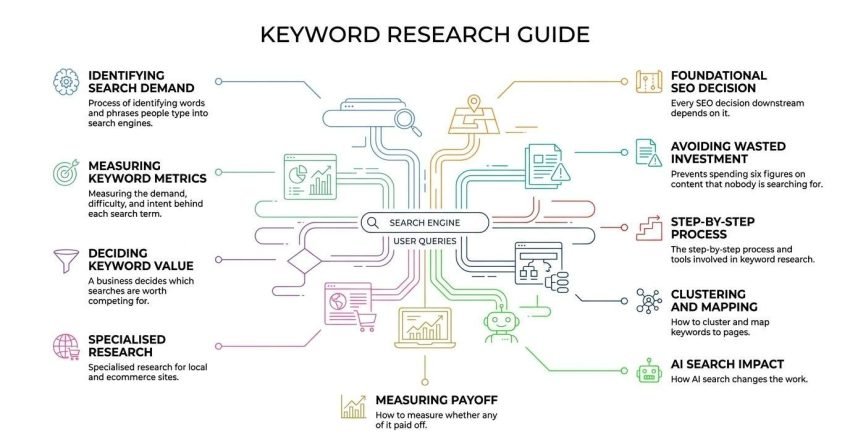
Keyword research is the process of identifying the words and phrases people type into search engines, then measuring the demand, difficulty, and intent behind each one so a business can decide which searches are worth competing for. Every SEO decision downstream depends on it.
I have watched companies spend six figures on content that nobody was searching for. That is what happens when keyword research gets skipped or rushed at the start of a campaign.
This guide covers what keyword research is and how search engines use it, the metrics and intent signals that decide keyword value, the step-by-step process and tools involved, how to cluster and map keywords to pages, specialised research for local and ecommerce sites, how AI search changes the work, and how to measure whether any of it paid off.
What Keyword Research Actually Is
Keyword research is the practice of discovering, evaluating, and prioritising the search terms your audience uses, so that content and page structure map to real demand rather than assumption. It is a demand research discipline first and a writing exercise second.
I treat it as market research that happens to run through a search engine. Every query is a person telling you what they want, in their own words, at a specific moment.
The output is not a spreadsheet of words. The output is a decision about what to build, in what order, and why.
The Difference Between a Keyword and a Query
A query is what a person actually types into the search box, and a keyword is the term marketers use to represent a group of similar queries. Google reports that around 15% of daily searches have never been seen before, which means queries always outnumber keywords.
That gap matters. You are never optimising for one exact string of text.
You are optimising for a cluster of related things people ask, held together by a shared need.
Why Keyword Research Sits at the Start of Every SEO Strategy
Keyword research comes first because it determines site architecture, content priorities, and budget allocation before a single page is written. Skipping it means you are guessing at demand and paying for the guess later.
I have rebuilt sites where the navigation was designed around internal jargon instead of search language. The fix costs more than doing the research would have.
Every other SEO activity inherits its direction from this stage.
How Search Engines Connect Keywords to Pages
Search engines match pages to queries through four stages: crawling, indexing, retrieval, and ranking. Understanding this sequence explains why keyword choice constrains everything that follows.
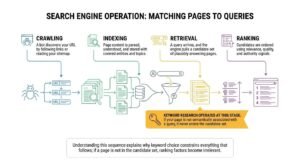
Here is the simplified sequence I explain to every client:
- Crawling: a bot discovers your URL by following links or reading your sitemap
- Indexing: the page content is parsed, understood, and stored with the entities and topics it covers
- Retrieval: a query arrives, and the engine pulls a candidate set of indexed pages that plausibly answer it
- Ranking: those candidates are ordered using relevance, quality, and authority signals
Keyword research operates at the retrieval stage. If your page is not semantically associated with a query, it never enters the candidate set, and ranking factors become irrelevant.
Crawling, Indexing, and Retrieval in Plain Terms
Crawling finds the page, indexing understands it, and retrieval decides whether it is even eligible for a given search. Most pages that fail to rank fail at eligibility, not at ranking.
I check index status before I check rankings. A page Google has not indexed cannot lose to a competitor.
The distinction saves a lot of wasted optimisation effort.
Why Google Ranks Topics, Not Single Words
Google ranks pages on topical coverage rather than exact word matching, because systems like BERT and MUM interpret meaning rather than string similarity. A single well-built page routinely ranks for hundreds of related queries.
Ahrefs found that the average page ranking in position one also ranks in the top ten for nearly 1,000 other keywords. That is topical coverage doing the work.
So the goal is not one keyword per page. The goal is one intent per page, covered thoroughly.
The Core Keyword Metrics You Need to Understand
Four metrics carry most of the decision weight in keyword research: search volume, keyword difficulty, cost per click, and click-through potential. Each answers a different question about whether a term is worth pursuing.
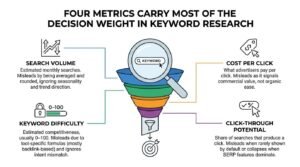
This table shows what each metric tells you and where it misleads:
| Metric | What it measures | Where it misleads |
| Search volume | Estimated monthly searches | Averaged and rounded; ignores seasonality and trend direction |
| Keyword difficulty | Estimated competitiveness, usually 0–100 | Tool-specific formula, mostly backlink-based; ignores intent mismatch |
| Cost per click | What advertisers pay per click | Signals commercial value, not organic ease |
| Click-through potential | Share of searches that produce a click | Rarely shown by default; collapses when SERP features dominate |
Search Volume
Search volume is the estimated number of times a keyword is searched per month, typically averaged over the preceding twelve months. Treat it as a directional signal rather than a forecast.
I care more about trend direction than the absolute number. A term at 300 and climbing beats a term at 3,000 and falling.
Seasonality distorts averages badly in retail, travel, and tax-adjacent industries.
Keyword Difficulty
Keyword difficulty is a tool-generated score, usually 0–100, that estimates how hard it is to rank on page one for a term based largely on the backlink profiles of current top results. Different tools produce different scores for the same keyword.
I use it as a rough sorting mechanism, never as a verdict. A low-difficulty term with a mismatched SERP is still unwinnable.
Manual SERP inspection beats the score every time.
Cost Per Click and Commercial Value
Cost per click is the average amount advertisers pay for a click on a paid ad for that keyword, and it acts as a proxy for commercial intent. High CPC usually means the term converts into revenue somewhere.
I use CPC to break ties between two terms with similar volume. The more expensive one is usually closer to money.
Zero CPC on a decent-volume term often signals pure research intent.
Click-Through Potential and Zero-Click Searches
Click-through potential is the share of searches for a keyword that result in a click to any organic result, and it is falling as SERP features expand. A SparkToro analysis of US search data found that roughly 58.5% of Google searches end without a click to the open web.
That changes which keywords are worth targeting. A 10,000-volume term answered fully in an AI Overview may deliver fewer visits than a 500-volume term that requires a page.
I check the live SERP for feature density before committing budget.
Search Intent: The Metric That Decides Everything
Search intent is the underlying goal behind a query, and matching it is the single strongest predictor of whether a page will rank. A perfect page with the wrong intent loses to a mediocre page with the right one.
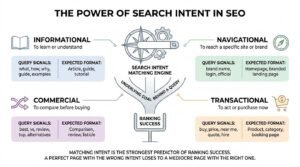
This table maps the four intent types to the content format Google expects:
| Intent type | What the searcher wants | Query signals | Expected format |
| Informational | To learn or understand | what, how, why, guide, examples | Article, guide, tutorial |
| Navigational | To reach a specific site or brand | brand name, login, official | Homepage, branded landing page |
| Commercial | To compare before buying | best, vs, review, top, alternatives | Comparison, review, listicle |
| Transactional | To act or purchase now | buy, price, near me, quote, hire | Product, category, booking page |
The Four Intent Types
The four intent types are informational, navigational, commercial investigation, and transactional, and every keyword falls into one dominant category. Some queries are mixed, and the SERP shows you which way Google has resolved them.
I assign intent before I assign a page type. That order prevents most content misfires.
Mixed-intent terms need the format Google already rewards, not the one you prefer.
How to Diagnose Intent From the SERP
You diagnose intent by searching the term and reading what already ranks, because the top ten results are Google’s own answer to the intent question. Format, page type, and SERP features tell you everything.
If nine of ten results are guides, a product page will not break through. If the results are all product listings, a blog post is wasted effort.
I run this check on every keyword before it enters a content plan.
Types of Keywords and What Each One Does
Keywords are classified by length, brand association, and geographic modification, and each type plays a different role in a search strategy. Mixing types deliberately is how a site builds both traffic volume and conversion quality.
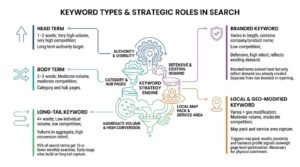
This table shows the main categories and their typical role:
| Keyword type | Typical length | Volume | Competition | Strategic role |
| Head term | 1–2 words | Very high | Very high | Long-term authority target |
| Body term | 2–3 words | Moderate | Moderate | Category and hub pages |
| Long-tail | 4+ words | Low each | Low | Volume in aggregate, high conversion |
| Branded | Varies | Varies | Low | Defensive, high intent |
| Local | Varies + geo | Moderate | Moderate | Map pack and service area capture |
Head Terms, Body Terms, and Long-Tail Keywords
A long-tail keyword is a search phrase of roughly four or more words that carries lower individual search volume but higher specificity and conversion intent. Ahrefs’ study of 1.9 billion keywords found that around 95% of all search terms get ten or fewer monthly searches.
That distribution is why long-tail research matters. The volume lives in the aggregate, not in any single phrase.
I build early-stage sites almost entirely on long-tail capture.
Branded vs Non-Branded Keywords
Branded keywords contain your company or product name, while non-branded keywords describe the problem or category without naming you. Branded terms convert best but only reflect demand you already created.
Non-branded terms are where new audiences come from. Growth reporting that leans on branded traffic hides stagnation.
I separate the two in every performance report.
Local and Geo-Modified Keywords
Local keywords include a place name or an implied proximity signal such as “near me,” and they trigger a different result set built around Google’s map pack. Google reports that searches containing “near me” have grown consistently for over a decade.
These terms behave differently from national keywords. Proximity and business profile signals outweigh page-level optimisation.
Any business with a physical catchment needs a separate local keyword layer.
How to Do Keyword Research Step by Step
Keyword research follows four repeatable steps: build a seed list, expand it with data, filter and score the results, then validate against the live SERP. The process is the same whether you have ten keywords or ten thousand.
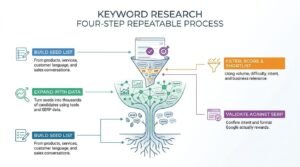
Here is the sequence I run on every new account:
- Build your seed list from products, services, customer language, and sales conversations
- Expand with tools and SERP data to turn twenty seeds into several thousand candidates
- Filter, score, and shortlist using volume, difficulty, intent, and business relevance
- Validate against the live SERP to confirm the intent and format Google actually rewards
Step 1: Build Your Seed List
A seed list is a small set of unmodified terms describing what you sell and the problems you solve, usually twenty to fifty phrases. It is the input every expansion tool needs.
I pull seeds from sales call transcripts, support tickets, and the words customers use in reviews. Internal product names rarely match search language.
Better seeds produce better expansions. The quality ceiling is set here.
Step 2: Expand With Tools and SERP Data
Expansion means feeding your seeds into keyword tools and SERP sources to surface every related query people actually search. Autocomplete, People Also Ask, and related searches are free and often more current than tool databases.
I combine one paid database with manual SERP mining. The tool gives scale, and the SERP gives accuracy.
Competitor domains are the third expansion source, and usually the richest.
Step 3: Filter, Score, and Shortlist
Filtering means cutting the expanded list down using volume floors, difficulty ceilings, intent match, and relevance to what you actually sell. Most expanded lists lose eighty percent of their rows at this stage.
I score relevance manually because no tool knows your margins. A high-volume term you cannot serve is worth nothing.
The shortlist should be small enough to act on this quarter.
Step 4: Validate Against the Live SERP
Validation means searching each shortlisted term and confirming that the ranking pages match the content you intend to build. This step catches intent errors that metrics alone hide.
I also check whether the top results are all major brands or aggregators. That tells me if the term is realistically winnable at my client’s authority level.
Skipping validation is the most common cause of content that never ranks.
Keyword Research Tools and What They Are For
Keyword research tools fall into two groups: free tools that provide directional data and paid platforms that provide database scale, competitor visibility, and difficulty scoring. Most teams need one of each.
This table shows what each category delivers:
| Tool category | Examples | Best for | Limitation |
| Free | Google Keyword Planner, Search Console, Trends, autocomplete | Real query data, seasonality, existing rankings | Volume ranges, no difficulty scores |
| Paid | Ahrefs, Semrush, Moz, Keyword Insights | Scale, competitor gaps, difficulty, clustering | Estimated data, subscription cost |
Free Tools Worth Using
Google Search Console is the single most valuable free keyword tool because it reports the exact queries your site already receives impressions for. It is first-party data, not an estimate.
I mine the Search Console query report on every audit. Terms sitting at positions eight to fifteen are usually the fastest wins available.
Google Trends adds direction, and autocomplete adds phrasing you would never guess.
Paid Tools and When They Pay for Themselves
Paid keyword platforms justify their cost once you are managing more than a handful of pages or need competitor keyword data at scale. Below that threshold, free tools plus manual SERP work is usually sufficient.
I would not buy a subscription for a five-page site. I would not run a content programme without one.
The break-even point is roughly when research time exceeds the monthly fee.
Competitor Keyword Research
Competitor keyword research is the practice of analysing which search terms rival sites rank for, in order to find demand you are currently missing. Your search competitors are often different from your business competitors.
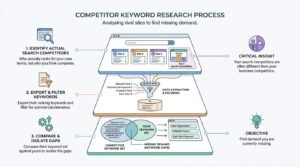
The process runs in three moves:
- Identify who actually ranks for your core terms, not who you think competes
- Export their ranking keywords and filter for commercial relevance
- Compare their keyword set against yours to isolate the gaps
Finding Who Actually Competes in Search
Your search competitors are the domains that repeatedly appear in the top ten for your target keywords, regardless of whether they sell what you sell. Publishers, marketplaces, and directories often dominate terms that businesses assume are theirs.
I list the five domains that appear most often across my target set. That list is the real competitive field.
Assuming your industry rivals are your search rivals leads to bad benchmarking.
Keyword Gap Analysis
Keyword gap analysis is the comparison of your ranking keyword set against competitors’ to identify terms they rank for, and you do not. It converts competitor performance into a prioritised content backlog.
I filter gap results by intent and difficulty before acting. Not every gap is worth closing.
The highest-value gaps are usually commercial terms where two or more competitors rank, and you are absent entirely.
Keyword Clustering and Topic Mapping
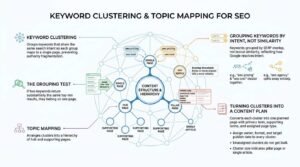
Keyword clustering is the process of grouping keywords that share the same search intent so that each group maps to a single page rather than many. It prevents the one-keyword-one-page mistake that fragments authority.
The grouping test is simple. If two keywords return substantially the same top-ten results, they belong on one page.
Topic mapping then arranges those clusters into a hierarchy of hub and supporting pages.
Grouping Keywords by Intent, Not Similarity
Keywords are grouped by SERP overlap rather than lexical similarity, because two phrases can look alike and still return completely different results. SERP-based clustering reflects how Google has already resolved the intent.
I have seen “seo pricing” and “seo cost” cluster together, while “seo agency” splits away entirely. Word similarity would have merged all three.
Overlap thresholds of three or more shared URLs work reliably.
Turning Clusters Into a Content Plan
A content plan converts each keyword cluster into one planned page with a primary term, supporting terms, and an assigned page type. This is where research becomes a production schedule.
I assign every cluster an owner, a format, and a target publish date. Unassigned clusters do not get built.
Cluster size also indicates whether a topic deserves a pillar page or a single article.
Mapping Keywords to Pages Without Cannibalization
Keyword mapping is the assignment of one primary keyword cluster to one specific URL, documented so that no two pages compete for the same intent. Without a map, sites drift into internal competition as they grow.
I maintain the map as a living document, one row per URL. It is the reference every writer and developer works from.
Pages without a mapped primary term are the ones that quietly underperform.
One Primary Keyword Per Page
Each page carries one primary keyword and a set of secondary terms that share its intent, rather than several unrelated primaries. Spreading multiple intents across one URL weakens relevance for all of them.
The secondary terms are what deliver the long-tail volume. The primary term sets the page’s purpose.
I write the title and H1 against the primary term only.
Spotting and Fixing Keyword Cannibalization
Keyword cannibalization is a condition where two or more pages on the same site compete for the same query, splitting signals and suppressing both. Search Console reveals it when several URLs alternate in position for one term.
I resolve it by consolidating, redirecting, or re-mapping the weaker page to a different intent. Deleting is rarely the right first move.
Larger sites should audit for cannibalization quarterly.
Using Keywords On the Page
Keywords belong in a small number of high-signal locations rather than distributed throughout the copy at a target frequency. Placement matters far more than repetition.
The locations that genuinely carry weight:
- Title tag, ideally near the front
- H1, matching the page’s primary intent
- First 100 words of body copy
- At least one subheading, phrased naturally
- URL slug, kept short and readable
- Image alt text where the image is relevant
- Meta description, for click-through rather than ranking
Where Keywords Genuinely Matter
The title tag is the highest-value keyword placement on any page because it is the strongest on-page relevance signal and the primary click driver in the SERP. Everything else is secondary to getting it right.
I write titles for the searcher first and the algorithm second. A term that ranks but nobody clicks earns nothing.
Body copy relevance comes from covering the topic, not from repeating the phrase.
Why Keyword Density Is a Myth
Keyword density is an obsolete metric that measures how often a term appears as a percentage of total words, and Google has confirmed it does not use a target ratio. Google’s own guidance describes repeated keyword stuffing as a spam signal.
I have never seen a density target improve a ranking. I have seen it damage readability repeatedly.
Write for comprehension, and the relevant terms appear naturally.
Local Keyword Research for US Businesses
Local keyword research identifies search terms that carry geographic or proximity intent, which trigger Google’s map pack and local result set rather than standard organic listings. The keyword patterns differ structurally from national terms.
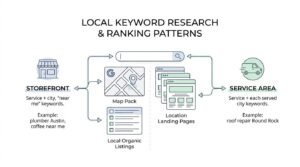
This table shows the two dominant local patterns:
| Business model | Keyword pattern | Example structure | Primary ranking surface |
| Storefront | Service + city, “near me” | plumber Austin, coffee near me | Map pack, local organic |
| Service area | Service + each served city | roof repair Round Rock | Location landing pages |
Service Area vs Storefront Keyword Patterns
Storefront businesses target proximity terms tied to one address, while service area businesses need a distinct keyword set and page for each city they serve. The research volume multiplies with the number of locations covered.
I build a keyword matrix of services against cities. Each cell becomes a candidate page.
Thin, duplicated city pages fail, so each needs genuinely distinct content.
Google Business Profile and Map Pack Keywords
Map pack visibility is driven largely by proximity, prominence, and Google Business Profile signals rather than page-level keyword optimisation. The profile categories function as keywords in their own right.
I match primary category selection to the highest-value local search term. That choice moves rankings more than most on-page changes.
Review content also contributes keyword context that many businesses ignore.
Ecommerce and Product Keyword Research
Ecommerce keyword research separates terms by page type, because category, product, and informational keywords require structurally different pages. Mapping a product term to a blog post wastes the page.
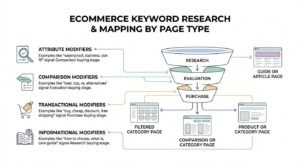
This table shows the modifier types that signal buying stage:
| Modifier type | Examples | Buying stage | Page type |
| Attribute | waterproof, stainless, size 10 | Comparison | Filtered category |
| Comparison | best, top, vs, alternatives | Evaluation | Comparison or category |
| Transactional | buy, cheap, discount, free shipping | Purchase | Product or category |
| Informational | how to choose, what is, care guide | Research | Guide or article |
Category, Product, and Modifier Keywords
Category keywords describe a group of products, product keywords name a specific item, and modifier keywords narrow either by attribute or condition. Each maps to a different template in the site structure.
I check whether Google returns category pages or product pages for each term. That determines which page I build.
Attribute modifiers frequently justify dedicated filtered landing pages.
Buying-Stage Modifiers That Signal Revenue
Transactional modifiers such as “buy,” “price,” and “free shipping” indicate a searcher at the point of purchase, and they convert at substantially higher rates than research terms. They also carry the highest cost per click.
I prioritise these terms early because revenue arrives faster. Informational terms build the audience that feeds them later.
A balanced plan runs both layers simultaneously.
Keyword Research in the Age of AI Search
AI search changes keyword research by shifting value away from queries that AI Overviews answer completely and toward queries that require a destination. The research process stays the same, and the selection criteria tighten.
Advanced Web Ranking data showed AI Overviews appearing on a rapidly growing share of US desktop queries through 2024 and 2025, concentrated heavily on informational searches. Definitional and simple factual terms are the most exposed.
I now check for AI Overview presence as a standard filter during validation.
How AI Overviews Change Keyword Selection
AI Overviews reduce click-through on simple informational queries while leaving commercial, transactional, and complex comparison queries largely intact. That pushes keyword priority toward terms with an action attached.
I have not stopped targeting informational terms. I have stopped assuming they convert traffic at historical rates.
Being cited inside an AI Overview is now its own visibility outcome.
Entity and Question Research Alongside Keywords
Entity research identifies the people, products, organisations, and concepts associated with a topic, and it complements keyword research by describing what a page must cover to be understood. Question research captures the conversational phrasing used in AI assistants.
I collect People Also Ask questions alongside keywords for every cluster. They map directly to subheadings.
Covering the entities completely is what makes a page eligible for citation.
Measuring Whether Your Keyword Research Worked
Keyword research is measured by tracking ranking movement, impression growth, click growth, and conversions from target terms over a defined period. Rankings alone are a vanity metric without traffic and revenue attached.
This table shows what to track and when to expect movement:
| Metric | Source | First meaningful signal |
| Impressions for target terms | Search Console | 4–8 weeks |
| Average position | Search Console | 8–16 weeks |
| Organic clicks | Search Console, GA4 | 12–24 weeks |
| Conversions from organic | GA4, CRM | 16–36 weeks |
The Metrics That Matter
Impression growth is the earliest reliable indicator that keyword research is working, because it shows Google has begun surfacing the page for target queries. Clicks and conversions follow later.
I report impressions and position in month two, clicks in month four. Setting that expectation up front prevents premature campaign changes.
Conversion data closes the loop back to keyword selection.
Realistic Timelines for Keyword-Driven Growth
Keyword-driven organic growth typically takes four to twelve months to produce meaningful traffic, depending on domain authority, competition, and content velocity. An Ahrefs study of two million keywords found only 5.7% of pages reach the top ten within a year of publication.
I set six to twelve months as the working window for competitive terms. Long-tail terms often move within eight weeks.
Anyone promising page one in thirty days is selling something else.
Common Keyword Research Mistakes
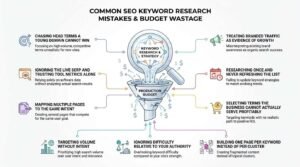
The most damaging keyword research mistakes are targeting volume without intent, ignoring difficulty relative to your authority, and building one page per keyword instead of per cluster. Each one wastes production budget.
The recurring errors I audit for:
- Chasing head terms a young domain cannot win
- Ignoring the live SERP and trusting tool metrics alone
- Mapping multiple pages to the same intent
- Treating branded traffic as evidence of growth
- Researching once and never refreshing the list
- Selecting terms the business cannot actually serve profitably
How often should keyword research be refreshed?
How Often to Refresh Keyword Research
Keyword research should be refreshed quarterly for active campaigns and at minimum annually for stable sites, because search demand, competitors, and SERP layouts all shift continuously. Seasonal businesses need a cycle ahead of each peak.
I run a full refresh every quarter and a Search Console query review monthly. The monthly review catches emerging terms before competitors notice them.
Major algorithm updates and product launches both trigger an off-cycle refresh.
Building Keyword Research Into an SEO Workflow
Keyword research works best as a recurring input to content planning rather than a one-time project at campaign launch. Embedding it into the workflow keeps the content calendar tied to live demand.
A workable cadence looks like this:
- Monthly: review Search Console for new and rising queries
- Quarterly: refresh the keyword database and re-cluster
- Per brief: validate the target term against the live SERP before writing
- Per quarter: audit for cannibalization and re-map affected URLs
Conclusion
You now understand keyword demand, intent classification, difficulty assessment, clustering, page mapping, and the measurement timelines that turn research into ranking.
Keyword research anchors every other discipline in search, from technical structure and content production through to authority building and reporting.
We build keyword strategies that produce measurable organic growth. Talk to White Label SEO Service about mapping your demand properly.
Frequently Asked Questions
What is keyword research in simple terms?
Keyword research is finding out what your customers actually type into Google. You then measure how many people search it and how hard those terms are to rank for.
How long does keyword research take?
A thorough first keyword research project takes ten to thirty hours for most small businesses. Ongoing quarterly refreshes take two to four hours once the foundation exists.
Is keyword research still relevant with AI search?
Yes, keyword research remains essential because AI systems still retrieve answers from indexed pages built around search demand. The selection criteria have tightened, not disappeared.
How many keywords should one page target?
One page targets one primary keyword plus every secondary term sharing that same intent. That commonly means one page ranking for dozens or hundreds of related queries.
Can I do keyword research for free?
Yes, Google Search Console, Keyword Planner, Trends, and autocomplete cover most needs at zero cost. Paid tools add scale, competitor data, and difficulty scoring.
What is a good search volume to target?
There is no universal number, because a 50-volume commercial term often beats a 5,000-volume informational one. Judge volume against intent and your ability to rank.
How do I know if a keyword is too competitive?
Search it and look at who ranks. If every result is a major brand or established authority site, a new domain will struggle for months.