A Google reconsideration request is a formal appeal submitted through Search Console asking Google to lift a manual action after a site owner has fixed the violation that triggered it. I’ve written enough of these to know the process rewards specificity, not apology. Getting one approved means proving the problem is gone, not promising it will be.
Google doesn’t reinstate rankings out of goodwill. It reinstates them when the evidence is undeniable, and the fix is complete.
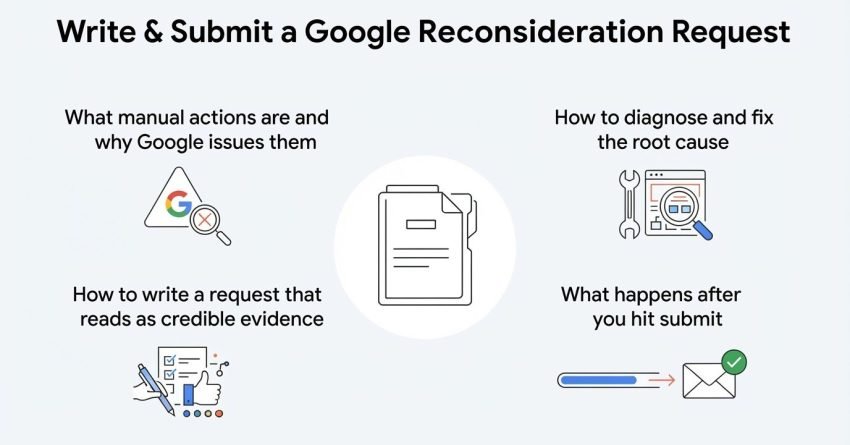
This guide covers what manual actions are and why Google issues them, how to diagnose and fix the root cause before you ever touch the request form, how to write a request that reads as credible evidence rather than an apology letter, and what happens after you hit submit, including what to do if it gets rejected.
What Is a Google Reconsideration Request?
A reconsideration request is a formal appeal filed in Google Search Console after a manual action has been applied to a site, asking a human reviewer at Google to re-examine the site and lift the penalty. I think of it less as a request and more as a case file where you’re presenting evidence, not pleading a position.
Google doesn’t automate this review. A real person on the search quality team reads the request, checks the site against the violation that was flagged, and decides whether the issue has genuinely been resolved.
This differs from waiting out a ranking drop caused by an algorithm update, which requires no submission at all. A manual action is a deliberate, human-issued penalty, and it stays in place until Google confirms in writing that it’s been removed.
What Is a Manual Action in Google Search Console?
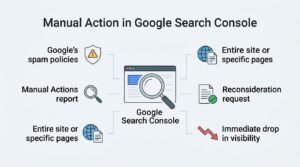
A manual action is a penalty applied by a member of Google’s search quality team when a site is found to violate Google’s spam policies, and it’s visible directly inside the Manual Actions report in Search Console. I check this report first with every new client site, before I look at anything else.
Manual actions can apply to an entire site or to specific pages, and each one names the exact violation Google found. That specificity matters because the reconsideration request has to respond directly to whatever violation is listed.
Sites under a manual action typically see a sharp, immediate drop in visibility for the affected pages, sometimes overnight. That sudden drop, paired with a notice in Search Console, is usually the first sign something structural is wrong rather than a normal ranking fluctuation.
Manual Action vs. Algorithmic Penalty: What’s the Difference?
A manual action is issued by a human reviewer and requires a reconsideration request to lift, while an algorithmic penalty is applied automatically by Google’s ranking systems and resolves on its own once the underlying issue is fixed. I get asked to “submit a reconsideration request” for algorithmic drops constantly, and the answer is always the same: there’s nothing to submit.
| Factor | Manual Action | Algorithmic Penalty |
| Issued by | Human reviewer | Automated ranking system |
| Visible in Search Console | Yes, under Manual Actions report | No direct notice |
| Requires reconsideration request | Yes | No |
| Resolution method | Fix + submit request + human review | Fix + wait for next algorithm refresh |
| Typical recovery timeline | Days to weeks after approval | Weeks to months, tied to update cycles |
Confusing the two wastes real time. I’ve seen sites sit stagnant for months because a marketing manager assumed a core update hit was a manual action and waited for a Search Console notice that was never coming.
Common Types of Manual Actions and Their Causes
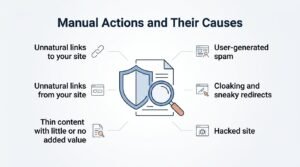
Google groups manual actions into a defined set of violation categories, and each one has a distinct root cause that determines the entire fix strategy. Knowing which category applies changes what the next six months of work looks like.
Unnatural links to your site happen when Google detects paid, exchanged, or manipulative links pointing to your domain, usually built to inflate rankings artificially. This is one of the two link-based manual actions and the more common of the pair.
Unnatural links from your site apply when your own site is passing manipulative links outward, often through paid guest posts, widgets, or link exchanges that violate outbound linking guidelines.
Thin content with little or no added value covers auto-generated pages, scraped content, doorway pages, and content that exists purely to attract search traffic without serving a real reader need.
User-generated spam targets sites where comment sections, forums, or user profiles have been flooded with spam content, usually because moderation was absent or too slow.
Cloaking and sneaky redirects flag sites showing search engines different content than what human visitors see, or redirecting users somewhere other than the page that ranked.
Hacked site manual actions apply when Google detects unauthorized content, often injected by malware, that the site owner didn’t create or approve.
How to Find Out If You Have a Manual Action
I check for a manual action by opening Google Search Console, selecting the property, and clicking into the Manual Actions report under the Security & Manual Actions section in the left sidebar. If nothing appears there, no manual action exists on that property.
- Log into Google Search Console and select the correct verified property
- Navigate to Security & Manual Actions in the left sidebar
- Click Manual Actions
- Review any listed issue, including the affected URLs and violation type
- Note whether the action applies sitewide or to specific pages
A blank report with a green checkmark means the site has no active manual action, and any ranking loss is coming from somewhere else entirely.
How to Diagnose the Root Cause of the Penalty
Diagnosing the root cause means matching the exact violation named in the Manual Actions report against a full audit of the affected area, whether that’s backlinks, content, or site security. I never start writing a reconsideration request until this step is finished, because a request built on a guess gets rejected.
Auditing your backlink profile for a links-based manual action means exporting every referring domain through Search Console or a third-party tool and manually reviewing each one for spam signals, paid link patterns, or irrelevant placements.
Auditing your content for quality issues for a thin content manual action means reviewing every flagged URL against Google’s own definition of added value, checking for duplication, thin word counts, and auto-generated patterns across the site.
How to Fix a Toxic Backlink Profile Before Submitting
Fixing a toxic backlink profile means identifying every unnatural link, attempting removal at the source, and disavowing whatever can’t be removed, all before a request goes anywhere near Search Console. Skipping straight to disavow without trying removal first is one of the most common reasons these requests bounce back.
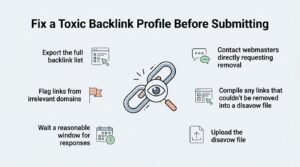
- Export the full backlink list from Search Console and any third-party crawler
- Flag links from irrelevant domains, obvious link farms, or paid placements
- Contact webmasters directly requesting removal, keeping records of every email sent
- Wait a reasonable window for responses before moving to disavow
- Compile any links that couldn’t be removed into a disavow file
- Upload the disavow file through Google’s Disavow Links tool
Requesting link removal from webmasters has to happen before disavowing, because Google’s reviewers specifically look for evidence of outreach attempts in the request itself. A disavow file with zero removal attempts documented reads as a shortcut, not a fix.
Using the disavow tool correctly means submitting a properly formatted text file at the domain level for entire sites you can’t get individual link removal from, rather than disavowing individual URLs one by one when the whole domain is the problem.
How to Fix Thin or Low-Quality Content Issues
Fixing thin content means either substantially rewriting flagged pages to add genuine depth and original value, or removing and 404-ing pages that serve no real purpose. I’ve found rewriting to be the stronger move whenever the page targets a keyword worth keeping.
Auto-generated and scraped pages almost always need to come down entirely rather than be improved, since their existence itself is the violation Google flagged. Pages with thin but legitimate content, on the other hand, usually just need more original research, examples, and depth added.
How to Remove User-Generated Spam
Removing user-generated spam means deleting every spam comment, forum post, or fake profile Google flagged, then locking down the moderation gap that let the spam through in the first place. Fixing the symptom without fixing the moderation process just invites the same manual action back.
Adding comment moderation queues, CAPTCHA on submission forms, and stricter user registration requirements closes the door that let spam accumulate. Google’s reviewers check whether the underlying vulnerability was addressed, not just whether the visible spam was deleted.
How Long Does It Take to Fix Issues Before Reapplying?
Fixing the underlying issue behind a manual action typically takes anywhere from a few days for simple content edits to four to six weeks for a full toxic backlink cleanup. Link-based manual actions take the longest because outreach for link removal alone can take two to three weeks before a disavow file even makes sense.
Content-based fixes move faster since they’re entirely within your control, often resolved within days once someone commits the time. Rushing this stage to submit sooner is the single biggest reason first requests get rejected.
How to Write a Google Reconsideration Request
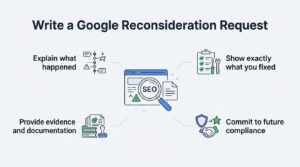
A strong reconsideration request explains exactly what happened, documents precisely what was fixed, and provides verifiable evidence for every claim made, all without minimizing or over-apologizing for the original violation. Google’s reviewers read hundreds of these, and vague, defensive language is the fastest way to get flagged as unresolved.
Explain what happened in plain, factual language, naming the specific violation type without deflecting blame onto a former employee, agency, or hacker unless that’s genuinely and verifiably what occurred.
Show exactly what you fixed by walking through the specific actions taken, page by page or link by link, rather than making a general statement like “we improved our content.”
Provide evidence and documentation including spreadsheets of removed or disavowed links, screenshots of deleted content, outreach email records, and dates for every action taken.
Commit to future compliance with a short, specific statement about what process changes will prevent the violation from recurring, such as new content review steps or link acquisition guidelines.
Reconsideration Request Examples: What to Include
The strongest reconsideration requests follow a consistent structure that gives Google’s reviewer everything needed to verify the fix in one pass, rather than making them dig for proof. This table shows what separates an approved request from a rejected one.
| Element | What Works | What Gets Rejected |
| Tone | Factual, specific, documented | Apologetic, vague, defensive |
| Evidence | Spreadsheets, screenshots, dated logs | Unsupported claims of being “fixed” |
| Scope | Addresses every flagged URL or link | Addresses only some of the issue |
| Link removal | Shows outreach attempts before disavow | Jumps straight to disavow with no outreach |
| Content fixes | Names specific pages rewritten or removed | General statement about “quality improvements” |
| Future prevention | Specific process change described | No mention of preventing recurrence |
How to Submit Your Reconsideration Request in Search Console
Submitting a reconsideration request happens directly inside the Manual Actions report in Google Search Console, using the same interface where the violation was originally flagged. There’s no separate form or external tool involved anywhere in this process.
- Open Google Search Console and go to the Manual Actions report
- Select the specific manual action you’re addressing
- Click Request Review
- Enter a detailed explanation of the issue and the fix, following the four-part structure above
- Attach or reference any supporting documentation described in your explanation
- Submit the request and note the submission date for tracking
How Long Does Google Take to Respond to a Reconsideration Request?
Google typically takes between a few days and several weeks to respond to a reconsideration request, though most link-based cases resolve within two to three weeks. More complex sitewide violations, particularly hacked site cases, can occasionally take longer depending on review queue volume.
Search Console shows a status update once the review begins and again once it’s complete, so there’s no need to keep resubmitting while waiting. Submitting a second request before hearing back on the first just adds to the queue without speeding anything up.
What Happens After You Submit the Request?
Once submitted, Google’s reviewer examines the site against the specific violation, and the site owner receives a written decision through Search Console with either an approval or a denial. Nothing about rankings changes until that decision is delivered.
If your request is approved, the manual action is removed from the Manual Actions report, and previously affected pages become eligible to rank normally again, though recovery to prior rankings isn’t instant.
If your request is denied, Search Console shows the reason for denial, usually pointing to specific unresolved elements, and a new request can be submitted once those gaps are addressed.
What to Do If Your Reconsideration Request Gets Rejected
A rejected reconsideration request almost always means Google found the underlying issue incompletely resolved, not that the request itself was written poorly. I go back to the original violation category first, not the wording of the request, whenever a denial comes in.
Rejections typically point to a specific gap, whether that’s links that weren’t actually removed, content that wasn’t sufficiently rewritten, or spam that resurfaced after submission. Re-auditing the exact same area flagged initially, rather than assuming something new went wrong, resolves most second-attempt denials.
Common Mistakes That Get Reconsideration Requests Rejected
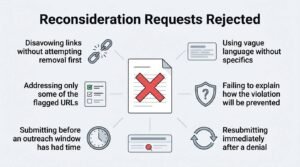
Most rejected requests share a small set of recurring mistakes that have nothing to do with writing quality and everything to do with incomplete fixes. I’ve pulled these directly from patterns across dozens of denied requests.
- Disavowing links without attempting removal first, which reads as skipping a required step
- Addressing only some of the flagged URLs or links instead of the full list
- Submitting before an outreach window has had time to generate responses
- Using vague language like “we’ve made quality improvements” without specifics
- Failing to explain how the violation will be prevented going forward
- Resubmitting immediately after a denial without addressing the stated reason
Reconsideration Request vs. Waiting Out an Algorithmic Filter
A reconsideration request only applies to manual actions and does nothing to lift an algorithmic filter, which instead requires fixing the underlying quality issue and waiting for Google’s systems to reprocess the site. Submitting a request against an algorithmic penalty simply gets ignored or bounced, since there’s no manual action attached to review.
Algorithmic recovery timelines depend entirely on when Google next refreshes the relevant system, which isn’t published in advance and isn’t something a request can accelerate. This distinction is why the very first step in this entire process is confirming a manual action actually exists in Search Console before doing anything else.
When to Work with an SEO Professional on Manual Actions
Sitewide manual actions involving hundreds or thousands of toxic backlinks, or violations tied to hacked content and malware, usually benefit from professional help simply due to the scale of auditing required. I’ve seen business owners lose weeks manually reviewing spreadsheets that a structured audit process handles in days.
Complex cases involving multiple overlapping violations, prior failed reconsideration attempts, or unclear root causes tend to move faster with an experienced second set of eyes reviewing the evidence before resubmission.
Conclusion
Recovering from a manual action comes down to diagnosing the real violation, fixing it completely, and documenting that fix with evidence Google can verify.
Every case connects back to the same cluster: backlink audits, content quality, and Search Console’s own reporting tools guide the path forward.
We help sites diagnose, fix, and resubmit reconsideration requests correctly the first time. Reach out to White Label SEO Service today.
Frequently Asked Questions
Can I submit multiple reconsideration requests?
Yes, you can submit a new reconsideration request every time a previous one is denied. Each new submission should address the specific reason given in the prior denial rather than repeating the same explanation.
Does a reconsideration request affect my rankings immediately?
No, approval doesn’t restore rankings instantly. Pages become eligible to rank normally again, but actual recovery depends on Google recrawling and reprocessing the site.
Do I need to disavow links before submitting?
Only if you have unnatural links you couldn’t get removed directly. Disavowing should follow documented removal attempts, not replace them entirely.
Can an algorithmic penalty be fixed with a reconsideration request?
No, reconsideration requests only apply to manual actions listed in Search Console. Algorithmic penalties resolve through fixing quality issues and waiting for a systems refresh.
How many times can a reconsideration request be rejected?
There’s no official limit on denials. Each rejection should be treated as new information pointing to what still needs fixing before resubmitting.
Should an agency write my reconsideration request?
It depends on the complexity of the violation and the scale of the audit required. Sitewide or link-heavy cases often benefit from experienced review before submission.
Is a manual action the same as being deindexed?
No, a manual action reduces or removes visibility for specific violations but doesn’t necessarily remove pages from Google’s index entirely. Deindexing is a more severe, distinct outcome sometimes tied to the most serious violations.